# addNewWebAuthnDevice
URL: /sdk-android/addNewWebAuthnDevice.html
client.addNewWebAuthnDevice(
[authToken](#authToken),
[origin](#originWebAuthn-addNewWebAuthnDevice),
[failure](#failure),
[activity](#activity),
// Optional arguments
[friendlyName](#friendlyName)
)
## About this command
When authenticated, the user can add a new FIDO2 device. This method will get a FIDO2 pending intent for registration with the options returned by the Purse Identity server and launch it.
The result will be processed by the [onAddNewWebAuthnDeviceResult](onAddNewWebAuthnDeviceResult.html) method.
> - The WebAuthn feature must be enabled on your Purse Identity account.
>
## Examples
```kotlin
import com.reach5.identity.sdk.core.models.AuthToken
val WEBAUTHN_REGISTER_REQUEST_CODE = 1
val authToken: AuthToken = // The authentication token obtained following signup or login.
client.addNewWebAuthnDevice(
authToken = authToken,
origin = "https://dev-sandbox-268508.web.app",
friendlyName = "Nexus 5"
registerRequestCode = WEBAUTHN_REGISTER_REQUEST_CODE,
failure = { error -> ... } // Handle a ReachFive error
)
```
## Parameters
##### activity Activity
The Android activity.
##### authToken AuthToken
Authorization token of the profile retrieved from login.
##### idToken string
The ID token [JSON Web Token (JWT)](https://tools.ietf.org/html/rfc7519) that contains the profile’s information.
##### accessToken string
The authorization credential [JSON Web Token (JWT)](https://tools.ietf.org/html/rfc7519) used to access the Purse Identity API.
##### amr string\[\]
Authentication Methods Reference. It indicates the method(s) used during the authentication process
##### refreshToken string
The refresh token [JSON Web Token (JWT)](https://tools.ietf.org/html/rfc7519) used to obtain new access tokens once they expire.
##### stepUpToken string
The step up token used to continue the step up flow and validate the user for authentication purposes.
This only applies for MFA flows.
##### tokenType string
The type of token. Always equal to `Bearer`.
##### expiresIn number
The lifetime in seconds of the access token.
If `expiresIn` is less than or equal to `0`, the `AuthToken` is expired.
##### user OpenIdUser
The user’s information contained in the ID token.
##### failure function
Callback called once the request has failed. You’ll get a `ReachFiveError` as an argument.
##### friendlyName string
The name associated to the passkey in Purse Identity.
Default to the name of the Android product.
##### originWebAuthn string
The domain of the origin.
## Response
Type: `Unit`
### ReachFiveError
##### message string
The message of the error.
##### getErrorCode() ErrorCode
The error code’s enumeration value.
##### code string
The code from the underlying WebAuthn library.
See [WebAuthn errors](reference/errors.html#webauthn-errors) for more details.
##### exception string
The stack trace of the error.
##### data ReachFiveApiError
Additional data about the error.
##### error string
The main error message.
##### errorId string
The identifier of the error.
##### errorUserMsg string
The user-friendly error message.
> This property is translated according to the user’s browser settings. Currently supported languages:
Currently supported languages
- `ar` - العربية _Arabic_
- `de` - Deutsch _German_
- `en` - English
- `es` - Español _Spanish_
- `fr` - Français _French_
- `hu` - Magyar _Hungarian_
- `it` - Italiano _Italian_
- `jp` - 日本 _Japanese_
- `ko` - 한국인 _Korean_
- `nl` - Nederlands _Dutch_
- `pt` - Portuguese
- `ru` - Ру́сский _Russian_
- `sk` - Slovenský _Slovak_
- `zh-CN` - _People’s Republic of China Simplified Chinese_
- `zh-Hans` - _Simplified Chinese_
- `zh-Hant` - _Traditional Chinese_
- `zh-HK` - _Hong Kong Traditional Chinese_
- `zh-MO` - _Macao Traditional Chinese_
- `zh-SG` - _Singapore Simplified Chinese_
- `zh-TW` - _Taiwan Traditional Chinese_
This property is translated according to the user’s browser settings. Currently supported languages:
##### errorMessageKey string
The technical error code.
##### errorDescription string
The technical error message.
##### errorDetails ReachFiveApiErrorDetails
- field - The field concerned by the error.
- message - The message error returned for the `field`.
This property is translated according to the user’s browser settings. Currently supported languages:
---
# discoverableLogin
URL: /sdk-android/discoverableLogin.html
client.discoverableLogin(
[requestCredentialTypes](#requestCredentialTypes),
[origin](#origin),
[scope](#scope),
[failure](#failure),
[success](#success),
[activity](#activity),
// Optional argument
[captcha](#captcha)
)
## About this command
Use this method to discover a credential to log in a user. This can be via password, passkey, or both.
The [`captcha`](#captcha) parameter applies only when the discovered credential is a password. The SDK ignores it when the credential is a passkey.
> The [WebAuthn feature](../docs/fido2.html#fido2-prerequisites) must be enabled on your Purse Identity account.
## Examples
```kotlin
client.discoverableLogin(
origin = "discoverable login from Android app",
success = { authToken -> ... }, // Get the profile's authentication token
failure = { error -> ... }, // Handle a ReachFive error
activity = activity,
)
```
## Parameters
##### activity Activity
The Android activity.
##### failure function
Callback called once the request has failed. You’ll get a `ReachFiveError` as an argument.
##### origin string
Free text parameter describing the source of the event (only for reporting purposes).
##### scope string\[\]
List of space-delimited, case-sensitive strings representing the requested scope.
Default scopes are the allowed scopes set up in the client’s configuration.
##### requestCredentialTypes enum
Set the type of credentials to request.
Pass like `CredentialType.Password`, or `CredentialType.Passkey`. Default is both.
```none
enum class CredentialType {
Password,
Passkey
}
```
##### success function
Callback called once the request has succeeded.
Takes `authToken` as a parameter.
##### captcha CaptchaToken
A `captcha` token and the provider that issued it.
Pass a `ReCaptchaToken`, `ReCaptchaEnterpriseToken` or a `CaptchaFoxToken`.
This parameter is required when the Purse Identity Console protects the endpoint with a `Captcha`. The Purse Identity Android SDK forwards the token and does not show a challenge or fetch a token. Get the token from Google reCAPTCHA or CaptchaFox in your app, then pass it here.
Enable `Captcha` in the Purse Identity Console at [reCAPTCHA](../docs/captcha/recaptcha.html) or [CaptchaFox](../docs/captcha/captcha-fox.html).
## Response
This method returns `Unit`. The login result will be obtained through the [onLoginActivityResult](onLoginActivityResult.html) method.
### ReachFiveError
##### message string
The message of the error.
##### getErrorCode() ErrorCode
The error code’s enumeration value.
##### code string
The HTTP status code or SDK error code.
See [Android SDK errors](reference/errors.html#android-sdk-errors) for more details.
##### exception string
The stack trace of the error.
##### data ReachFiveApiError
Additional data about the error.
##### error string
The main error message.
##### errorId string
The identifier of the error.
##### errorUserMsg string
The user-friendly error message.
> This property is translated according to the user’s browser settings. Currently supported languages:
Currently supported languages
- `ar` - العربية _Arabic_
- `de` - Deutsch _German_
- `en` - English
- `es` - Español _Spanish_
- `fr` - Français _French_
- `hu` - Magyar _Hungarian_
- `it` - Italiano _Italian_
- `jp` - 日本 _Japanese_
- `ko` - 한국인 _Korean_
- `nl` - Nederlands _Dutch_
- `pt` - Portuguese
- `ru` - Ру́сский _Russian_
- `sk` - Slovenský _Slovak_
- `zh-CN` - _People’s Republic of China Simplified Chinese_
- `zh-Hans` - _Simplified Chinese_
- `zh-Hant` - _Traditional Chinese_
- `zh-HK` - _Hong Kong Traditional Chinese_
- `zh-MO` - _Macao Traditional Chinese_
- `zh-SG` - _Singapore Simplified Chinese_
- `zh-TW` - _Taiwan Traditional Chinese_
This property is translated according to the user’s browser settings. Currently supported languages:
##### errorMessageKey string
The technical error code.
##### errorDescription string
The technical error message.
##### errorDetails ReachFiveApiErrorDetails
- field - The field concerned by the error.
- message - The message error returned for the `field`.
This property is translated according to the user’s browser settings. Currently supported languages:
---
# endStepUp
URL: /sdk-android/endStepUp.html
client.endStepUp(
[challengeId](#challengeId),
[verificationCode](#verificationCode),
[success](#success),
[failure](#failure),
[activity](#activity),
// Optional arguments
[trustDevice](#trustDevice)
)
## About this command
Logs in a user by initiating the authentication code flow, ending the step up flow. This is executed when a user uses the SMS verification code or clicks the link provided in the email.
> The Passwordless feature must be enabled on your Purse Identity Console account. The SMS feature must be enabled on your Purse Identity Console account if the profile can choose a phone number to login.
## Examples
```kotlin
import com.reach5.identity.sdk.core.models.AuthToken
import com.reach5.identity.sdk.core.models.Profile
val authToken: AuthToken = // The authentication token obtained from login or signup.
client.endStepUp(
challengeId: "m3DaoT...7Rzp1m",
verificationCode: "123456"
success = { _ -> ... }, // Do something
failure = { error -> ... }, // Handle a ReachFive error
activity = activity,
trustDevice = true
)
```
## Parameters
##### activity Activity
The Android activity.
##### challengeId string
The code challenge ID to verify the user.
##### trustDevice boolean
Boolean indicating if the device should be trusted or not.
- `true` = trust the device
- `false` = do not trust the device
Defaults to `false`.
> This option only applies during registration when the second factor is already verified and the user doesn’t need to enter a verification code to complete enrollment.
This option only applies during registration when the second factor is already verified and the user doesn’t need to enter a verification code to complete enrollment.
##### failure function
Callback called once the request has failed. You’ll get a `ReachFiveError` as an argument.
##### success function
Callback called once the request has succeeded.
##### verificationCode string
The verification code sent by email or SMS.
## Response
### AuthToken
The authentication token.
##### idToken
The ID token [JSON Web Token (JWT)](https://tools.ietf.org/html/rfc7519) that contains the profile’s information.
##### accessToken
The authorization credential [JSON Web Token (JWT)](https://tools.ietf.org/html/rfc7519) used to access the Purse Identity API.
##### refreshToken
The refresh token [JSON Web Token (JWT)](https://tools.ietf.org/html/rfc7519) used to obtain new access tokens once they expire.
##### stepUpToken string
The step up token used to continue the step up flow and validate the user for authentication purposes.
This only applies for MFA flows.
##### tokenType
The type of token. Always equal to `Bearer`.
##### expiresIn
The lifetime in seconds of the access token.
If `expiresIn` is less than or equal to `0`, the `AuthToken` is expired.
##### user OpenIDUser
The user’s information contained in the ID token.
##### id string
The identifier of the user.
##### name string
The full name of the user in displayable form including all name parts, possibly including titles and suffixes, ordered according to the user’s locale and preferences.
##### preferredUsername string
The shorthand name by which the user wishes to be referred to.
##### givenName string
The given name or first name of the user.
##### familyName string
The surname or last name of the user.
##### middleName string
The middle name of the user.
##### nickname string
The casual name of the user that may or may not be the same as the givenName
##### picture string
The URL of the user’s profile picture.
##### website string
The URL of the user’s web page or blog.
##### email string
The user’s preferred e-mail address.
##### emailVerified boolean
True if the user’s e-mail address has been verified; otherwise false.
##### gender string
The user’s gender.
##### zoneinfo string
The string from zoneinfo time zone database representing the user’s time zone.
##### locale string
The user’s language code in lowercase and country code in uppercase, separated by a dash.
##### phoneNumber string
The user’s preferred telephone number.
##### phoneNumberVerified boolean
`true` if the user’s phone number has been verified; otherwise `false`.
##### address string
The user’s preferred postal address.
### Error response
Type: `Unit`
### ReachFiveError
##### message string
The message of the error.
##### getErrorCode() ErrorCode
The error code’s enumeration value.
##### code string
The HTTP status code or SDK error code.
See [Android SDK errors](reference/errors.html#android-sdk-errors) for more details.
##### exception string
The stack trace of the error.
##### data ReachFiveApiError
Additional data about the error.
##### error string
The main error message.
##### errorId string
The identifier of the error.
##### errorUserMsg string
The user-friendly error message.
> This property is translated according to the user’s browser settings. Currently supported languages:
Currently supported languages
- `ar` - العربية _Arabic_
- `de` - Deutsch _German_
- `en` - English
- `es` - Español _Spanish_
- `fr` - Français _French_
- `hu` - Magyar _Hungarian_
- `it` - Italiano _Italian_
- `jp` - 日本 _Japanese_
- `ko` - 한국인 _Korean_
- `nl` - Nederlands _Dutch_
- `pt` - Portuguese
- `ru` - Ру́сский _Russian_
- `sk` - Slovenský _Slovak_
- `zh-CN` - _People’s Republic of China Simplified Chinese_
- `zh-Hans` - _Simplified Chinese_
- `zh-Hant` - _Traditional Chinese_
- `zh-HK` - _Hong Kong Traditional Chinese_
- `zh-MO` - _Macao Traditional Chinese_
- `zh-SG` - _Singapore Simplified Chinese_
- `zh-TW` - _Taiwan Traditional Chinese_
This property is translated according to the user’s browser settings. Currently supported languages:
##### errorMessageKey string
The technical error code.
##### errorDescription string
The technical error message.
##### errorDetails ReachFiveApiErrorDetails
- field - The field concerned by the error.
- message - The message error returned for the `field`.
This property is translated according to the user’s browser settings. Currently supported languages:
---
# exchangeCodeForToken
URL: /sdk-android/exchangeCodeForToken.html
client.exchangeCodeForToken([authorizationCode](#authorizationCode), [success](#success), [failure](#failure))
## About this command
Exchange an authorization code for an access token.
> This method is set to be deprecated. All SDK flows should be fully handled by the client. If you are using this method for a custom implementation, please contact your account’s support representative so that we may assist you accordingly.
## Examples
```kotlin
client.exchangeCodeForToken(
authorizationCode = "Azc6229cee...",
success = { authToken -> ...}, // Get the profile's authentication token
failure = { error -> ... } // Handle a ReachFive error
)
```
## Parameters
##### authorizationCode string
The authorization code.
##### success function
Callback called once the exchange has succeeded. You’ll get an `AuthToken` as an argument.
##### failure function
Callback called once the request has failed. You’ll get a `ReachFiveError` as an argument.
## Response
Type: `Unit`
### AuthToken
The authentication token.
##### idToken
The ID token [JSON Web Token (JWT)](https://tools.ietf.org/html/rfc7519) that contains the profile’s information.
##### accessToken
The authorization credential [JSON Web Token (JWT)](https://tools.ietf.org/html/rfc7519) used to access the Purse Identity API.
##### refreshToken
The refresh token [JSON Web Token (JWT)](https://tools.ietf.org/html/rfc7519) used to obtain new access tokens once they expire.
##### stepUpToken string
The step up token used to continue the step up flow and validate the user for authentication purposes.
This only applies for MFA flows.
##### tokenType
The type of token. Always equal to `Bearer`.
##### expiresIn
The lifetime in seconds of the access token.
If `expiresIn` is less than or equal to `0`, the `AuthToken` is expired.
##### user OpenIDUser
The user’s information contained in the ID token.
##### id string
The identifier of the user.
##### name string
The full name of the user in displayable form including all name parts, possibly including titles and suffixes, ordered according to the user’s locale and preferences.
##### preferredUsername string
The shorthand name by which the user wishes to be referred to.
##### givenName string
The given name or first name of the user.
##### familyName string
The surname or last name of the user.
##### middleName string
The middle name of the user.
##### nickname string
The casual name of the user that may or may not be the same as the givenName
##### picture string
The URL of the user’s profile picture.
##### website string
The URL of the user’s web page or blog.
##### email string
The user’s preferred e-mail address.
##### emailVerified boolean
True if the user’s e-mail address has been verified; otherwise false.
##### gender string
The user’s gender.
##### zoneinfo string
The string from zoneinfo time zone database representing the user’s time zone.
##### locale string
The user’s language code in lowercase and country code in uppercase, separated by a dash.
##### phoneNumber string
The user’s preferred telephone number.
##### phoneNumberVerified boolean
`true` if the user’s phone number has been verified; otherwise `false`.
##### address string
The user’s preferred postal address.
### ReachFiveError
##### message string
The message of the error.
##### getErrorCode() ErrorCode
The error code’s enumeration value.
##### code string
The HTTP status code or SDK error code.
See [Android SDK errors](reference/errors.html#android-sdk-errors) for more details.
##### exception string
The stack trace of the error.
##### data ReachFiveApiError
Additional data about the error.
##### error string
The main error message.
##### errorId string
The identifier of the error.
##### errorUserMsg string
The user-friendly error message.
> This property is translated according to the user’s browser settings. Currently supported languages:
Currently supported languages
- `ar` - العربية _Arabic_
- `de` - Deutsch _German_
- `en` - English
- `es` - Español _Spanish_
- `fr` - Français _French_
- `hu` - Magyar _Hungarian_
- `it` - Italiano _Italian_
- `jp` - 日本 _Japanese_
- `ko` - 한국인 _Korean_
- `nl` - Nederlands _Dutch_
- `pt` - Portuguese
- `ru` - Ру́сский _Russian_
- `sk` - Slovenský _Slovak_
- `zh-CN` - _People’s Republic of China Simplified Chinese_
- `zh-Hans` - _Simplified Chinese_
- `zh-Hant` - _Traditional Chinese_
- `zh-HK` - _Hong Kong Traditional Chinese_
- `zh-MO` - _Macao Traditional Chinese_
- `zh-SG` - _Singapore Simplified Chinese_
- `zh-TW` - _Taiwan Traditional Chinese_
This property is translated according to the user’s browser settings. Currently supported languages:
##### errorMessageKey string
The technical error code.
##### errorDescription string
The technical error message.
##### errorDetails ReachFiveApiErrorDetails
- field - The field concerned by the error.
- message - The message error returned for the `field`.
This property is translated according to the user’s browser settings. Currently supported languages:
---
# getProfile
URL: /sdk-android/getProfile.html
client.getProfile([authToken](#authToken), [success](#success), [failure](#failure))
## About this command
Retrieve the profile’s information.
> - The profile must have been granted the `profile` scope at the last authentication otherwise the profile’s attributes are null.
>
## Examples
```kotlin
import com.reach5.identity.sdk.core.models.AuthToken
val authToken: AuthToken = // The authentication token obtained following signup or login.
client.getProfile(
authToken = authToken,
success = { profile -> ... }, // Get the profile
failure = { error -> ... } // Handle a ReachFive error
)
```
## Parameters
##### authToken AuthToken
Authorization token of the profile retrieved from login.
##### idToken string
The ID token [JSON Web Token (JWT)](https://tools.ietf.org/html/rfc7519) that contains the profile’s information.
##### accessToken string
The authorization credential [JSON Web Token (JWT)](https://tools.ietf.org/html/rfc7519) used to access the Purse Identity API.
##### amr string\[\]
Authentication Methods Reference. It indicates the method(s) used during the authentication process
##### refreshToken string
The refresh token [JSON Web Token (JWT)](https://tools.ietf.org/html/rfc7519) used to obtain new access tokens once they expire.
##### stepUpToken string
The step up token used to continue the step up flow and validate the user for authentication purposes.
This only applies for MFA flows.
##### tokenType string
The type of token. Always equal to `Bearer`.
##### expiresIn number
The lifetime in seconds of the access token.
If `expiresIn` is less than or equal to `0`, the `AuthToken` is expired.
##### user OpenIdUser
The user’s information contained in the ID token.
##### success function
Callback called once the fetch has succeeded. You’ll get the `Profile` as an argument.
##### failure function
Callback called once the request has failed. You’ll get a `ReachFiveError` as an argument.
## Response
Type: `Unit`
### Profile
##### id string
The Purse Identity identifier of the profile.
##### givenName string
The given name of the profile.
##### middleName string
The middle name of the profile.
##### familyName string
The family name of the profile.
##### name string
The full name of the profile.
##### nickname string
The nickname of the profile.
##### birthdate string
The birthdate of the profile, represented as an [ISO 8601](https://en.wikipedia.org/wiki/ISO_8601) `YYYY-MM-DD` format.
##### profileURL string
The URL of one of the user’s profile page (usually a social provider’s page).
##### picture string
The URL of one of the profile picture. This URL refers to an image file (PNG, JPEG, or GIF image file).
##### externalId string
The external identifier of the profile.
##### authTypes String\[\]
The list of the authentication providers used to login by the profile (e.g. facebook, password …).
##### loginSummary LoginSummary
The login activities history of the profile.
##### firstLogin string
The time of the first login.
##### lastLogin string
The time of the last login.
##### total string
The number of login.
##### origins string
Some additional information about the login.
##### devices string
The devices used for login (`desktop`, `ios`, `android`, `mobile_web` and `windows_phone`).
##### lastProvider string
The last provider used for login (e.g. `local`, `lite`, `facebook` …).
##### username string
The username of the profile (the login’s name).
##### gender string
The gender of the profile.
Allowed values are `female`, `male` and `other`.
##### email string
The primary email address of the profile.
##### emailVerified boolean
`true` if the profile’s e-mail address has been verified; otherwise `false`.
##### emails Emails
The e-mail addresses of the profile.
##### verified string\[\]
The list of the verified e-mail addresses of the profile.
##### unverified string\[\]
The list of the unverified e-mail addresses of the profile.
##### phoneNumber string
The primary phone number of the profile.
Both the international format and the national conventions of the account’s country are accepted if configured in account settings.
##### phoneNumberVerified boolean
`true` if the user’s phone number has been verified; otherwise `false`.
##### addresses List of ProfileAddress
The list of the profile’s postal addresses. To get this attribute, the profile must have been granted the `address` scope at the last authentication.
##### title string
The title of the address.
This value can’t be an empty string.
##### isDefault boolean
Whether the address is the default postal address of the profile. Only a single address can be the default address.
Defaults to `true`.
##### addressType string
The type of address
Allowed values: `delivery` or `billing`.
##### streetAddress string
The full street address component which may include the house number, the street’s name and the extended street address information separated by newlines.
This value can’t be an empty string.
##### address\_complement string
A complementary address field which can contain additional information about the address. This can be the floor, a door number, or any other useful address information.
##### locality string
The name of the city.
##### region string
The name of the region.
##### postalCode string
The zip code.
##### country string
The name of the country.
This value can’t be an empty string.
##### deliveryNote string
An additional note from the profile for the delivery.
##### recipient string
The name of the recipient located at this address.
##### company string
The name of the company located at this address.
##### phoneNumber string
The phone number of the contact point at this address (no format validation is required).
##### locale string
The profile’s language code in lowercase and country code in uppercase, separated by a dash (e.g. `en`, `fr-FR` …).
##### bio string
The biography of the profile.
##### customFields Map
The custom fields of the profile.
[Structured custom fields](../docs/custom-fields.html) are only available using the full key for the field (e.g., `full.custom_field.key`). They are not supported as nested objects.
##### consents Map
The consents granted to the profile. It is a map of string keys with the associated consent object.
##### granted boolean
Whether the consent was granted to the profile or not.
##### consentType boolean
The type of consent.
Allowed values: `opt-in` `opt-out`.
##### date string
The time the consent was last updated.
##### createdAt string
The time the profile’s information was created.
##### updatedAt string
The time the profile’s information was last updated.
### ReachFiveError
##### message string
The message of the error.
##### getErrorCode() ErrorCode
The error code’s enumeration value.
##### code string
The HTTP status code or SDK error code.
See [Android SDK errors](reference/errors.html#android-sdk-errors) for more details.
##### exception string
The stack trace of the error.
##### data ReachFiveApiError
Additional data about the error.
##### error string
The main error message.
##### errorId string
The identifier of the error.
##### errorUserMsg string
The user-friendly error message.
> This property is translated according to the user’s browser settings. Currently supported languages:
Currently supported languages
- `ar` - العربية _Arabic_
- `de` - Deutsch _German_
- `en` - English
- `es` - Español _Spanish_
- `fr` - Français _French_
- `hu` - Magyar _Hungarian_
- `it` - Italiano _Italian_
- `jp` - 日本 _Japanese_
- `ko` - 한국인 _Korean_
- `nl` - Nederlands _Dutch_
- `pt` - Portuguese
- `ru` - Ру́сский _Russian_
- `sk` - Slovenský _Slovak_
- `zh-CN` - _People’s Republic of China Simplified Chinese_
- `zh-Hans` - _Simplified Chinese_
- `zh-Hant` - _Traditional Chinese_
- `zh-HK` - _Hong Kong Traditional Chinese_
- `zh-MO` - _Macao Traditional Chinese_
- `zh-SG` - _Singapore Simplified Chinese_
- `zh-TW` - _Taiwan Traditional Chinese_
This property is translated according to the user’s browser settings. Currently supported languages:
##### errorMessageKey string
The technical error code.
##### errorDescription string
The technical error message.
##### errorDetails ReachFiveApiErrorDetails
- field - The field concerned by the error.
- message - The message error returned for the `field`.
This property is translated according to the user’s browser settings. Currently supported languages:
---
# Getting Started
URL: /sdk-android/index.html
**MavenCentral** `11.2.0`
This page introduces you to the **Android SDK** documentation for version `11.2.0` of the `11.x` release.
Breaking changes for `11.0.0`, please read.
## Breaking changes for `Android SDK 11.0.0`
From Android SDK version `11.0.0`, the WebView opened by [`loginWithWebView`](loginWithWebView.html) is edge-to-edge by default and adds padding for system bars.
- By default (`fullScreenWebView` is `false`), the WebView draws edge-to-edge and applies padding so content is not hidden under the status and navigation bars.
- Set [`fullScreenWebView`](loginWithWebView.html#fullScreenWebView) to `true` to disable that padding.
See [loginWithWebView](loginWithWebView.html) and [Customize WebView](guides/customize-webview.html) for more details.
## Requirements
The ReachFive SDK supports Android SDK from API Level 21 (Android version `5.0` Lollipop).
To initialize the Purse Identity client:
- You need a [Domain URL and Client ID](../docs/console.html#get-domain).
- You must whitelist all available domains where the Purse Identity SDK will be used.
> This is done in the **Allowed Origins (CORS)** field of your Purse Identity console, in the **Settings** menu.
## Installation
ReachFive SDKs are published to [Maven Central](https://search.maven.org/search?q=g:co.reachfive.identity) as separate modules.
```groovy
allprojects {
repositories {
mavenCentral() (1)
}
}
```
- (1) Add `mavenCentral` as a repository location in your project’s top-level `build.gradle` file.
> Below are installation instructions for each module.
## SDK Core
Core contains all the main tools and interfaces, and the methods related to authentication.
Add the following line to your `app/build.gradle`, replacing `x.y.z` with the latest SDK version:
```groovy
dependencies {
implementation "co.reachfive.identity:sdk-core:x.y.z"
}
```
The following permissions are required to communicate with the Purse Identity servers. Add them to the `AndroidManifest.xml` file.
```xml
```
### Proguard rule exception
If you have set `minifyEnabled true` in your Android build, you need to add the following Proguard rule in order to make an exception for certain Purse Identity SDK models.
Add the following rule to your `proguard-rules.pro` file to prevent Purse Identity API models from being obfuscated:
```none
-keep class co.reachfive.identity.sdk.core.models.** {*;}
```
## Web-based Flows
If you intend on using non-native social login providers (SDK WebView) or our orchestrated web login flow (Core), then you must properly configure your application accordingly.
> Check out the [Web-Based Flows](guides/web-based-flows.html) guide for more details.
## SDK WebView
This module uses a [Custom Tab](https://developer.chrome.com/docs/android/custom-tabs) to authenticate users through a social login provider configured in your account; it enables all [providers](../docs/social-login-overview.html) that are supported by Purse Identity.
> For mobile contexts, you must whitelist `reachfive://${clientId}/callback` using your Purse Identity identity client ID. This URL scheme is the **default callback URL** and is used to request a token when implementing the SDK Webview.
Add the following line to your `app/build.gradle`, replacing `x.y.z` with the latest version:
```groovy
dependencies {
implementation "co.reachfive.identity:sdk-webview:x.y.z"
}
```
You must also add the following activity into the `AndroidManifest.xml` file:
```xml
```
- (1) Define `reachfive_client_id`, `reachfive_path`, and `reachfive_scheme` in the `` section of your **settings.xml** file.
settings.xml example
```xml
YOUR_CLIENT_ID
reachfive
/callback
```
### Release build considerations
When building your app in release mode, the WebView used by the Purse Identity Android SDK may encounter issues due to code shrinking and obfuscation performed by R8, Android’s default optimization tool. These issues can manifest as the WebView failing to load content or authentication flows not completing.
To ensure the WebView functions correctly in release builds, consider the following:
1. **Verify Proguard/R8 Rules**:
The Purse Identity Android SDK includes Proguard rules to prevent critical classes and methods from being removed or obfuscated. Ensure that your app’s `proguard-rules.pro` file does not conflict with these rules.
2. **Disable R8 Full Mode**:
If you encounter issues with the WebView in release builds (e.g., blank WebView or failed authentication), it may be due to R8’s aggressive optimizations in full mode. As a workaround, you can disable R8’s full mode by adding the following line to your app’s `gradle.properties` file:
```java
android.enableR8.fullMode=false
```
## Facebook Native Provider
This module uses the Facebook native SDK to provide a better user experience.
> Refer to the [Meta Connect (Facebook Login)](../docs/facebook.html) guide to create your Facebook application.
1. Add the following lines to your `app/build.gradle`, replacing `x.y.z` with the latest version:
```groovy
dependencies {
implementation "co.reachfive.identity:sdk-facebook:x.y.z"
}
```
2. Add the line below into your `string.xml` resource file with your Facebook application ID:
```xml
FACEBOOK_APPLICATION_ID (1)
FACEBOOK_CLIENT_TOKEN (1)
```
- (1) Get your App ID and Client Access Token from your Facebook Developer account.
3. Then add these lines into the `AndroidManifest.xml` file:
```xml
(1)
(1)
```
- (1) Get your App ID and Client Access Token from your Facebook Developer account.
## Configure Google native provider
This module uses the **Google native SDK** to provide a better user experience.
1. Add the following line to your `app/build.gradle`, replacing `x.y.z` with the latest version:
```groovy
dependencies {
implementation "co.reachfive.identity:sdk-google:x.y.z"
}
```
2. Set up your Google Cloud Console project.
1. You need to create an **Android client ID** with information about your application.
To create the Android client ID, you must provide the SHA-1 certificate fingerprint of your application. You can get the SHA-1 fingerprint using the `keytool` utility:
For more details, see [Client authentication](https://developers.google.com/android/guides/client-auth).
3. Create a **Web client ID**.
This corresponds to the usual Google Provider configuration in the Purse Identity Console. You will need to copy the **Client ID** and **Client Secret** from this Web client and paste them into your Purse Identity Console settings for the Google provider. If already configured, you can skip this step.
Take a peek
1. On the Purse Identity Console, go to **Settings** **Providers**, and select Google.
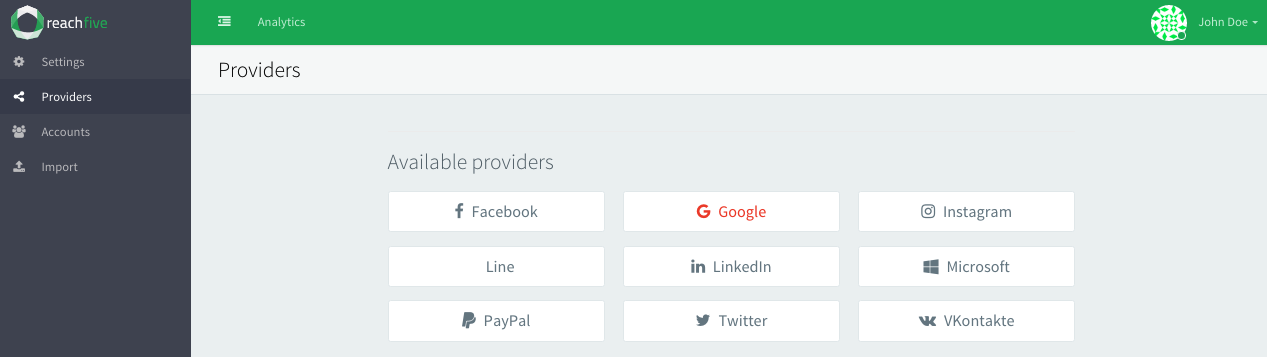
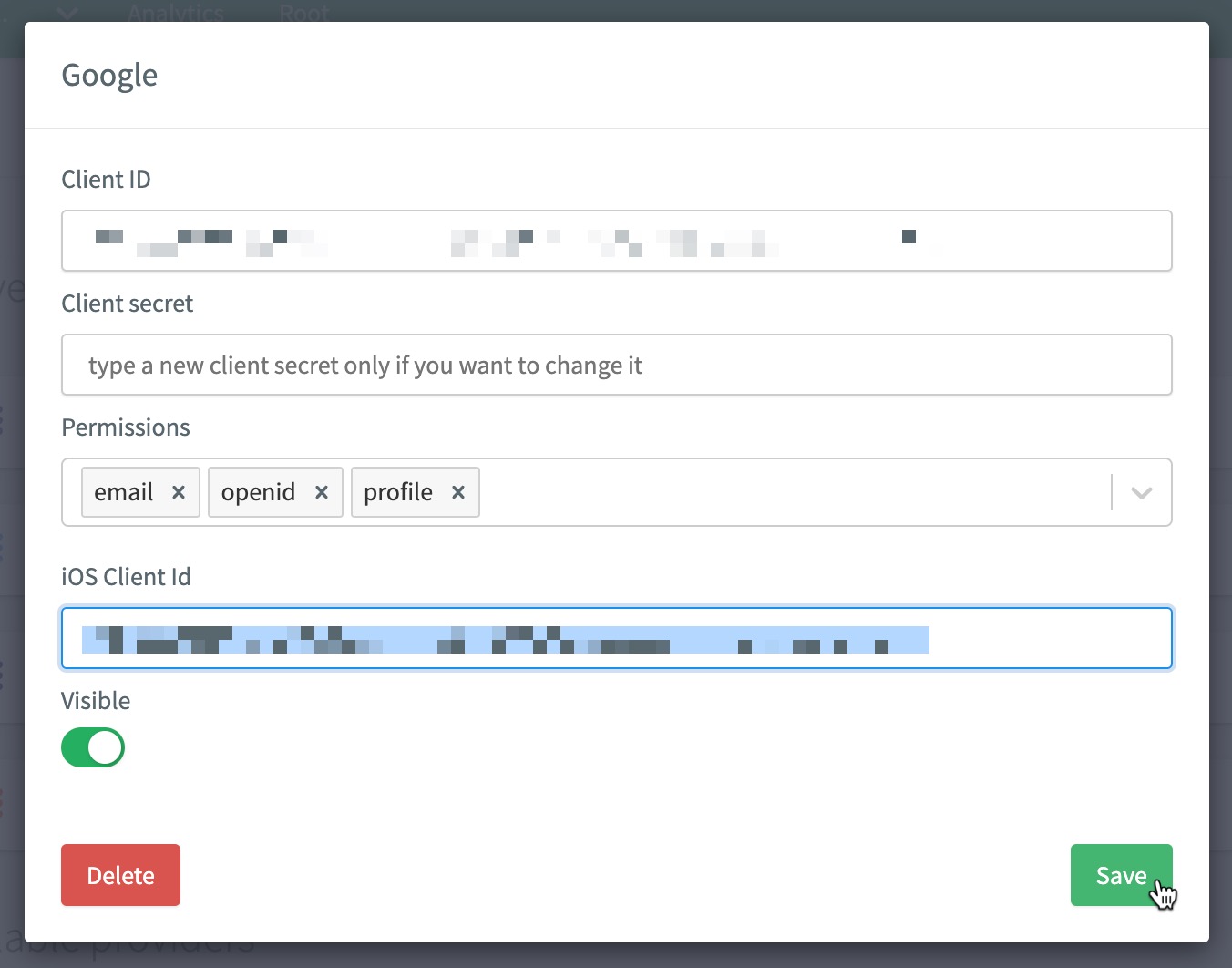
2. Paste your credentials and add all available permissions.
3. If using iOS, you should also paste in your Google Client ID.
**Example**: `1234567890-abcdefg.apps.googleusercontent.com` For more, see [iOS SDK: Google native provider](../sdk-ios/index.html).
Have multiple brands using Google?
If you have multiple brands or subsidiaries using Google or even if you have different use cases, you can add them as _variants_ within the Purse Identity Console.
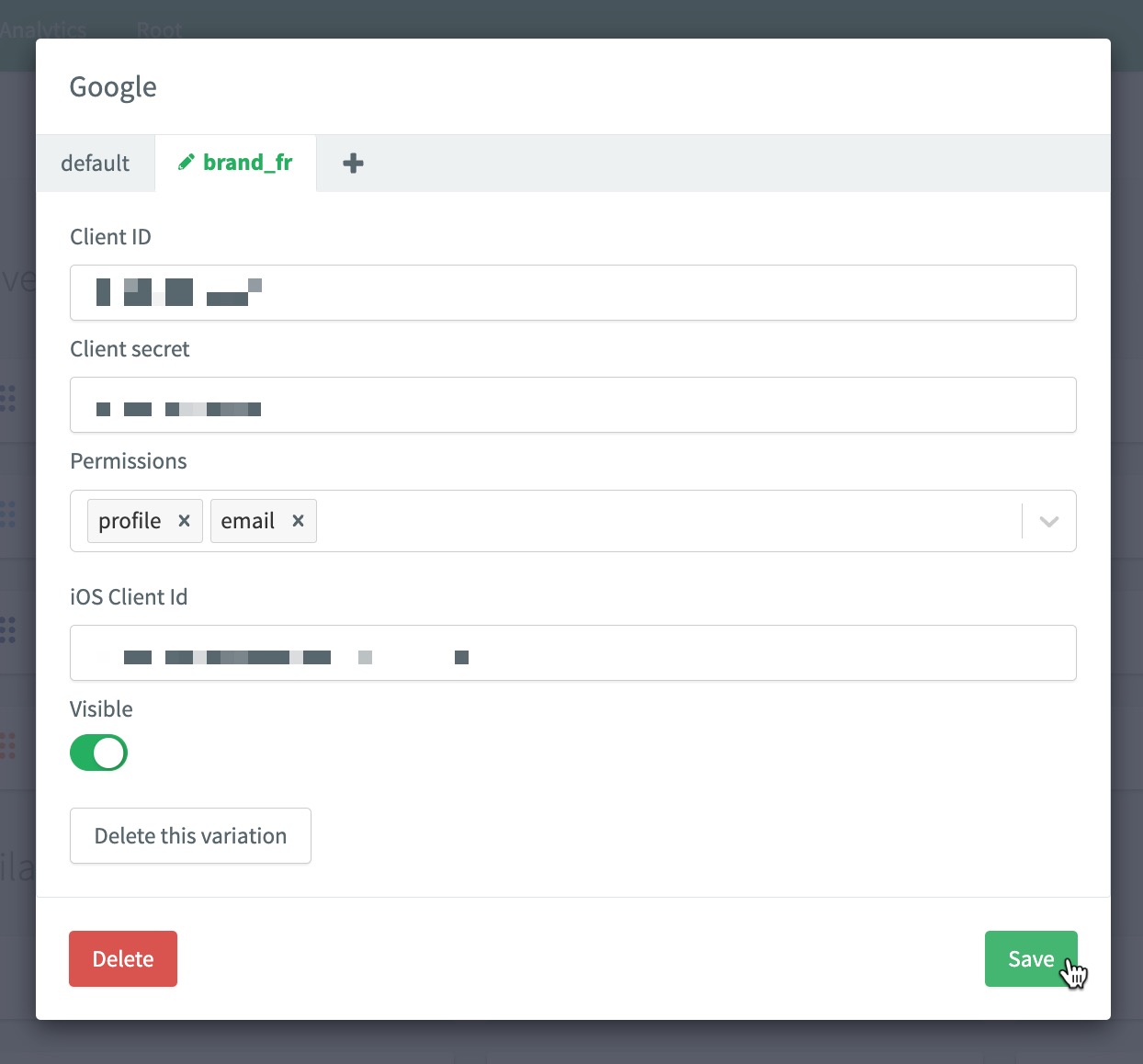
4. Don’t forget to **Save** your input..
## WeChat Connector
This module uses the WeChat Android SDK to provide a better user experience.
Minimum Android SDK version
`8.2.0`
> Refer to the [WeChat Connect](../docs/wechat.html) guide to create your WeChat application.
1. Add the following lines to your `app/build.gradle`, replacing `x.y.z` with the latest version:
```groovy
dependencies {
implementation "co.reachfive.identity:sdk-wechat:x.y.z"
}
```
2. Add these lines into the `AndroidManifest.xml` file:
```xml
...
(1)
...
```
- (1) **Required** Tencent is the parent company of WeChat.
## Client Initialization
In all the code example below, the Purse Identity client is instantiated and stored in a variable named `client`.
```kotlin
import android.content.Intent
import android.os.Bundle
import android.util.Log
import android.view.Menu
import android.view.MenuItem
import android.widget.Toast
import androidx.appcompat.app.AppCompatActivity
import co.reachfive.identity.sdk.core.ReachFive
import co.reachfive.identity.sdk.core.SdkConfig
import co.reachfive.identity.sdk.core.models.AuthToken
import co.reachfive.identity.sdk.core.models.ProfileSignupRequest
import co.reachfive.identity.sdk.facebook.FacebookProvider
import co.reachfive.identity.sdk.google.GoogleProvider
import co.reachfive.identity.sdk.webview.WebViewProvider
import io.github.cdimascio.dotenv.dotenv
import kotlinx.android.synthetic.main.activity_main.*
class MainActivity : AppCompatActivity() {
private const val TAG = "YourApp"
// The ReachFive client
private lateinit var client: ReachFive
val DOMAIN = "Your ReachFive domain"
val CLIENT_ID = "Your ReachFive client ID"
val SCHEME = "Your ReachFive scheme" (1)
val originWebAuthn = "Your Relying Party ID" (2)
override fun onCreate(savedInstanceState: Bundle?) {
// The configuration parameters needed by the ReachFive client
val sdkConfig = SdkConfig(domain = DOMAIN, clientId = CLIENT_ID, scheme = SCHEME)
// The list of the social providers needed by your application
val providersCreators = listOf(GoogleProvider(), FacebookProvider(), WebViewProvider()) (3)
client = ReachFive(
sdkConfig = sdkConfig,
providersCreators = providersCreators, (3)
)
// Initialize the ReachFive client
client.initialize({
// Success
}, {
// On failure, log the error message returned by the ReachFive client
Log.d(TAG, "ReachFive init ${it.message}")
})
// Load the social providers
client.loadSocialProviders( (3)
applicationContext,
success = { providers -> /* update the providers you display */},
failure = { Log.d(TAG, "Loading providers failed ${it.message}") }
)
}
}
```
- (1) The `SCHEME` should follow the format: `reachfive://${clientId}/callback`. It is a URI for native apps.
- (2) **For passkeys only**: The Relying Party ID which is the domain to which passkeys are bound. Once bound to a domain, it can be used on subdomains but not other full domains. See [Relying Party ID](guides/passkeys.html#relying-party-id) for more details.
- (3) Social providers should be initialized even in an activity where the user is expected to be authenticated already. This ensures a proper logout is performed if the user has signed in through a social provider.
---
# initialize
URL: /sdk-android/initialize.html
client.initialize(
[success](#success),
[failure](#failure)
)
## About this command
Initializes the client to include the important Purse Identity information.
## Examples
```kotlin
client.initialize(
success = { ... }, // Do something
failure = { error -> ... } // Handle a ReachFive error
)
```
## Parameters
##### failure function
Callback called once the request has failed. You’ll get a `ReachFiveError` as an argument.
##### success function
Callback called once the request has succeeded.
## Response
Type: `Unit`
### ReachFiveError
##### message string
The message of the error.
##### getErrorCode() ErrorCode
The error code’s enumeration value.
##### code string
The HTTP status code or SDK error code.
See [Android SDK errors](reference/errors.html#android-sdk-errors) for more details.
##### exception string
The stack trace of the error.
##### data ReachFiveApiError
Additional data about the error.
##### error string
The main error message.
##### errorId string
The identifier of the error.
##### errorUserMsg string
The user-friendly error message.
> This property is translated according to the user’s browser settings. Currently supported languages:
Currently supported languages
- `ar` - العربية _Arabic_
- `de` - Deutsch _German_
- `en` - English
- `es` - Español _Spanish_
- `fr` - Français _French_
- `hu` - Magyar _Hungarian_
- `it` - Italiano _Italian_
- `jp` - 日本 _Japanese_
- `ko` - 한국인 _Korean_
- `nl` - Nederlands _Dutch_
- `pt` - Portuguese
- `ru` - Ру́сский _Russian_
- `sk` - Slovenský _Slovak_
- `zh-CN` - _People’s Republic of China Simplified Chinese_
- `zh-Hans` - _Simplified Chinese_
- `zh-Hant` - _Traditional Chinese_
- `zh-HK` - _Hong Kong Traditional Chinese_
- `zh-MO` - _Macao Traditional Chinese_
- `zh-SG` - _Singapore Simplified Chinese_
- `zh-TW` - _Taiwan Traditional Chinese_
This property is translated according to the user’s browser settings. Currently supported languages:
##### errorMessageKey string
The technical error code.
##### errorDescription string
The technical error message.
##### errorDetails ReachFiveApiErrorDetails
- field - The field concerned by the error.
- message - The message error returned for the `field`.
This property is translated according to the user’s browser settings. Currently supported languages:
---
# listMfaCredentials
URL: /sdk-android/listMfaCredentials.html
client.listMfaCredentials(
[authToken](#authToken),
[success](#success),
[failure](#failure)
)
## About this command
Lists any registered MFA credentials for a user.
## Examples
```kotlin
import com.reach5.identity.sdk.core.models.AuthToken
import com.reach5.identity.sdk.core.models.Profile
val authToken: AuthToken = // The authentication token obtained from login or signup.
client.listMfaCredentials(
authToken = authToken,
success = { _ -> ... }, // Do something
failure = { error -> ... } // Handle a ReachFive error
)
```
## Parameters
##### authToken AuthToken
Authorization token of the profile retrieved from login.
##### idToken string
The ID token [JSON Web Token (JWT)](https://tools.ietf.org/html/rfc7519) that contains the profile’s information.
##### accessToken string
The authorization credential [JSON Web Token (JWT)](https://tools.ietf.org/html/rfc7519) used to access the Purse Identity API.
##### amr string\[\]
Authentication Methods Reference. It indicates the method(s) used during the authentication process
##### refreshToken string
The refresh token [JSON Web Token (JWT)](https://tools.ietf.org/html/rfc7519) used to obtain new access tokens once they expire.
##### stepUpToken string
The step up token used to continue the step up flow and validate the user for authentication purposes.
This only applies for MFA flows.
##### tokenType string
The type of token. Always equal to `Bearer`.
##### expiresIn number
The lifetime in seconds of the access token.
If `expiresIn` is less than or equal to `0`, the `AuthToken` is expired.
##### user OpenIdUser
The user’s information contained in the ID token.
##### failure function
Callback called once the request has failed. You’ll get a `ReachFiveError` as an argument.
##### success function
Callback called once the request has succeeded.
## Response
Type: `Promise`
##### credentials array
An array of objects, each containing information on a specific credential.
##### type CredentialType
Specifies the type of credential.
- `sms`
- `email`
##### createdAt string
The date on which the credential was created.
Format
`"YYYY-MM-DD"`
##### friendlyName string
The user-friendly name for the credential.
##### phone\_number string
The user’s phone number.
Example
```json
{
credentials: [{
type: "sms",
createdAt: "2026-10-30"
}]
}
```
### Error response
Type: `Unit`
### ReachFiveError
##### message string
The message of the error.
##### getErrorCode() ErrorCode
The error code’s enumeration value.
##### code string
The HTTP status code or SDK error code.
See [Android SDK errors](reference/errors.html#android-sdk-errors) for more details.
##### exception string
The stack trace of the error.
##### data ReachFiveApiError
Additional data about the error.
##### error string
The main error message.
##### errorId string
The identifier of the error.
##### errorUserMsg string
The user-friendly error message.
> This property is translated according to the user’s browser settings. Currently supported languages:
Currently supported languages
- `ar` - العربية _Arabic_
- `de` - Deutsch _German_
- `en` - English
- `es` - Español _Spanish_
- `fr` - Français _French_
- `hu` - Magyar _Hungarian_
- `it` - Italiano _Italian_
- `jp` - 日本 _Japanese_
- `ko` - 한국인 _Korean_
- `nl` - Nederlands _Dutch_
- `pt` - Portuguese
- `ru` - Ру́сский _Russian_
- `sk` - Slovenský _Slovak_
- `zh-CN` - _People’s Republic of China Simplified Chinese_
- `zh-Hans` - _Simplified Chinese_
- `zh-Hant` - _Traditional Chinese_
- `zh-HK` - _Hong Kong Traditional Chinese_
- `zh-MO` - _Macao Traditional Chinese_
- `zh-SG` - _Singapore Simplified Chinese_
- `zh-TW` - _Taiwan Traditional Chinese_
This property is translated according to the user’s browser settings. Currently supported languages:
##### errorMessageKey string
The technical error code.
##### errorDescription string
The technical error message.
##### errorDetails ReachFiveApiErrorDetails
- field - The field concerned by the error.
- message - The message error returned for the `field`.
This property is translated according to the user’s browser settings. Currently supported languages:
---
# listMfaTrustedDevices
URL: /sdk-android/listMfaTrustedDevices.html
client.listMfaTrustedDevices(
[authToken](#authToken),
[success](#success),
[failure](#failure)
)
## About this command
Lists any MFA trusted devices for a user.
## Examples
```kotlin
import com.reach5.identity.sdk.core.models.AuthToken
import com.reach5.identity.sdk.core.models.Profile
val authToken: AuthToken = // The authentication token obtained from login or signup.
client.listMfaTrustedDevices(
authToken = authToken,
success = { _ -> ... }, // Do something
failure = { error -> ... } // Handle a ReachFive error
)
```
## Parameters
##### authToken AuthToken
Authorization token of the profile retrieved from login.
##### idToken string
The ID token [JSON Web Token (JWT)](https://tools.ietf.org/html/rfc7519) that contains the profile’s information.
##### accessToken string
The authorization credential [JSON Web Token (JWT)](https://tools.ietf.org/html/rfc7519) used to access the Purse Identity API.
##### amr string\[\]
Authentication Methods Reference. It indicates the method(s) used during the authentication process
##### refreshToken string
The refresh token [JSON Web Token (JWT)](https://tools.ietf.org/html/rfc7519) used to obtain new access tokens once they expire.
##### stepUpToken string
The step up token used to continue the step up flow and validate the user for authentication purposes.
This only applies for MFA flows.
##### tokenType string
The type of token. Always equal to `Bearer`.
##### expiresIn number
The lifetime in seconds of the access token.
If `expiresIn` is less than or equal to `0`, the `AuthToken` is expired.
##### user OpenIdUser
The user’s information contained in the ID token.
##### failure function
Callback called once the request has failed. You’ll get a `ReachFiveError` as an argument.
##### success function
Callback called once the request has succeeded.
## Response
Type: `List`
##### id string
The trusted device ID.
##### userId string
The user ID.
##### createdAt string
The date and time when the device was trusted.
##### metaData object
The metadata associated with the trusted device.
This includes:
- `ip`: The IP of the trusted device.
- `operatingSystemAgent`: The Operating System such as Android.
- `userAgent`: The User Agent information.
- `deviceClass`: The device class such as mobile.
- `deviceName`: The device name such as "My Mobile".
### Error response
Type: `Unit`
### ReachFiveError
##### message string
The message of the error.
##### getErrorCode() ErrorCode
The error code’s enumeration value.
##### code string
The HTTP status code or SDK error code.
See [Android SDK errors](reference/errors.html#android-sdk-errors) for more details.
##### exception string
The stack trace of the error.
##### data ReachFiveApiError
Additional data about the error.
##### error string
The main error message.
##### errorId string
The identifier of the error.
##### errorUserMsg string
The user-friendly error message.
> This property is translated according to the user’s browser settings. Currently supported languages:
Currently supported languages
- `ar` - العربية _Arabic_
- `de` - Deutsch _German_
- `en` - English
- `es` - Español _Spanish_
- `fr` - Français _French_
- `hu` - Magyar _Hungarian_
- `it` - Italiano _Italian_
- `jp` - 日本 _Japanese_
- `ko` - 한국인 _Korean_
- `nl` - Nederlands _Dutch_
- `pt` - Portuguese
- `ru` - Ру́сский _Russian_
- `sk` - Slovenský _Slovak_
- `zh-CN` - _People’s Republic of China Simplified Chinese_
- `zh-Hans` - _Simplified Chinese_
- `zh-Hant` - _Traditional Chinese_
- `zh-HK` - _Hong Kong Traditional Chinese_
- `zh-MO` - _Macao Traditional Chinese_
- `zh-SG` - _Singapore Simplified Chinese_
- `zh-TW` - _Taiwan Traditional Chinese_
This property is translated according to the user’s browser settings. Currently supported languages:
##### errorMessageKey string
The technical error code.
##### errorDescription string
The technical error message.
##### errorDetails ReachFiveApiErrorDetails
- field - The field concerned by the error.
- message - The message error returned for the `field`.
This property is translated according to the user’s browser settings. Currently supported languages:
---
# listWebAuthnDevices
URL: /sdk-android/listWebAuthnDevices.html
client.listWebAuthnDevices([authToken](#authToken), [success](#success), [failure](#failure))
## About this command
When authenticated, the user can list the registered devices and/or passkeys.
> - The WebAuthn feature must be enabled on your Purse Identity account.
>
## Examples
```kotlin
import com.reach5.identity.sdk.core.models.AuthToken
val authToken: AuthToken = // The authentication token obtained following signup or login.
client.listWebAuthnDevices(
authToken = authToken,
success = { devices -> ... }, // Get the list of devices
failure = { error -> ... } // Handle a ReachFive error
)
```
## Parameters
##### authToken AuthToken
Authorization token of the profile retrieved from login.
##### idToken string
The ID token [JSON Web Token (JWT)](https://tools.ietf.org/html/rfc7519) that contains the profile’s information.
##### accessToken string
The authorization credential [JSON Web Token (JWT)](https://tools.ietf.org/html/rfc7519) used to access the Purse Identity API.
##### amr string\[\]
Authentication Methods Reference. It indicates the method(s) used during the authentication process
##### refreshToken string
The refresh token [JSON Web Token (JWT)](https://tools.ietf.org/html/rfc7519) used to obtain new access tokens once they expire.
##### stepUpToken string
The step up token used to continue the step up flow and validate the user for authentication purposes.
This only applies for MFA flows.
##### tokenType string
The type of token. Always equal to `Bearer`.
##### expiresIn number
The lifetime in seconds of the access token.
If `expiresIn` is less than or equal to `0`, the `AuthToken` is expired.
##### user OpenIdUser
The user’s information contained in the ID token.
##### success function
Callback called once the fetch has succeeded. You’ll get the list of `DeviceCredential` as an argument.
##### failure function
Callback called once the request has failed. You’ll get a `ReachFiveError` as an argument.
## Response
Type: `Unit`
### DeviceCredential
The details of a device credential.
##### friendlyName string
The name of the FIDO2 device.
##### id string
The identifier of the FIDO2 device.
##### createdAt string
The date and time when the passkey was created.
##### lastUsedAt string
The date and time when the passkey was last used.
##### aaguid string
The Authenticator Attestation Globally Unique Identifier, a unique number that identifies the model of the authenticator.
> This isn’t always present in the response.
This isn’t always present in the response.
### ReachFiveError
##### message string
The message of the error.
##### getErrorCode() ErrorCode
The error code’s enumeration value.
##### code string
The code from the underlying WebAuthn library.
See [WebAuthn errors](reference/errors.html#webauthn-errors) for more details.
##### exception string
The stack trace of the error.
##### data ReachFiveApiError
Additional data about the error.
##### error string
The main error message.
##### errorId string
The identifier of the error.
##### errorUserMsg string
The user-friendly error message.
> This property is translated according to the user’s browser settings. Currently supported languages:
Currently supported languages
- `ar` - العربية _Arabic_
- `de` - Deutsch _German_
- `en` - English
- `es` - Español _Spanish_
- `fr` - Français _French_
- `hu` - Magyar _Hungarian_
- `it` - Italiano _Italian_
- `jp` - 日本 _Japanese_
- `ko` - 한국인 _Korean_
- `nl` - Nederlands _Dutch_
- `pt` - Portuguese
- `ru` - Ру́сский _Russian_
- `sk` - Slovenský _Slovak_
- `zh-CN` - _People’s Republic of China Simplified Chinese_
- `zh-Hans` - _Simplified Chinese_
- `zh-Hant` - _Traditional Chinese_
- `zh-HK` - _Hong Kong Traditional Chinese_
- `zh-MO` - _Macao Traditional Chinese_
- `zh-SG` - _Singapore Simplified Chinese_
- `zh-TW` - _Taiwan Traditional Chinese_
This property is translated according to the user’s browser settings. Currently supported languages:
##### errorMessageKey string
The technical error code.
##### errorDescription string
The technical error message.
##### errorDetails ReachFiveApiErrorDetails
- field - The field concerned by the error.
- message - The message error returned for the `field`.
This property is translated according to the user’s browser settings. Currently supported languages:
---
# loadSocialProviders
URL: /sdk-android/loadSocialProviders.html
client.loadSocialProviders(
context,
[success](#success),
[failure](#failure)
)
## About this command
Loads your social providers.
## Examples
```kotlin
client.loadSocialProviders(
this,
success = { providers -> /* update the providers you display */},
failure = { Log.d(TAG, "Loading providers failed ${it.message}") }
)
```
## Parameters
##### failure function
Callback called once the request has failed. You’ll get a `ReachFiveError` as an argument.
##### success function
Callback called once the request has succeeded.
## Response
Type: `Unit`
### ReachFiveError
##### message string
The message of the error.
##### getErrorCode() ErrorCode
The error code’s enumeration value.
##### code string
The HTTP status code or SDK error code.
See [Android SDK errors](reference/errors.html#android-sdk-errors) for more details.
##### exception string
The stack trace of the error.
##### data ReachFiveApiError
Additional data about the error.
##### error string
The main error message.
##### errorId string
The identifier of the error.
##### errorUserMsg string
The user-friendly error message.
> This property is translated according to the user’s browser settings. Currently supported languages:
Currently supported languages
- `ar` - العربية _Arabic_
- `de` - Deutsch _German_
- `en` - English
- `es` - Español _Spanish_
- `fr` - Français _French_
- `hu` - Magyar _Hungarian_
- `it` - Italiano _Italian_
- `jp` - 日本 _Japanese_
- `ko` - 한국인 _Korean_
- `nl` - Nederlands _Dutch_
- `pt` - Portuguese
- `ru` - Ру́сский _Russian_
- `sk` - Slovenský _Slovak_
- `zh-CN` - _People’s Republic of China Simplified Chinese_
- `zh-Hans` - _Simplified Chinese_
- `zh-Hant` - _Traditional Chinese_
- `zh-HK` - _Hong Kong Traditional Chinese_
- `zh-MO` - _Macao Traditional Chinese_
- `zh-SG` - _Singapore Simplified Chinese_
- `zh-TW` - _Taiwan Traditional Chinese_
This property is translated according to the user’s browser settings. Currently supported languages:
##### errorMessageKey string
The technical error code.
##### errorDescription string
The technical error message.
##### errorDetails ReachFiveApiErrorDetails
- field - The field concerned by the error.
- message - The message error returned for the `field`.
This property is translated according to the user’s browser settings. Currently supported languages:
---
# loginWithPasskey
URL: /sdk-android/loginWithPasskey.html
client.loginWithPasskey(
[loginRequest](#loginRequest),
[scope](#scope),
[origin](#origin),
[success](#success),
[failure](#failure),
[activity](#activity)
)
## About this command
A user with an already registered credential can authenticate with a passkey.
> The [WebAuthn feature](../docs/fido2.html#fido2-prerequisites) must be enabled on your Purse Identity account.
## Examples
```kotlin
client.loginWithPasskey(
loginRequest = WebAuthnLoginRequest.EmailWebAuthnLoginRequest(
email = "john.doe@example.com"
),
origin = "passkey login from Android app",
success = { authToken -> ... }, // Get the profile's authentication token
failure = { error -> ... }, // Handle a ReachFive error
activity = activity,
)
```
```kotlin
client.loginWithPasskey(
loginRequest = WebAuthnLoginRequest.PhoneNumberWebAuthnLoginRequest(
phoneNumber = "+33682234940",
),
origin = "passkey login from Android app",
success = { authToken -> ... }, // Get the profile's authentication token
failure = { error -> ... }, // Handle a ReachFive error
activity = activity,
)
```
## Parameters
##### activity Activity
The Android activity.
##### failure function
Callback called once the request has failed. You’ll get a `ReachFiveError` as an argument.
##### loginRequest WebAuthnLoginRequest
The parameters required to login with a registered FIDO2 device.
The `WebAuthnLoginRequest` enum class consists into:
- `EmailWebAuthnLoginRequest`
- `PhoneNumberWebAuthnLoginRequest`
##### origin string
Free text parameter describing the source of the event (only for reporting purposes).
##### scope string\[\]
List of space-delimited, case-sensitive strings representing the requested scope.
Default scopes are the allowed scopes set up in the client’s configuration.
##### success function
Callback called once the request has succeeded.
Takes `authToken` as a parameter.
## Response
This method returns `Unit`. The login result will be obtained through the [onLoginActivityResult](onLoginActivityResult.html) method.
### ReachFiveError
##### message string
The message of the error.
##### getErrorCode() ErrorCode
The error code’s enumeration value.
##### code string
The HTTP status code or SDK error code.
See [Android SDK errors](reference/errors.html#android-sdk-errors) for more details.
##### exception string
The stack trace of the error.
##### data ReachFiveApiError
Additional data about the error.
##### error string
The main error message.
##### errorId string
The identifier of the error.
##### errorUserMsg string
The user-friendly error message.
> This property is translated according to the user’s browser settings. Currently supported languages:
Currently supported languages
- `ar` - العربية _Arabic_
- `de` - Deutsch _German_
- `en` - English
- `es` - Español _Spanish_
- `fr` - Français _French_
- `hu` - Magyar _Hungarian_
- `it` - Italiano _Italian_
- `jp` - 日本 _Japanese_
- `ko` - 한국인 _Korean_
- `nl` - Nederlands _Dutch_
- `pt` - Portuguese
- `ru` - Ру́сский _Russian_
- `sk` - Slovenský _Slovak_
- `zh-CN` - _People’s Republic of China Simplified Chinese_
- `zh-Hans` - _Simplified Chinese_
- `zh-Hant` - _Traditional Chinese_
- `zh-HK` - _Hong Kong Traditional Chinese_
- `zh-MO` - _Macao Traditional Chinese_
- `zh-SG` - _Singapore Simplified Chinese_
- `zh-TW` - _Taiwan Traditional Chinese_
This property is translated according to the user’s browser settings. Currently supported languages:
##### errorMessageKey string
The technical error code.
##### errorDescription string
The technical error message.
##### errorDetails ReachFiveApiErrorDetails
- field - The field concerned by the error.
- message - The message error returned for the `field`.
This property is translated according to the user’s browser settings. Currently supported languages:
---
# loginWithPassword
URL: /sdk-android/loginWithPassword.html
client.loginWithPassword(
[email](#email),
[phoneNumber](#phoneNumber),
[customIdentifier](#customIdentifier),
[password](#password),
[success](#success),
[failure](#failure),
// Optional arguments
[mfaConf](#mfaConf),
[scope](#scope),
[captcha](#captcha)
)
## About this command
Authenticate the user with the specified identifier (email, phone number, or custom identifier) and password.
A user may identify himself with either his email address or his phone number if the SMS feature is enabled.
When the Purse Identity Console protects the login endpoint with a `Captcha`, get a token from Google reCAPTCHA or CaptchaFox in your app, then pass it as [`captcha`](#captcha). The Purse Identity Android SDK does not show the challenge or fetch that token.
Use a `captcha` token
1. Enable [reCAPTCHA](../docs/captcha/recaptcha.html) or [CaptchaFox](../docs/captcha/captcha-fox.html) on the login endpoint in the Purse Identity Console.
2. In your app, run the Google reCAPTCHA or CaptchaFox challenge and keep the token they return.
3. Pass that token as `ReCaptchaToken` or `CaptchaFoxToken` in [`captcha`](#captcha).
## Examples
```kotlin
import co.reachfive.identity.sdk.core.models.ReCaptchaToken
val recaptchaToken: String = // Token returned by Google reCAPTCHA in your app
client.loginWithPassword(
email = "john.doe@gmail.com",
password = "UCrcF4RH",
scope = listOf("openid", "profile", "email"),
captcha = ReCaptchaToken(recaptchaToken),
success = { authToken -> ... }, // Get the profile's authentication token
failure = { error -> ... } // Handle a ReachFive error
)
```
```kotlin
client.loginWithPassword(
phoneNumber = "+33682234940",
password = "UCrcF4RH",
scope = listOf("openid", "profile", "phone"),
success = { authToken -> ... }, // Get the profile's authentication token
failure = { error -> ... } // Handle a ReachFive error
)
```
```kotlin
client.loginWithPassword(
customIdentifier = "coolCat55",
password = "UCrcF4RH",
scope = listOf("openid", "profile", "email"),
success = { authToken -> ... }, // Get the profile's authentication token
failure = { error -> ... } // Handle a ReachFive error
)
```
## Parameters
##### email string
The email address of the profile.
##### phoneNumber string
The phone number of the profile.
Both the international format and the national conventions of the account’s country are accepted if configured in account settings.
##### customIdentifier string
A string that allows users to authenticate with something other than an `email` or `phone_number`. It’s important to note that an `email` and/or `phone_number` is still required to create a managed profile. Each `custom_identifier` value must be unique. The `custom_identifier` must be between _4-80_ characters.
##### password string
The password of the profile
##### mfaConf LoginMfaConf
Contains the `activity` used during the MFA step-up when it is required during a login flow.
##### scope string\[\]
List of space-delimited, case-sensitive strings representing the requested scope.
Default scopes are the allowed scopes set up in the client’s configuration.
##### success function
Callback called once the login has succeeded. You’ll get an `AuthToken` as an argument.
##### failure function
Callback called once the request has failed. You’ll get a `ReachFiveError` as an argument.
##### captcha CaptchaToken
A `captcha` token and the provider that issued it.
Pass a `ReCaptchaToken`, `ReCaptchaEnterpriseToken` or a `CaptchaFoxToken`.
This parameter is required when the Purse Identity Console protects the endpoint with a `Captcha`. The Purse Identity Android SDK forwards the token and does not show a challenge or fetch a token. Get the token from Google reCAPTCHA or CaptchaFox in your app, then pass it here.
Enable `Captcha` in the Purse Identity Console at [reCAPTCHA](../docs/captcha/recaptcha.html) or [CaptchaFox](../docs/captcha/captcha-fox.html).
## Response
Type: `Unit`
### AuthToken
The authentication token.
##### idToken
The ID token [JSON Web Token (JWT)](https://tools.ietf.org/html/rfc7519) that contains the profile’s information.
##### accessToken
The authorization credential [JSON Web Token (JWT)](https://tools.ietf.org/html/rfc7519) used to access the Purse Identity API.
##### refreshToken
The refresh token [JSON Web Token (JWT)](https://tools.ietf.org/html/rfc7519) used to obtain new access tokens once they expire.
##### stepUpToken string
The step up token used to continue the step up flow and validate the user for authentication purposes.
This only applies for MFA flows.
##### tokenType
The type of token. Always equal to `Bearer`.
##### expiresIn
The lifetime in seconds of the access token.
If `expiresIn` is less than or equal to `0`, the `AuthToken` is expired.
##### user OpenIDUser
The user’s information contained in the ID token.
##### id string
The identifier of the user.
##### name string
The full name of the user in displayable form including all name parts, possibly including titles and suffixes, ordered according to the user’s locale and preferences.
##### preferredUsername string
The shorthand name by which the user wishes to be referred to.
##### givenName string
The given name or first name of the user.
##### familyName string
The surname or last name of the user.
##### middleName string
The middle name of the user.
##### nickname string
The casual name of the user that may or may not be the same as the givenName
##### picture string
The URL of the user’s profile picture.
##### website string
The URL of the user’s web page or blog.
##### email string
The user’s preferred e-mail address.
##### emailVerified boolean
True if the user’s e-mail address has been verified; otherwise false.
##### gender string
The user’s gender.
##### zoneinfo string
The string from zoneinfo time zone database representing the user’s time zone.
##### locale string
The user’s language code in lowercase and country code in uppercase, separated by a dash.
##### phoneNumber string
The user’s preferred telephone number.
##### phoneNumberVerified boolean
`true` if the user’s phone number has been verified; otherwise `false`.
##### address string
The user’s preferred postal address.
### Error
### ReachFiveError
##### message string
The message of the error.
##### getErrorCode() ErrorCode
The error code’s enumeration value.
##### code string
The HTTP status code or SDK error code.
See [Android SDK errors](reference/errors.html#android-sdk-errors) for more details.
##### exception string
The stack trace of the error.
##### data ReachFiveApiError
Additional data about the error.
##### error string
The main error message.
##### errorId string
The identifier of the error.
##### errorUserMsg string
The user-friendly error message.
> This property is translated according to the user’s browser settings. Currently supported languages:
Currently supported languages
- `ar` - العربية _Arabic_
- `de` - Deutsch _German_
- `en` - English
- `es` - Español _Spanish_
- `fr` - Français _French_
- `hu` - Magyar _Hungarian_
- `it` - Italiano _Italian_
- `jp` - 日本 _Japanese_
- `ko` - 한국인 _Korean_
- `nl` - Nederlands _Dutch_
- `pt` - Portuguese
- `ru` - Ру́сский _Russian_
- `sk` - Slovenský _Slovak_
- `zh-CN` - _People’s Republic of China Simplified Chinese_
- `zh-Hans` - _Simplified Chinese_
- `zh-Hant` - _Traditional Chinese_
- `zh-HK` - _Hong Kong Traditional Chinese_
- `zh-MO` - _Macao Traditional Chinese_
- `zh-SG` - _Singapore Simplified Chinese_
- `zh-TW` - _Taiwan Traditional Chinese_
This property is translated according to the user’s browser settings. Currently supported languages:
##### errorMessageKey string
The technical error code.
##### errorDescription string
The technical error message.
##### errorDetails ReachFiveApiErrorDetails
- field - The field concerned by the error.
- message - The message error returned for the `field`.
This property is translated according to the user’s browser settings. Currently supported languages:
---
# loginWithProvider
URL: /sdk-android/loginWithProvider.html
client.loginWithProvider([name](#name), [scope](#scope), [origin](#origin), [activity](#activity))
## About this command
Authenticate the user with a social provider (Facebook, Google…).
Refer to the Android SDK Installation to initialize the providers at the client’s instantiation.
> - The provider scopes provided are the permissions setup in the provider’s configuration through the console.
>
If the flow is performed through the web, then afer end-users have completed the OpenID flow, the Purse Identity authorization server will redirect back to your application with an authorization code. Automatically complete the flow by calling `[onLoginActivityResult](onLoginActivityResult.html)` in your activity’s `onActivityResult` override.
## Examples
```kotlin
import android.support.v7.app.AppCompatActivity
import com.reach5.identity.sdk.core.ReachFive
class MainActivity : AppCompatActivity() {
// List the providers created on your ReachFive client
val providers = ReachFive.getProviders()[0]
// List of ReachFive scope values assigned to the user
val scope = setOf("openid", "email", "profile", "phone_number", "offline_access", "events", "full_write")
client.loginWithProvider(providers[0].name, scope, "home", this)
}
```
## Parameters
##### name string
The name of the provider.
##### scope string\[\]
List of space-delimited, case-sensitive strings representing the requested scope.
##### origin string
Free text parameter describing the source of the event (only for reporting purposes).
##### activity Activity
The Android activity.
## Response
Type: `Unit`
---
# loginWithWeb
URL: /sdk-android/loginWithWeb.html
client.loginWithWeb(
[activity](#activity) = this,
// Optional arguments
[state](#state) = "state",
[nonce](#nonce) = "nonce",
[origin](#origin) = "origin"
[useEphemeralBrowsing](#useEphemeralBrowsing) = false,
[loginUrlFragment](#loginUrlFragment) = mapOf()
)
## About this command
Opens a custom tab through the authorization endpoint.
When the [Include SSO tokens in token endpoint response](../docs/clients.html) option is enabled in the Purse Identity Console on your client, session cookies are included in the `/oauth/token` response and added to the app’s cookie jar, allowing webviews inside the app to access the SSO session initiated by the browser enhancing session continuity across custom tabs, app views, and web views.
> Custom tab SSO sessions and app/webview SSO sessions are distinct. [logout](logout.html) always kills the app/webview’s SSO session. With the `logout` method’s [`ssoCustomTab` parameter](logout.html#ssoCustomTab), it also kills the browser’s session.
- If end-users have an active web SSO session, then the authorization endpoint will immediately redirect to the application.
- If end-users do not have an active web SSO session, then they will be redirected to the client’s Login URL for authentication.
For more on this, see the [request orchestration documentation](../docs/orchestration-token.html).
- You must have configured a Login URL and enabled request orchestration tokens in your identity client.
Orchestrated flows are supported from [version `1.24.0`](https://github.com/ReachFive/identity-web-core-sdk/releases/tag/v1.24.0) for the [Core SDK](../sdk-core/index.html) and [version `1.16.0`](https://github.com/ReachFive/identity-web-ui-sdk/releases/tag/v1.16.0) for the [UI SDK](../sdk-ui/index.html).
- Ensure your application is properly configured to open Custom Tabs, see [Web-based Flows Configuration](guides/web-based-flows.html).
Next step
Once end-users have authenticated on the web, the Purse Identity authorization server will redirect back to your application with an authorization code. Automatically complete the flow by calling `[onLoginActivityResult](onLoginActivityResult.html)` in your activity’s `onActivityResult` override.
## Examples
```kotlin
client.loginWithWeb(
activity = this,
state = "state",
nonce = "nonce",
origin = "origin",
loginUrlFragment = mapOf("channel" to "android"), // Example keys; the Login URL chooses what to read from the fragment
)
```
## Parameters
##### activity Activity
The Android activity.
##### origin string
Free text parameter describing the source of the event (only for reporting purposes).
##### state string
An OAuth2 state value.
##### nonce string
An OIDC nonce value.
##### useEphemeralBrowsing boolean
**optional** Indicates whether to attempt launching the custom tab in an ephemeral (private) mode.
**Default**: `false`.
When set to `true`, the SDK attempts to open the custom tab using a completely blank context that is isolated from the user’s regular browser session.
- **Session Isolation:** Because it operates in a blank context, it does not share cookies or local data with the browser. It cannot access, create, or update the user’s existing web Single Sign-On (SSO) sessions.
- **Use Case:** This is ideal for preventing session conflicts between your app and the browser. However, be aware that users will be forced to manually authenticate on every login unless they have an active SSO session directly within the app.
- **Important Fallback Behavior:** Support for ephemeral browsing varies across Android browsers. If the user’s default browser does not support this feature, the SDK will automatically fall back to launching a regular custom tab (which **will** share the user’s standard browsing context and cookies).
##### loginUrlFragment Map
Key/value pairs propagated in the **fragment** of the [`/oauth/authorize` URL](https://docs.identity.purse.eu/openapi/identity.html#operation/authorizeUser) (for example, `#key=value&key2=value2`).
This parameter is intended for the token-orchestration flow: [`/oauth/authorize`](https://docs.identity.purse.eu/openapi/identity.html#operation/authorizeUser) redirects to the client’s Login URL.
> Requires the client to have a Login URL configured and [request orchestration tokens](../docs/orchestration-token.html) enabled; otherwise this parameter has no effect.
Requires the client to have a Login URL configured and [request orchestration tokens](../docs/orchestration-token.html) enabled; otherwise this parameter has no effect.
## Response
Type: `Unit`
### ReachFiveError
##### message string
The message of the error.
##### getErrorCode() ErrorCode
The error code’s enumeration value.
##### code string
The HTTP status code or SDK error code.
See [Android SDK errors](reference/errors.html#android-sdk-errors) for more details.
##### exception string
The stack trace of the error.
##### data ReachFiveApiError
Additional data about the error.
##### error string
The main error message.
##### errorId string
The identifier of the error.
##### errorUserMsg string
The user-friendly error message.
> This property is translated according to the user’s browser settings. Currently supported languages:
Currently supported languages
- `ar` - العربية _Arabic_
- `de` - Deutsch _German_
- `en` - English
- `es` - Español _Spanish_
- `fr` - Français _French_
- `hu` - Magyar _Hungarian_
- `it` - Italiano _Italian_
- `jp` - 日本 _Japanese_
- `ko` - 한국인 _Korean_
- `nl` - Nederlands _Dutch_
- `pt` - Portuguese
- `ru` - Ру́сский _Russian_
- `sk` - Slovenský _Slovak_
- `zh-CN` - _People’s Republic of China Simplified Chinese_
- `zh-Hans` - _Simplified Chinese_
- `zh-Hant` - _Traditional Chinese_
- `zh-HK` - _Hong Kong Traditional Chinese_
- `zh-MO` - _Macao Traditional Chinese_
- `zh-SG` - _Singapore Simplified Chinese_
- `zh-TW` - _Taiwan Traditional Chinese_
This property is translated according to the user’s browser settings. Currently supported languages:
##### errorMessageKey string
The technical error code.
##### errorDescription string
The technical error message.
##### errorDetails ReachFiveApiErrorDetails
- field - The field concerned by the error.
- message - The message error returned for the `field`.
This property is translated according to the user’s browser settings. Currently supported languages:
---
# loginWithWebAuthn
URL: /sdk-android/loginWithWebAuthn.html
client.loginWithWebAuthn([loginRequest](#loginRequest), [failure](#failure), [activity](#activity))
## About this command
A user with an already registered credential can authenticate with a registered FIDO2 device. This method will get a FIDO2 pending intent for authentication with the options returned by the Purse Identity server and launch it.
The result will be processed by the [onLoginActivityResult](onLoginActivityResult.html) method.
> - The WebAuthn feature must be enabled on your Purse Identity account.
>
## Examples
```kotlin
import com.reach5.identity.sdk.core.models.requests.webAuthn.WebAuthnLoginRequest
client.loginWithWebAuthn(
webAuthnLoginRequest = WebAuthnLoginRequest.EmailWebAuthnLoginRequest(
origin = "https://dev-sandbox-268508.web.app",
email = "john.doe@example.com",
scope = setOf("openid", "profile", "email")
),
failure = { error -> ... }, // Handle a ReachFive error
activity = activity
)
```
```kotlin
import com.reach5.identity.sdk.core.models.requests.webAuthn.WebAuthnLoginRequest
client.loginWithWebAuthn(
webAuthnLoginRequest = WebAuthnLoginRequest.PhoneNumberWebAuthnLoginRequest(
origin = "https://dev-sandbox-268508.web.app",
phoneNumber = "+33682234940",
scope = setOf("openid", "profile", "phone")
),
failure = { error -> ... }, // Handle a ReachFive error
activity = activity
)
```
## Parameters
##### loginRequest WebAuthnLoginRequest
The parameters required to login with a registered FIDO2 device.
The `WebAuthnLoginRequest` enum class consists into:
- `EmailWebAuthnLoginRequest`
- `PhoneNumberWebAuthnLoginRequest`
##### failure function
Callback called once the request has failed. You’ll get a `ReachFiveError` as an argument.
##### activity Activity
The Android activity.
`EmailWebAuthnLoginRequest`
##### originWebAuthn string
The domain of the origin.
##### scope string\[\]
List of space-delimited, case-sensitive strings representing the requested scope.
Default scopes are the allowed scopes set up in the client’s configuration.
##### email string
The email address of the profile.
`PhoneNumberWebAuthnLoginRequest`
##### originWebAuthn string
The domain of the origin.
##### scope string\[\]
List of space-delimited, case-sensitive strings representing the requested scope.
Default scopes are the allowed scopes set up in the client’s configuration.
##### phoneNumber string
The phone number of the profile.
Both the international format and the national conventions of the account’s country are accepted if configured in account settings.
## Response
This method returns `Unit`. The login result will be obtained through the [onLoginActivityResult](onLoginActivityResult.html) method.
### ReachFiveError
##### message string
The message of the error.
##### getErrorCode() ErrorCode
The error code’s enumeration value.
##### code string
The code from the underlying WebAuthn library.
See [WebAuthn errors](reference/errors.html#webauthn-errors) for more details.
##### exception string
The stack trace of the error.
##### data ReachFiveApiError
Additional data about the error.
##### error string
The main error message.
##### errorId string
The identifier of the error.
##### errorUserMsg string
The user-friendly error message.
> This property is translated according to the user’s browser settings. Currently supported languages:
Currently supported languages
- `ar` - العربية _Arabic_
- `de` - Deutsch _German_
- `en` - English
- `es` - Español _Spanish_
- `fr` - Français _French_
- `hu` - Magyar _Hungarian_
- `it` - Italiano _Italian_
- `jp` - 日本 _Japanese_
- `ko` - 한국인 _Korean_
- `nl` - Nederlands _Dutch_
- `pt` - Portuguese
- `ru` - Ру́сский _Russian_
- `sk` - Slovenský _Slovak_
- `zh-CN` - _People’s Republic of China Simplified Chinese_
- `zh-Hans` - _Simplified Chinese_
- `zh-Hant` - _Traditional Chinese_
- `zh-HK` - _Hong Kong Traditional Chinese_
- `zh-MO` - _Macao Traditional Chinese_
- `zh-SG` - _Singapore Simplified Chinese_
- `zh-TW` - _Taiwan Traditional Chinese_
This property is translated according to the user’s browser settings. Currently supported languages:
##### errorMessageKey string
The technical error code.
##### errorDescription string
The technical error message.
##### errorDetails ReachFiveApiErrorDetails
- field - The field concerned by the error.
- message - The message error returned for the `field`.
This property is translated according to the user’s browser settings. Currently supported languages:
---
# loginWithWebView
URL: /sdk-android/loginWithWebView.html
client.loginWithWebView(
[activity](#activity) = this,
// Optional arguments
[state](#state) = "state",
[nonce](#nonce) = "nonce",
[origin](#origin) = "origin",
[fullScreenWebView](#fullScreenWebView) = false, <1>
[loginUrlFragment](#loginUrlFragment) = mapOf()
)
- (1) WebView displays edge-to-edge by default and adds padding for system bars. Enabling (`true`) `fullScreenWebView` disables the padding for the system bars. See [fullScreenWebView](#fullScreenWebView) for more details.
## Description
> We recommend using the standard native login or [loginWithWeb](loginWithWeb.html). Proceed with caution while using this particular method for user authentication.
>
> Why don’t you recommend `loginWithWebView`? 🤔
>
> Primarly because it’s an insecure way of handling the login. It is also not compliant with Google’s secure browser policy.
>
> Find more details at [Security changes to Google’s OAuth 2.0](https://developers.googleblog.com/2021/06/upcoming-security-changes-to-googles-oauth-2.0-authorization-endpoint.html).
Opens an _insecure_ webview through the authorization endpoint:
- If end-users have an active in-app SSO session, the authorization endpoint immediately redirects to the application.
The SSO session being within the webview itself.
- If end-users do not have an active in-app SSO session, they are redirected to the client’s Login URL for authentication.
- You must have configured a Login URL and enabled [request orchestration tokens](../docs/orchestration-token.html) for your identity client.
Orchestrated flows are supported from [version `1.24.0`](https://github.com/ReachFive/identity-web-core-sdk/releases/tag/v1.24.0) for the [Core SDK](../sdk-core/index.html) and [version `1.16.0`](https://github.com/ReachFive/identity-web-ui-sdk/releases/tag/v1.16.0) for the [UI SDK](../sdk-ui/index.html).
> You can optionally [customize the WebView](guides/customize-webview.html) if desired.
## Examples
```swift
client.loginWithWebView(
activity = this,
state = "state",
nonce = "nonce",
origin = "origin",
loginUrlFragment = mapOf("channel" to "android"), // Example keys; the Login URL chooses what to read from the fragment
)
```
## Parameters
##### activity Activity
The Android activity.
##### origin string
Free text parameter describing the source of the event (only for reporting purposes).
##### state string
An OAuth2 state value.
##### nonce string
An OIDC nonce value.
##### fullScreenWebView boolean
Indicates whether to launch the webview in full-screen mode without padding for system bars.
WebView displays edge-to-edge by default and adds padding for system bars. Enabling (`true`) `fullScreenWebView` disables the padding for the system bars.
**Default**: `false`
##### loginUrlFragment Map
Key/value pairs propagated in the **fragment** of the [`/oauth/authorize` URL](https://docs.identity.purse.eu/openapi/identity.html#operation/authorizeUser) (for example, `#key=value&key2=value2`).
This parameter is intended for the token-orchestration flow: [`/oauth/authorize`](https://docs.identity.purse.eu/openapi/identity.html#operation/authorizeUser) redirects to the client’s Login URL.
> Requires the client to have a Login URL configured and [request orchestration tokens](../docs/orchestration-token.html) enabled; otherwise this parameter has no effect.
Requires the client to have a Login URL configured and [request orchestration tokens](../docs/orchestration-token.html) enabled; otherwise this parameter has no effect.
## Response
Type: `Unit`
### ReachFiveError
##### message string
The message of the error.
##### getErrorCode() ErrorCode
The error code’s enumeration value.
##### code string
The HTTP status code or SDK error code.
See [Android SDK errors](reference/errors.html#android-sdk-errors) for more details.
##### exception string
The stack trace of the error.
##### data ReachFiveApiError
Additional data about the error.
##### error string
The main error message.
##### errorId string
The identifier of the error.
##### errorUserMsg string
The user-friendly error message.
> This property is translated according to the user’s browser settings. Currently supported languages:
Currently supported languages
- `ar` - العربية _Arabic_
- `de` - Deutsch _German_
- `en` - English
- `es` - Español _Spanish_
- `fr` - Français _French_
- `hu` - Magyar _Hungarian_
- `it` - Italiano _Italian_
- `jp` - 日本 _Japanese_
- `ko` - 한국인 _Korean_
- `nl` - Nederlands _Dutch_
- `pt` - Portuguese
- `ru` - Ру́сский _Russian_
- `sk` - Slovenský _Slovak_
- `zh-CN` - _People’s Republic of China Simplified Chinese_
- `zh-Hans` - _Simplified Chinese_
- `zh-Hant` - _Traditional Chinese_
- `zh-HK` - _Hong Kong Traditional Chinese_
- `zh-MO` - _Macao Traditional Chinese_
- `zh-SG` - _Singapore Simplified Chinese_
- `zh-TW` - _Taiwan Traditional Chinese_
This property is translated according to the user’s browser settings. Currently supported languages:
##### errorMessageKey string
The technical error code.
##### errorDescription string
The technical error message.
##### errorDetails ReachFiveApiErrorDetails
- field - The field concerned by the error.
- message - The message error returned for the `field`.
This property is translated according to the user’s browser settings. Currently supported languages:
---
# logout
URL: /sdk-android/logout.html
client.logout(
[success](#success), **(1)**
[failure](#failure), **(2)**
[tokens](#tokens),
[ssoCustomTab](#ssoCustomTab)
)
- (1) Required.
- (2) Required.
## About this command
Kills the SSO session corresponding to the app’s cookie jar.
If you pass a `token` parameter, all tokens are revoked including access and refresh tokens.
If you pass the `ssoCustomTab parameter`, a custom tab calling [`/identity/v1/logout` endpoint](https://docs.identity.purse.eu/openapi/identity.html#operation/destroySSOsession) is opened to kill the browser’s SSO session.
### Custom tabs and browser session
When using the `logout` method for opening a custom tab and logging out in the browser, we have `isReachFiveLogoutRequestCode` boolean to ensure the code is from Purse Identity.
Finally, [onLogoutResult](onLogoutResult.html) assists in dealing with the custom tab opened by the `logout` method when it redirects to the app.
## Examples
```kotlin
client.logout(
success = { _ ->
// Handle successful logout, e.g., navigate to login screen
},
failure = { error ->
// Handle ReachFive error, e.g., show error message
},
tokens = authToken, // Revokes access/refresh tokens if provided
ssoCustomTab = activityInstance // Opens Custom Tab to clear browser's SSO session if provided
)
```
## Parameters
##### failure function
Callback called once the request has failed. You’ll get a `ReachFiveError` as an argument.
##### tokens AuthToken
**optional** The authorization token.
This revokes any access and refresh tokens associated with the specified authorization token.
##### ssoCustomTab Activity
**optional** A custom tab calling [`/identity/v1/logout` endpoint](https://docs.identity.purse.eu/openapi/identity.html#operation/destroySSOsession) opened to kill the browser’s SSO session.
##### success function
Callback called once the request has succeeded.
## Response
Type: `Unit`
### ReachFiveError
##### message string
The message of the error.
##### getErrorCode() ErrorCode
The error code’s enumeration value.
##### code string
The HTTP status code or SDK error code.
See [Android SDK errors](reference/errors.html#android-sdk-errors) for more details.
##### exception string
The stack trace of the error.
##### data ReachFiveApiError
Additional data about the error.
##### error string
The main error message.
##### errorId string
The identifier of the error.
##### errorUserMsg string
The user-friendly error message.
> This property is translated according to the user’s browser settings. Currently supported languages:
Currently supported languages
- `ar` - العربية _Arabic_
- `de` - Deutsch _German_
- `en` - English
- `es` - Español _Spanish_
- `fr` - Français _French_
- `hu` - Magyar _Hungarian_
- `it` - Italiano _Italian_
- `jp` - 日本 _Japanese_
- `ko` - 한국인 _Korean_
- `nl` - Nederlands _Dutch_
- `pt` - Portuguese
- `ru` - Ру́сский _Russian_
- `sk` - Slovenský _Slovak_
- `zh-CN` - _People’s Republic of China Simplified Chinese_
- `zh-Hans` - _Simplified Chinese_
- `zh-Hant` - _Traditional Chinese_
- `zh-HK` - _Hong Kong Traditional Chinese_
- `zh-MO` - _Macao Traditional Chinese_
- `zh-SG` - _Singapore Simplified Chinese_
- `zh-TW` - _Taiwan Traditional Chinese_
This property is translated according to the user’s browser settings. Currently supported languages:
##### errorMessageKey string
The technical error code.
##### errorDescription string
The technical error message.
##### errorDetails ReachFiveApiErrorDetails
- field - The field concerned by the error.
- message - The message error returned for the `field`.
This property is translated according to the user’s browser settings. Currently supported languages:
---
# onAddNewWebAuthnDeviceResult
URL: /sdk-android/onAddNewWebAuthnDeviceResult.html
client.onAddNewWebAuthnDeviceResult(
[requestCode](#requestcode),
[intent](#fido2intent),
[success](#success),
[failure](#failure)
)
## About this command
After launching a FIDO2 registration task (with the [addNewWebAuthnDevice](addNewWebAuthnDevice.html) method), this method will parse the resulting intent and if successful, the new device will be added in the user’s registered FIDO2 devices.
> - The WebAuthn feature must be enabled on your Purse Identity account.
>
## Examples
```kotlin
import com.reach5.identity.sdk.core.models.AuthToken
override fun onActivityResult(requestCode: Int, resultCode: Int, data: Intent?) {
super.onActivityResult(requestCode, resultCode, data)
// Method A, using SDK helper:
val handler = reach5.resolveResultHandler(requestCode, resultCode, data)
if (handler is WebAuthnDeviceAddResult) {
handler.handle(
success = {
showToast("New FIDO2 device registered")
refreshDevicesDisplayed()
},
failure = {
Log.d(TAG, "onAddNewWebAuthnDeviceResult error=$it")
showErrorToast(it)
}
)
}
// Method B, directly calling method. Nothing happens if requestCode does not concern SDK:
reach5.onAddNewWebAuthnDeviceResult(
requestCode,
data,
success = {
showToast("New FIDO2 device registered")
refreshDevicesDisplayed()
},
failure = {
Log.d(TAG, "onAddNewWebAuthnDeviceResult error=$it")
showErrorToast(it)
}
)
}
```
## Parameters
##### requestCode Int
The Android request code obtained in `onActivityResult`.
##### intent Intent
The intent received after launching a FIDO2 task.
##### success function
Callback called once the request has succeeded.
##### failure function
Callback called once the request has failed. You’ll get a `ReachFiveError` as an argument.
## Response
Type: `Unit`
### ReachFiveError
##### message string
The message of the error.
##### getErrorCode() ErrorCode
The error code’s enumeration value.
##### code string
The code from the underlying WebAuthn library.
See [WebAuthn errors](reference/errors.html#webauthn-errors) for more details.
##### exception string
The stack trace of the error.
##### data ReachFiveApiError
Additional data about the error.
##### error string
The main error message.
##### errorId string
The identifier of the error.
##### errorUserMsg string
The user-friendly error message.
> This property is translated according to the user’s browser settings. Currently supported languages:
Currently supported languages
- `ar` - العربية _Arabic_
- `de` - Deutsch _German_
- `en` - English
- `es` - Español _Spanish_
- `fr` - Français _French_
- `hu` - Magyar _Hungarian_
- `it` - Italiano _Italian_
- `jp` - 日本 _Japanese_
- `ko` - 한국인 _Korean_
- `nl` - Nederlands _Dutch_
- `pt` - Portuguese
- `ru` - Ру́сский _Russian_
- `sk` - Slovenský _Slovak_
- `zh-CN` - _People’s Republic of China Simplified Chinese_
- `zh-Hans` - _Simplified Chinese_
- `zh-Hant` - _Traditional Chinese_
- `zh-HK` - _Hong Kong Traditional Chinese_
- `zh-MO` - _Macao Traditional Chinese_
- `zh-SG` - _Singapore Simplified Chinese_
- `zh-TW` - _Taiwan Traditional Chinese_
This property is translated according to the user’s browser settings. Currently supported languages:
##### errorMessageKey string
The technical error code.
##### errorDescription string
The technical error message.
##### errorDetails ReachFiveApiErrorDetails
- field - The field concerned by the error.
- message - The message error returned for the `field`.
This property is translated according to the user’s browser settings. Currently supported languages:
---
# onLoginActivityResult
URL: /sdk-android/onLoginActivityResult.html
client.onLoginActivityResult(
[requestCode](#requestcode),
[resultCode](#resultCode),
[intent](#intent),
[success](#success),
[failure](#failure),
[activity](#activity)
)
## About this command
This method is meant to be called within your `onActivityResult` override following any of the below login methods:
- `[loginWithWeb](loginWithWeb.html)`
- `[loginWithProvider](loginWithProvider.html)`
- `[signupWithWebAuthn](signupWithWebAuthn.html)`
- `[loginWithWebAuthn](loginWithWebAuthn.html)`
- `[loginWithWebView](loginWithWebView.html)`
> Ensure that only a single instance of `ActivityEventListener` calls `onLoginActivityResult`. Otherwise, unintended consequences may occur (e.g., repeated code exchanges) that may break your integration.
> Calling this method with a non-Purse Identity request code has no effect (noop); no exception is thrown, but a debug-level log is emitted for development purposes.
>
> Use `ReachFive.isReachFiveLoginRequestCode` to probe whether the request code belongs to Purse Identity.
## Examples
```kotlin
override fun onActivityResult(requestCode: Int, resultCode: Int, data: Intent?) {
// Method A
// Tip: nothing happens if the request code does not concern ReachFive
client.onLoginActivityResult(
requestCode = requestCode,
resultCode = resultCode,
intent = data,
success = { handleLoginSuccess(it) },
failure = { reachFiveError ->
Log.e(TAG, "Login error!", reachFiveError)
},
activity = this
)
// Method B
val handler: ActivityResultHandler? = reach5.resolveResultHandler(requestCode, resultCode, data)
when (handler) {
is LoginResultHandler -> handler.handle(
success = { handleLoginSuccess(it) },
failure = { reachfiveError ->
Log.e(TAG, "Login error!", reachfiveError)
},
activity = this
)
else -> { /* Not a login callback, or not ReachFive */ }
}
}
```
## Parameters
##### requestCode Int
The Android request code obtained in `onActivityResult`.
##### resultCode int
Identifies the return result of the authentication callback when the result arrives.
##### intent Intent
The intent received after launching the activity to retrieve the authentication callback result.
##### success function
Callback called once the authentication callback has succeeded. You’ll get an `AuthToken` as an argument.
##### failure function
Callback called once the request has failed. You’ll get a `ReachFiveError` as an argument.
##### activity Activity
The Android activity.
## Response
Type: `Unit`
### AuthToken
The authentication token.
##### idToken
The ID token [JSON Web Token (JWT)](https://tools.ietf.org/html/rfc7519) that contains the profile’s information.
##### accessToken
The authorization credential [JSON Web Token (JWT)](https://tools.ietf.org/html/rfc7519) used to access the Purse Identity API.
##### refreshToken
The refresh token [JSON Web Token (JWT)](https://tools.ietf.org/html/rfc7519) used to obtain new access tokens once they expire.
##### stepUpToken string
The step up token used to continue the step up flow and validate the user for authentication purposes.
This only applies for MFA flows.
##### tokenType
The type of token. Always equal to `Bearer`.
##### expiresIn
The lifetime in seconds of the access token.
If `expiresIn` is less than or equal to `0`, the `AuthToken` is expired.
##### user OpenIDUser
The user’s information contained in the ID token.
##### id string
The identifier of the user.
##### name string
The full name of the user in displayable form including all name parts, possibly including titles and suffixes, ordered according to the user’s locale and preferences.
##### preferredUsername string
The shorthand name by which the user wishes to be referred to.
##### givenName string
The given name or first name of the user.
##### familyName string
The surname or last name of the user.
##### middleName string
The middle name of the user.
##### nickname string
The casual name of the user that may or may not be the same as the givenName
##### picture string
The URL of the user’s profile picture.
##### website string
The URL of the user’s web page or blog.
##### email string
The user’s preferred e-mail address.
##### emailVerified boolean
True if the user’s e-mail address has been verified; otherwise false.
##### gender string
The user’s gender.
##### zoneinfo string
The string from zoneinfo time zone database representing the user’s time zone.
##### locale string
The user’s language code in lowercase and country code in uppercase, separated by a dash.
##### phoneNumber string
The user’s preferred telephone number.
##### phoneNumberVerified boolean
`true` if the user’s phone number has been verified; otherwise `false`.
##### address string
The user’s preferred postal address.
### ReachFiveError
##### message string
The message of the error.
##### getErrorCode() ErrorCode
The error code’s enumeration value.
##### code string
The HTTP status code or SDK error code.
See [Android SDK errors](reference/errors.html#android-sdk-errors) for more details.
##### exception string
The stack trace of the error.
##### data ReachFiveApiError
Additional data about the error.
##### error string
The main error message.
##### errorId string
The identifier of the error.
##### errorUserMsg string
The user-friendly error message.
> This property is translated according to the user’s browser settings. Currently supported languages:
Currently supported languages
- `ar` - العربية _Arabic_
- `de` - Deutsch _German_
- `en` - English
- `es` - Español _Spanish_
- `fr` - Français _French_
- `hu` - Magyar _Hungarian_
- `it` - Italiano _Italian_
- `jp` - 日本 _Japanese_
- `ko` - 한국인 _Korean_
- `nl` - Nederlands _Dutch_
- `pt` - Portuguese
- `ru` - Ру́сский _Russian_
- `sk` - Slovenský _Slovak_
- `zh-CN` - _People’s Republic of China Simplified Chinese_
- `zh-Hans` - _Simplified Chinese_
- `zh-Hant` - _Traditional Chinese_
- `zh-HK` - _Hong Kong Traditional Chinese_
- `zh-MO` - _Macao Traditional Chinese_
- `zh-SG` - _Singapore Simplified Chinese_
- `zh-TW` - _Taiwan Traditional Chinese_
This property is translated according to the user’s browser settings. Currently supported languages:
##### errorMessageKey string
The technical error code.
##### errorDescription string
The technical error message.
##### errorDetails ReachFiveApiErrorDetails
- field - The field concerned by the error.
- message - The message error returned for the `field`.
This property is translated according to the user’s browser settings. Currently supported languages:
---
# onLogoutResult
URL: /sdk-android/onLogoutResult.html
client.onLogoutResult(
[requestCode](#requestcode),
[intent](#intent),
[success](#success),
[failure](#failure),
)
## About this command
This method handles returning to the app from the custom tab initiated by `logout`.
## Examples
```kotlin
client.onLogoutResult(
requestCode: Int,
intent: Intent?,
success: Success,
failure: Failure,
)
```
## Parameters
##### requestCode Int
The Android request code obtained in `onActivityResult`.
##### intent Intent
The intent received from the activity lauching the logout Custom Tab.
##### success function
Callback called once the logout Custom Tab has successfully returned.
##### failure function
Callback called once the request has failed. You’ll get a `ReachFiveError` as an argument.
## Response
Type: `Unit`
### ReachFiveError
##### message string
The message of the error.
##### getErrorCode() ErrorCode
The error code’s enumeration value.
##### code string
The HTTP status code or SDK error code.
See [Android SDK errors](reference/errors.html#android-sdk-errors) for more details.
##### exception string
The stack trace of the error.
##### data ReachFiveApiError
Additional data about the error.
##### error string
The main error message.
##### errorId string
The identifier of the error.
##### errorUserMsg string
The user-friendly error message.
> This property is translated according to the user’s browser settings. Currently supported languages:
Currently supported languages
- `ar` - العربية _Arabic_
- `de` - Deutsch _German_
- `en` - English
- `es` - Español _Spanish_
- `fr` - Français _French_
- `hu` - Magyar _Hungarian_
- `it` - Italiano _Italian_
- `jp` - 日本 _Japanese_
- `ko` - 한국인 _Korean_
- `nl` - Nederlands _Dutch_
- `pt` - Portuguese
- `ru` - Ру́сский _Russian_
- `sk` - Slovenský _Slovak_
- `zh-CN` - _People’s Republic of China Simplified Chinese_
- `zh-Hans` - _Simplified Chinese_
- `zh-Hant` - _Traditional Chinese_
- `zh-HK` - _Hong Kong Traditional Chinese_
- `zh-MO` - _Macao Traditional Chinese_
- `zh-SG` - _Singapore Simplified Chinese_
- `zh-TW` - _Taiwan Traditional Chinese_
This property is translated according to the user’s browser settings. Currently supported languages:
##### errorMessageKey string
The technical error code.
##### errorDescription string
The technical error message.
##### errorDetails ReachFiveApiErrorDetails
- field - The field concerned by the error.
- message - The message error returned for the `field`.
This property is translated according to the user’s browser settings. Currently supported languages:
---
# refreshAccessToken
URL: /sdk-android/refreshAccessToken.html
client.refreshAccessToken([authToken](#authToken), [success](#success), [failure](#failure))
## About this command
Obtain a new `AuthToken` once your access token has expired.
> - An expired access token (short-lived) can be renewed using a refresh token (long-lived).
>
> - Refreshing access tokens using a revoked refresh token fails and invalidates the current refresh token.
>
> - The profile must have been granted the `offline_access` scope at the last authentication to obtain a refresh token.
>
> - In order for a refresh token to be included in your `AuthToken`, your client must be configured on the ReachFive console to enforce PKCE and must enable refresh tokens.
>
>
> For more on refresh tokens, check out the [Refresh Tokens](../docs/refresh-tokens.html) page.
## Examples
```kotlin
import com.reach5.identity.sdk.core.models.AuthToken
val authToken: AuthToken = // The authentication token obtained from login or signup.
client.refreshAccessToken(
authToken = authToken,
success = { authToken -> ... }, // Get a new authentication token
failure = { error -> ... } // Handle a ReachFive error
)
```
## Parameters
##### authToken AuthToken
Authorization token of the profile retrieved from login.
##### idToken string
The ID token [JSON Web Token (JWT)](https://tools.ietf.org/html/rfc7519) that contains the profile’s information.
##### accessToken string
The authorization credential [JSON Web Token (JWT)](https://tools.ietf.org/html/rfc7519) used to access the Purse Identity API.
##### amr string\[\]
Authentication Methods Reference. It indicates the method(s) used during the authentication process
##### refreshToken string
The refresh token [JSON Web Token (JWT)](https://tools.ietf.org/html/rfc7519) used to obtain new access tokens once they expire.
##### stepUpToken string
The step up token used to continue the step up flow and validate the user for authentication purposes.
This only applies for MFA flows.
##### tokenType string
The type of token. Always equal to `Bearer`.
##### expiresIn number
The lifetime in seconds of the access token.
If `expiresIn` is less than or equal to `0`, the `AuthToken` is expired.
##### user OpenIdUser
The user’s information contained in the ID token.
##### success function
Callback called once token refresh has succeeded. You’ll get an `AuthToken` as an argument, which contains your newly refreshed access token.
##### failure function
Callback called once the request has failed. You’ll get a `ReachFiveError` as an argument.
## Response
Type: `Unit`
### AuthToken
The authentication token.
##### idToken
The ID token [JSON Web Token (JWT)](https://tools.ietf.org/html/rfc7519) that contains the profile’s information.
##### accessToken
The authorization credential [JSON Web Token (JWT)](https://tools.ietf.org/html/rfc7519) used to access the Purse Identity API.
##### refreshToken
The refresh token [JSON Web Token (JWT)](https://tools.ietf.org/html/rfc7519) used to obtain new access tokens once they expire.
##### stepUpToken string
The step up token used to continue the step up flow and validate the user for authentication purposes.
This only applies for MFA flows.
##### tokenType
The type of token. Always equal to `Bearer`.
##### expiresIn
The lifetime in seconds of the access token.
If `expiresIn` is less than or equal to `0`, the `AuthToken` is expired.
##### user OpenIDUser
The user’s information contained in the ID token.
##### id string
The identifier of the user.
##### name string
The full name of the user in displayable form including all name parts, possibly including titles and suffixes, ordered according to the user’s locale and preferences.
##### preferredUsername string
The shorthand name by which the user wishes to be referred to.
##### givenName string
The given name or first name of the user.
##### familyName string
The surname or last name of the user.
##### middleName string
The middle name of the user.
##### nickname string
The casual name of the user that may or may not be the same as the givenName
##### picture string
The URL of the user’s profile picture.
##### website string
The URL of the user’s web page or blog.
##### email string
The user’s preferred e-mail address.
##### emailVerified boolean
True if the user’s e-mail address has been verified; otherwise false.
##### gender string
The user’s gender.
##### zoneinfo string
The string from zoneinfo time zone database representing the user’s time zone.
##### locale string
The user’s language code in lowercase and country code in uppercase, separated by a dash.
##### phoneNumber string
The user’s preferred telephone number.
##### phoneNumberVerified boolean
`true` if the user’s phone number has been verified; otherwise `false`.
##### address string
The user’s preferred postal address.
### ReachFiveError
##### message string
The message of the error.
##### getErrorCode() ErrorCode
The error code’s enumeration value.
##### code string
The HTTP status code or SDK error code.
See [Android SDK errors](reference/errors.html#android-sdk-errors) for more details.
##### exception string
The stack trace of the error.
##### data ReachFiveApiError
Additional data about the error.
##### error string
The main error message.
##### errorId string
The identifier of the error.
##### errorUserMsg string
The user-friendly error message.
> This property is translated according to the user’s browser settings. Currently supported languages:
Currently supported languages
- `ar` - العربية _Arabic_
- `de` - Deutsch _German_
- `en` - English
- `es` - Español _Spanish_
- `fr` - Français _French_
- `hu` - Magyar _Hungarian_
- `it` - Italiano _Italian_
- `jp` - 日本 _Japanese_
- `ko` - 한국인 _Korean_
- `nl` - Nederlands _Dutch_
- `pt` - Portuguese
- `ru` - Ру́сский _Russian_
- `sk` - Slovenský _Slovak_
- `zh-CN` - _People’s Republic of China Simplified Chinese_
- `zh-Hans` - _Simplified Chinese_
- `zh-Hant` - _Traditional Chinese_
- `zh-HK` - _Hong Kong Traditional Chinese_
- `zh-MO` - _Macao Traditional Chinese_
- `zh-SG` - _Singapore Simplified Chinese_
- `zh-TW` - _Taiwan Traditional Chinese_
This property is translated according to the user’s browser settings. Currently supported languages:
##### errorMessageKey string
The technical error code.
##### errorDescription string
The technical error message.
##### errorDetails ReachFiveApiErrorDetails
- field - The field concerned by the error.
- message - The message error returned for the `field`.
This property is translated according to the user’s browser settings. Currently supported languages:
---
# registerNewPasskey
URL: /sdk-android/registerNewPasskey.html
client.registerNewPasskey(
[authToken](#authToken),
[friendlyName](#friendlyName),
[success](#success),
[failure](#failure),
[activity](#activity)
)
## About this command
When authenticated, the user can add a new passkey.
> The [WebAuthn feature](../docs/fido2.html#fido2-prerequisites) must be enabled on your Purse Identity account.
## Examples
```kotlin
client.registerNewPasskey(
authToken = authToken,
friendlyName = "Google Password Manager",
success = { ... }, // Handle success
failure = { error -> ... }, // Handle a ReachFive error
activity = activity,
)
```
## Parameters
##### activity Activity
The Android activity.
##### authToken AuthToken
Authorization token of the profile retrieved from login.
##### idToken string
The ID token [JSON Web Token (JWT)](https://tools.ietf.org/html/rfc7519) that contains the profile’s information.
##### accessToken string
The authorization credential [JSON Web Token (JWT)](https://tools.ietf.org/html/rfc7519) used to access the Purse Identity API.
##### amr string\[\]
Authentication Methods Reference. It indicates the method(s) used during the authentication process
##### refreshToken string
The refresh token [JSON Web Token (JWT)](https://tools.ietf.org/html/rfc7519) used to obtain new access tokens once they expire.
##### stepUpToken string
The step up token used to continue the step up flow and validate the user for authentication purposes.
This only applies for MFA flows.
##### tokenType string
The type of token. Always equal to `Bearer`.
##### expiresIn number
The lifetime in seconds of the access token.
If `expiresIn` is less than or equal to `0`, the `AuthToken` is expired.
##### user OpenIdUser
The user’s information contained in the ID token.
##### failure function
Callback called once the request has failed. You’ll get a `ReachFiveError` as an argument.
##### friendlyName string
The name associated to the passkey in Purse Identity.
Default to the name of the Android product.
##### success function
Callback called once the request has succeeded.
## Response
Type: `Unit`
### ReachFiveError
##### message string
The message of the error.
##### getErrorCode() ErrorCode
The error code’s enumeration value.
##### code string
The HTTP status code or SDK error code.
See [Android SDK errors](reference/errors.html#android-sdk-errors) for more details.
##### exception string
The stack trace of the error.
##### data ReachFiveApiError
Additional data about the error.
##### error string
The main error message.
##### errorId string
The identifier of the error.
##### errorUserMsg string
The user-friendly error message.
> This property is translated according to the user’s browser settings. Currently supported languages:
Currently supported languages
- `ar` - العربية _Arabic_
- `de` - Deutsch _German_
- `en` - English
- `es` - Español _Spanish_
- `fr` - Français _French_
- `hu` - Magyar _Hungarian_
- `it` - Italiano _Italian_
- `jp` - 日本 _Japanese_
- `ko` - 한국인 _Korean_
- `nl` - Nederlands _Dutch_
- `pt` - Portuguese
- `ru` - Ру́сский _Russian_
- `sk` - Slovenský _Slovak_
- `zh-CN` - _People’s Republic of China Simplified Chinese_
- `zh-Hans` - _Simplified Chinese_
- `zh-Hant` - _Traditional Chinese_
- `zh-HK` - _Hong Kong Traditional Chinese_
- `zh-MO` - _Macao Traditional Chinese_
- `zh-SG` - _Singapore Simplified Chinese_
- `zh-TW` - _Taiwan Traditional Chinese_
This property is translated according to the user’s browser settings. Currently supported languages:
##### errorMessageKey string
The technical error code.
##### errorDescription string
The technical error message.
##### errorDetails ReachFiveApiErrorDetails
- field - The field concerned by the error.
- message - The message error returned for the `field`.
This property is translated according to the user’s browser settings. Currently supported languages:
---
# removeMfaEmail
URL: /sdk-android/removeMfaEmail.html
client.removeMfaEmail(
[authToken](#authToken),
[success](#success),
[failure](#failure)
)
## About this command
Remove email for use as a second-factor MFA credential.
## Examples
```kotlin
import com.reach5.identity.sdk.core.models.AuthToken
import com.reach5.identity.sdk.core.models.Profile
val authToken: AuthToken = // The authentication token obtained from login or signup.
client.removeMfaEmail(
authToken = authToken,
success = { _ -> ... }, // Do something
failure = { error -> ... } // Handle a ReachFive error
)
```
## Parameters
##### authToken AuthToken
Authorization token of the profile retrieved from login.
##### idToken string
The ID token [JSON Web Token (JWT)](https://tools.ietf.org/html/rfc7519) that contains the profile’s information.
##### accessToken string
The authorization credential [JSON Web Token (JWT)](https://tools.ietf.org/html/rfc7519) used to access the Purse Identity API.
##### amr string\[\]
Authentication Methods Reference. It indicates the method(s) used during the authentication process
##### refreshToken string
The refresh token [JSON Web Token (JWT)](https://tools.ietf.org/html/rfc7519) used to obtain new access tokens once they expire.
##### stepUpToken string
The step up token used to continue the step up flow and validate the user for authentication purposes.
This only applies for MFA flows.
##### tokenType string
The type of token. Always equal to `Bearer`.
##### expiresIn number
The lifetime in seconds of the access token.
If `expiresIn` is less than or equal to `0`, the `AuthToken` is expired.
##### user OpenIdUser
The user’s information contained in the ID token.
##### failure function
Callback called once the request has failed. You’ll get a `ReachFiveError` as an argument.
##### success function
Callback called once the request has succeeded.
## Response
Type: `Promise`
### Error response
Type: `Unit`
### ReachFiveError
##### message string
The message of the error.
##### getErrorCode() ErrorCode
The error code’s enumeration value.
##### code string
The HTTP status code or SDK error code.
See [Android SDK errors](reference/errors.html#android-sdk-errors) for more details.
##### exception string
The stack trace of the error.
##### data ReachFiveApiError
Additional data about the error.
##### error string
The main error message.
##### errorId string
The identifier of the error.
##### errorUserMsg string
The user-friendly error message.
> This property is translated according to the user’s browser settings. Currently supported languages:
Currently supported languages
- `ar` - العربية _Arabic_
- `de` - Deutsch _German_
- `en` - English
- `es` - Español _Spanish_
- `fr` - Français _French_
- `hu` - Magyar _Hungarian_
- `it` - Italiano _Italian_
- `jp` - 日本 _Japanese_
- `ko` - 한국인 _Korean_
- `nl` - Nederlands _Dutch_
- `pt` - Portuguese
- `ru` - Ру́сский _Russian_
- `sk` - Slovenský _Slovak_
- `zh-CN` - _People’s Republic of China Simplified Chinese_
- `zh-Hans` - _Simplified Chinese_
- `zh-Hant` - _Traditional Chinese_
- `zh-HK` - _Hong Kong Traditional Chinese_
- `zh-MO` - _Macao Traditional Chinese_
- `zh-SG` - _Singapore Simplified Chinese_
- `zh-TW` - _Taiwan Traditional Chinese_
This property is translated according to the user’s browser settings. Currently supported languages:
##### errorMessageKey string
The technical error code.
##### errorDescription string
The technical error message.
##### errorDetails ReachFiveApiErrorDetails
- field - The field concerned by the error.
- message - The message error returned for the `field`.
This property is translated according to the user’s browser settings. Currently supported languages:
---
# removeMfaPhoneNumber
URL: /sdk-android/removeMfaPhoneNumber.html
client.removeMfaPhoneNumber(
[authToken](#authToken),
[phoneNumber](#phoneNumber),
[success](#success),
[failure](#failure)
)
## About this command
Unregister a phone number from MFA credentials.
## Examples
```kotlin
import com.reach5.identity.sdk.core.models.AuthToken
import com.reach5.identity.sdk.core.models.Profile
val authToken: AuthToken = // The authentication token obtained from login or signup.
client.removeMfaPhoneNumber(
authToken = authToken,
phoneNumber = "+3531119393",
success = { _ -> ... }, // Do something
failure = { error -> ... } // Handle a ReachFive error
)
```
## Parameters
##### authToken AuthToken
Authorization token of the profile retrieved from login.
##### idToken string
The ID token [JSON Web Token (JWT)](https://tools.ietf.org/html/rfc7519) that contains the profile’s information.
##### accessToken string
The authorization credential [JSON Web Token (JWT)](https://tools.ietf.org/html/rfc7519) used to access the Purse Identity API.
##### amr string\[\]
Authentication Methods Reference. It indicates the method(s) used during the authentication process
##### refreshToken string
The refresh token [JSON Web Token (JWT)](https://tools.ietf.org/html/rfc7519) used to obtain new access tokens once they expire.
##### stepUpToken string
The step up token used to continue the step up flow and validate the user for authentication purposes.
This only applies for MFA flows.
##### tokenType string
The type of token. Always equal to `Bearer`.
##### expiresIn number
The lifetime in seconds of the access token.
If `expiresIn` is less than or equal to `0`, the `AuthToken` is expired.
##### user OpenIdUser
The user’s information contained in the ID token.
##### failure function
Callback called once the request has failed. You’ll get a `ReachFiveError` as an argument.
##### phoneNumber string
The phone number of the profile.
Both the international format and the national conventions of the account’s country are accepted if configured in account settings.
##### success function
Callback called once the request has succeeded.
## Response
Type: `Promise`
### Error response
Type: `Unit`
### ReachFiveError
##### message string
The message of the error.
##### getErrorCode() ErrorCode
The error code’s enumeration value.
##### code string
The HTTP status code or SDK error code.
See [Android SDK errors](reference/errors.html#android-sdk-errors) for more details.
##### exception string
The stack trace of the error.
##### data ReachFiveApiError
Additional data about the error.
##### error string
The main error message.
##### errorId string
The identifier of the error.
##### errorUserMsg string
The user-friendly error message.
> This property is translated according to the user’s browser settings. Currently supported languages:
Currently supported languages
- `ar` - العربية _Arabic_
- `de` - Deutsch _German_
- `en` - English
- `es` - Español _Spanish_
- `fr` - Français _French_
- `hu` - Magyar _Hungarian_
- `it` - Italiano _Italian_
- `jp` - 日本 _Japanese_
- `ko` - 한국인 _Korean_
- `nl` - Nederlands _Dutch_
- `pt` - Portuguese
- `ru` - Ру́сский _Russian_
- `sk` - Slovenský _Slovak_
- `zh-CN` - _People’s Republic of China Simplified Chinese_
- `zh-Hans` - _Simplified Chinese_
- `zh-Hant` - _Traditional Chinese_
- `zh-HK` - _Hong Kong Traditional Chinese_
- `zh-MO` - _Macao Traditional Chinese_
- `zh-SG` - _Singapore Simplified Chinese_
- `zh-TW` - _Taiwan Traditional Chinese_
This property is translated according to the user’s browser settings. Currently supported languages:
##### errorMessageKey string
The technical error code.
##### errorDescription string
The technical error message.
##### errorDetails ReachFiveApiErrorDetails
- field - The field concerned by the error.
- message - The message error returned for the `field`.
This property is translated according to the user’s browser settings. Currently supported languages:
---
# removeMfaTrustedDevice
URL: /sdk-android/removeMfaTrustedDevice.html
client.removeMfaTrustedDevice(
[authToken](#authToken),
[trustedDeviceId](#trustedDeviceId),
[success](#success),
[failure](#failure)
)
## About this command
Removes an MFA trusted device for a user.
## Examples
```kotlin
import com.reach5.identity.sdk.core.models.AuthToken
import com.reach5.identity.sdk.core.models.Profile
val authToken: AuthToken = // The authentication token obtained from login or signup.
client.removeMfaTrustedDevice(
authToken = authToken,
trustedDeviceId = trustedDeviceId,
success = { _ -> ... }, // Do something
failure = { error -> ... } // Handle a ReachFive error
)
```
## Parameters
##### authToken AuthToken
Authorization token of the profile retrieved from login.
##### idToken string
The ID token [JSON Web Token (JWT)](https://tools.ietf.org/html/rfc7519) that contains the profile’s information.
##### accessToken string
The authorization credential [JSON Web Token (JWT)](https://tools.ietf.org/html/rfc7519) used to access the Purse Identity API.
##### amr string\[\]
Authentication Methods Reference. It indicates the method(s) used during the authentication process
##### refreshToken string
The refresh token [JSON Web Token (JWT)](https://tools.ietf.org/html/rfc7519) used to obtain new access tokens once they expire.
##### stepUpToken string
The step up token used to continue the step up flow and validate the user for authentication purposes.
This only applies for MFA flows.
##### tokenType string
The type of token. Always equal to `Bearer`.
##### expiresIn number
The lifetime in seconds of the access token.
If `expiresIn` is less than or equal to `0`, the `AuthToken` is expired.
##### user OpenIdUser
The user’s information contained in the ID token.
##### trustedDeviceId string
The ID of the trusted device.
##### failure function
Callback called once the request has failed. You’ll get a `ReachFiveError` as an argument.
##### success function
Callback called once the request has succeeded.
## Response
Type: `Unit`
### ReachFiveError
##### message string
The message of the error.
##### getErrorCode() ErrorCode
The error code’s enumeration value.
##### code string
The HTTP status code or SDK error code.
See [Android SDK errors](reference/errors.html#android-sdk-errors) for more details.
##### exception string
The stack trace of the error.
##### data ReachFiveApiError
Additional data about the error.
##### error string
The main error message.
##### errorId string
The identifier of the error.
##### errorUserMsg string
The user-friendly error message.
> This property is translated according to the user’s browser settings. Currently supported languages:
Currently supported languages
- `ar` - العربية _Arabic_
- `de` - Deutsch _German_
- `en` - English
- `es` - Español _Spanish_
- `fr` - Français _French_
- `hu` - Magyar _Hungarian_
- `it` - Italiano _Italian_
- `jp` - 日本 _Japanese_
- `ko` - 한국인 _Korean_
- `nl` - Nederlands _Dutch_
- `pt` - Portuguese
- `ru` - Ру́сский _Russian_
- `sk` - Slovenský _Slovak_
- `zh-CN` - _People’s Republic of China Simplified Chinese_
- `zh-Hans` - _Simplified Chinese_
- `zh-Hant` - _Traditional Chinese_
- `zh-HK` - _Hong Kong Traditional Chinese_
- `zh-MO` - _Macao Traditional Chinese_
- `zh-SG` - _Singapore Simplified Chinese_
- `zh-TW` - _Taiwan Traditional Chinese_
This property is translated according to the user’s browser settings. Currently supported languages:
##### errorMessageKey string
The technical error code.
##### errorDescription string
The technical error message.
##### errorDetails ReachFiveApiErrorDetails
- field - The field concerned by the error.
- message - The message error returned for the `field`.
This property is translated according to the user’s browser settings. Currently supported languages:
---
# removeWebAuthnDevice
URL: /sdk-android/removeWebAuthnDevice.html
client.removeWebAuthnDevice([authToken](#authToken), [deviceId](#deviceId), [success](#success), [failure](#failure))
## About this command
When authenticated, the user can remove a registered device or passkey.
> - The WebAuthn feature must be enabled on your Purse Identity account.
>
## Examples
```kotlin
import com.reach5.identity.sdk.core.models.AuthToken
val authToken: AuthToken = // The authentication token obtained following signup or login.
client.removeWebAuthnDevice(
authToken = authToken,
deviceId = "AcfbMjJcS7vE46R3WHOJL...",
success = { _ -> ... }, // Do something
failure = { error -> ... } // Handle a ReachFive error
)
```
## Parameters
##### authToken AuthToken
Authorization token of the profile retrieved from login.
##### idToken string
The ID token [JSON Web Token (JWT)](https://tools.ietf.org/html/rfc7519) that contains the profile’s information.
##### accessToken string
The authorization credential [JSON Web Token (JWT)](https://tools.ietf.org/html/rfc7519) used to access the Purse Identity API.
##### amr string\[\]
Authentication Methods Reference. It indicates the method(s) used during the authentication process
##### refreshToken string
The refresh token [JSON Web Token (JWT)](https://tools.ietf.org/html/rfc7519) used to obtain new access tokens once they expire.
##### stepUpToken string
The step up token used to continue the step up flow and validate the user for authentication purposes.
This only applies for MFA flows.
##### tokenType string
The type of token. Always equal to `Bearer`.
##### expiresIn number
The lifetime in seconds of the access token.
If `expiresIn` is less than or equal to `0`, the `AuthToken` is expired.
##### user OpenIdUser
The user’s information contained in the ID token.
##### deviceId string
The identifier of the device.
##### success function
Callback called once the request has succeeded.
##### failure function
Callback called once the request has failed. You’ll get a `ReachFiveError` as an argument.
## Response
Type: `Unit`
### ReachFiveError
##### message string
The message of the error.
##### getErrorCode() ErrorCode
The error code’s enumeration value.
##### code string
The code from the underlying WebAuthn library.
See [WebAuthn errors](reference/errors.html#webauthn-errors) for more details.
##### exception string
The stack trace of the error.
##### data ReachFiveApiError
Additional data about the error.
##### error string
The main error message.
##### errorId string
The identifier of the error.
##### errorUserMsg string
The user-friendly error message.
> This property is translated according to the user’s browser settings. Currently supported languages:
Currently supported languages
- `ar` - العربية _Arabic_
- `de` - Deutsch _German_
- `en` - English
- `es` - Español _Spanish_
- `fr` - Français _French_
- `hu` - Magyar _Hungarian_
- `it` - Italiano _Italian_
- `jp` - 日本 _Japanese_
- `ko` - 한국인 _Korean_
- `nl` - Nederlands _Dutch_
- `pt` - Portuguese
- `ru` - Ру́сский _Russian_
- `sk` - Slovenský _Slovak_
- `zh-CN` - _People’s Republic of China Simplified Chinese_
- `zh-Hans` - _Simplified Chinese_
- `zh-Hant` - _Traditional Chinese_
- `zh-HK` - _Hong Kong Traditional Chinese_
- `zh-MO` - _Macao Traditional Chinese_
- `zh-SG` - _Singapore Simplified Chinese_
- `zh-TW` - _Taiwan Traditional Chinese_
This property is translated according to the user’s browser settings. Currently supported languages:
##### errorMessageKey string
The technical error code.
##### errorDescription string
The technical error message.
##### errorDetails ReachFiveApiErrorDetails
- field - The field concerned by the error.
- message - The message error returned for the `field`.
This property is translated according to the user’s browser settings. Currently supported languages:
---
# requestAccountRecovery
URL: /sdk-android/requestAccountRecovery.html
client.requestAccountRecovery(
[email](#email),
[phoneNumber](#phoneNumber),
[success](#success),
[failure](#failure),
// Optional arguments
[redirectUrl](#redirectUrl),
[captcha](#captcha)
)
## About this command
Request account recovery for a profile. The profile receives an email if you pass an email address, or an SMS if you pass a phone number.
You must configure and enable the [Email Account Recovery](../docs/email-templates.html#account-recovery) and/or the [SMS Account Recovery](../docs/sms-templates.html#account-recovery) templates in your Purse Identity account settings.
When the Purse Identity Console protects forgot password with a `Captcha`, pass [`captcha`](#captcha). This method uses the same `Captcha` configuration as [requestPasswordReset](requestPasswordReset.html).
## Examples
```kotlin
import co.reachfive.identity.sdk.core.models.ReCaptchaToken
val recaptchaToken: String = // Token returned by Google reCAPTCHA in your app
client.requestAccountRecovery(
email = "john.doe@gmail.com",
redirectUrl = "https://example-account-recovery.com",
captcha = ReCaptchaToken(recaptchaToken),
success = { _ -> ... }, // Do something
failure = { error -> ... } // Handle a ReachFive error
)
```
```kotlin
client.requestAccountRecovery(
phoneNumber = "+33682234940",
success = { _ -> ... }, // Do something
failure = { error -> ... } // Handle a ReachFive error
)
```
## Parameters
##### email string
The email address of the profile.
##### phoneNumber string
The phone number of the profile.
Both the international format and the national conventions of the account’s country are accepted if configured in account settings.
##### redirectUrl string
The URL sent in the email to which the user is redirected.
This URL must be whitelisted in the `Allowed Callback URLs` field of your ReachFive client settings.
##### success function
Callback called once the request has succeeded.
##### failure function
Callback called once the request has failed. You’ll get a `ReachFiveError` as an argument.
##### captcha CaptchaToken
A `captcha` token and the provider that issued it.
Pass a `ReCaptchaToken`, `ReCaptchaEnterpriseToken` or a `CaptchaFoxToken`.
This parameter is required when the Purse Identity Console protects the endpoint with a `Captcha`. The Purse Identity Android SDK forwards the token and does not show a challenge or fetch a token. Get the token from Google reCAPTCHA or CaptchaFox in your app, then pass it here.
Enable `Captcha` in the Purse Identity Console at [reCAPTCHA](../docs/captcha/recaptcha.html) or [CaptchaFox](../docs/captcha/captcha-fox.html).
## Response
Type: `Unit`
### ReachFiveError
##### message string
The message of the error.
##### getErrorCode() ErrorCode
The error code’s enumeration value.
##### code string
The HTTP status code or SDK error code.
See [Android SDK errors](reference/errors.html#android-sdk-errors) for more details.
##### exception string
The stack trace of the error.
##### data ReachFiveApiError
Additional data about the error.
##### error string
The main error message.
##### errorId string
The identifier of the error.
##### errorUserMsg string
The user-friendly error message.
> This property is translated according to the user’s browser settings. Currently supported languages:
Currently supported languages
- `ar` - العربية _Arabic_
- `de` - Deutsch _German_
- `en` - English
- `es` - Español _Spanish_
- `fr` - Français _French_
- `hu` - Magyar _Hungarian_
- `it` - Italiano _Italian_
- `jp` - 日本 _Japanese_
- `ko` - 한국인 _Korean_
- `nl` - Nederlands _Dutch_
- `pt` - Portuguese
- `ru` - Ру́сский _Russian_
- `sk` - Slovenský _Slovak_
- `zh-CN` - _People’s Republic of China Simplified Chinese_
- `zh-Hans` - _Simplified Chinese_
- `zh-Hant` - _Traditional Chinese_
- `zh-HK` - _Hong Kong Traditional Chinese_
- `zh-MO` - _Macao Traditional Chinese_
- `zh-SG` - _Singapore Simplified Chinese_
- `zh-TW` - _Taiwan Traditional Chinese_
This property is translated according to the user’s browser settings. Currently supported languages:
##### errorMessageKey string
The technical error code.
##### errorDescription string
The technical error message.
##### errorDetails ReachFiveApiErrorDetails
- field - The field concerned by the error.
- message - The message error returned for the `field`.
This property is translated according to the user’s browser settings. Currently supported languages:
---
# sendEmailVerification
URL: /sdk-android/sendEmailVerification.html
client.sendEmailVerification(
[authToken](#authToken),
[redirectUrl](#redirectUrl),
[returnToAfterEmailConfirmation](#returnToAfterEmailConfirmation),
[success](#success),
[failure](#failure)
)
## About this command
Initiates the email verification process by sending a verification email to the user’s registered email address. The email contains a unique verification code required to confirm the email address.
This method requires the user to be authenticated and is typically used after signup or an email update.
## Examples
```kotlin
import com.reach5.identity.sdk.core.models.AuthToken
client.sendEmailVerification(
authToken = authToken,
success = { emailVerification ->
// Handle success: Verification email sent
},
failure = { error ->
// Handle a ReachFive error
}
)
```
## Parameters
##### authToken AuthToken
Authorization token of the profile retrieved from login.
##### idToken string
The ID token [JSON Web Token (JWT)](https://tools.ietf.org/html/rfc7519) that contains the profile’s information.
##### accessToken string
The authorization credential [JSON Web Token (JWT)](https://tools.ietf.org/html/rfc7519) used to access the Purse Identity API.
##### amr string\[\]
Authentication Methods Reference. It indicates the method(s) used during the authentication process
##### refreshToken string
The refresh token [JSON Web Token (JWT)](https://tools.ietf.org/html/rfc7519) used to obtain new access tokens once they expire.
##### stepUpToken string
The step up token used to continue the step up flow and validate the user for authentication purposes.
This only applies for MFA flows.
##### tokenType string
The type of token. Always equal to `Bearer`.
##### expiresIn number
The lifetime in seconds of the access token.
If `expiresIn` is less than or equal to `0`, the `AuthToken` is expired.
##### user OpenIdUser
The user’s information contained in the ID token.
##### failure function
Callback called once the request has failed. You’ll get a `ReachFiveError` as an argument.
##### redirectUrl string
The URL sent in the email to which the user is redirected.
This URL must be whitelisted in the `Allowed Callback URLs` field of your ReachFive client settings.
##### success function
Callback called once the request has succeeded.
##### returnToAfterEmailConfirmation string
Returned in the `redirectUrl` as a query parameter, this parameter is used as the post-email confirmation URL.
> This parameter should only be used with [Hosted Pages](../docs/hosted-pages.html).
This parameter should only be used with [Hosted Pages](../docs/hosted-pages.html).
## Response
Type: `Unit`
### ReachFiveError
##### message string
The message of the error.
##### getErrorCode() ErrorCode
The error code’s enumeration value.
##### code string
The HTTP status code or SDK error code.
See [Android SDK errors](reference/errors.html#android-sdk-errors) for more details.
##### exception string
The stack trace of the error.
##### data ReachFiveApiError
Additional data about the error.
##### error string
The main error message.
##### errorId string
The identifier of the error.
##### errorUserMsg string
The user-friendly error message.
> This property is translated according to the user’s browser settings. Currently supported languages:
Currently supported languages
- `ar` - العربية _Arabic_
- `de` - Deutsch _German_
- `en` - English
- `es` - Español _Spanish_
- `fr` - Français _French_
- `hu` - Magyar _Hungarian_
- `it` - Italiano _Italian_
- `jp` - 日本 _Japanese_
- `ko` - 한국인 _Korean_
- `nl` - Nederlands _Dutch_
- `pt` - Portuguese
- `ru` - Ру́сский _Russian_
- `sk` - Slovenský _Slovak_
- `zh-CN` - _People’s Republic of China Simplified Chinese_
- `zh-Hans` - _Simplified Chinese_
- `zh-Hant` - _Traditional Chinese_
- `zh-HK` - _Hong Kong Traditional Chinese_
- `zh-MO` - _Macao Traditional Chinese_
- `zh-SG` - _Singapore Simplified Chinese_
- `zh-TW` - _Taiwan Traditional Chinese_
This property is translated according to the user’s browser settings. Currently supported languages:
##### errorMessageKey string
The technical error code.
##### errorDescription string
The technical error message.
##### errorDetails ReachFiveApiErrorDetails
- field - The field concerned by the error.
- message - The message error returned for the `field`.
This property is translated according to the user’s browser settings. Currently supported languages:
---
# signup
URL: /sdk-android/signup.html
client.signup(
[profile](#profileSignupRequest),
[redirectUrl](#redirectUrl),
[success](#success),
[failure](#failure),
// Optional arguments
[scope](#scope),
[captcha](#captcha)
)
## About this command
Create and authenticate a new user with the specified data.
A user may identify himself with either his email address or his phone number if the SMS feature is enabled.
## Examples
```kotlin
import com.reach5.identity.sdk.core.ReachFive
import com.reach5.identity.sdk.core.models.ProfileSignupRequest
import com.reach5.identity.sdk.core.models.SignupResponse
client.signup(
profile = ProfileSignupRequest(
givenName = "John",
familyName = "Doe",
gender = "male",
email = "john.doe@gmail.com",
customIdentifier = "coolCat55",
password = "hjk90wxc"
),
scope = listOf("openid", "profile", "email"),
success = { response ->
when (response) {
is SignupResponse.AchievedLogin(authToken) -> {
// Signup succeeded and the user is logged in
// Handle authenticated session
}
is SignupResponse.AwaitingIdentifierVerification -> {
// Signup succeeded but requires email verification before login
// Prompt the user to verify their email
}
}
},
failure = { error ->
// Handle a ReachFive error
}
)
```
```kotlin
import com.reach5.identity.sdk.core.ReachFive
import com.reach5.identity.sdk.core.models.ProfileSignupRequest
import com.reach5.identity.sdk.core.models.SignupResponse
client.signup(
profile = ProfileSignupRequest(
givenName = "John",
familyName = "Doe",
gender = "male",
phoneNumber = "+353875551234",
customIdentifier = "coolCat55",
password = "hjk90wxc"
),
scope = listOf("openid", "profile", "phone"),
success = { response ->
when (response) {
is SignupResponse.AchievedLogin -> {
// Signup succeeded and the user is logged in
// Handle authenticated session
}
is SignupResponse.AwaitingIdentifierVerification -> {
// Signup succeeded but requires phone number verification before login
// Prompt the user to verify their phone number
}
}
},
failure = { error ->
// Handle a ReachFive error
}
)
```
```kotlin
import com.reach5.identity.sdk.core.models.Profile
client.signup(
profile = ProfileSignupRequest(
givenName = "John",
familyName = "Doe",
gender = "male",
email = "john.doe@gmail.com",
customIdentifier = "coolCat55",
password = "hjk90wxc"
),
scope = listOf("openid", "profile", "email"),
success = { authToken -> ... }, // Get the profile's authentication token
failure = { error -> ... } // Handle a ReachFive error
)
```
## Parameters
##### profile ProfileSignupRequest
The data of the profile.
##### password string
The password of the profile. Password must meet the minimum requirements defined by the [zxcvbn](https://github.com/dropbox/zxcvbn) used.
##### email string
The primary email address of the profile.
##### phoneNumber string
The primary phone number of the profile.
Both the international format and the national conventions of the account’s country are accepted if configured in account settings.
##### customIdentifier string
A string that allows users to authenticate with something other than an `email` or `phone_number`. It’s important to note that an `email` and/or `phone_number` is still required to create a managed profile. Each `custom_identifier` value must be unique. The `custom_identifier` must be between _4-80_ characters.
##### givenName string
The given name of the profile.
##### middleName string
The middle name of the profile.
##### familyName string
The family name of the profile.
##### name string
The full name of the profile.
##### nickname string
The nickname of the profile.
##### birthdate string
The birthdate of the profile, represented as an [ISO 8601](https://en.wikipedia.org/wiki/ISO_8601) `YYYY-MM-DD` format.
##### profileURL string
The URL of one of the user’s profile page (usually a social provider’s page).
##### picture string
The URL of one of the profile picture. This URL refers to an image file (PNG, JPEG, or GIF image file).
##### username string
The username of the profile (the login’s name).
##### gender string
The gender of the profile.
Allowed values are `female`, `male` and `other`.
##### company string
The company’s name of the profile.
##### addresses ProfileAddress\[\]
The list of the profile’s postal addresses
##### locale string
The profile’s language code in lowercase and country code in uppercase, separated by a dash (eg `en`, `fr-FR` …).
##### bio string
The biography of the profile.
##### customFields Map
The custom fields of the profile.
[Structured custom fields](../docs/custom-fields.html) are only available using the full key for the field (e.g., `full.custom_field.key`). They are not supported as nested objects.
##### consents Map
The consents granted to the profile. It is a map of string keys with the associated consent object.
##### redirectUrl string
The URL sent in the email to which the user is redirected.
This URL must be whitelisted in the `Allowed Callback URLs` field of your ReachFive client settings.
##### scope string\[\]
List of space-delimited, case-sensitive strings representing the requested scope.
Default scopes are the allowed scopes set up in the client’s configuration.
##### success function
Callback called once the signup process completes. You receive a `SignupResponse` as an argument, which can be one of:
- `SignupResponse.AchievedLogin(authToken)`: signup succeeded and the user is immediately logged in; contains an `authToken`.
- `SignupResponse.AwaitingIdentifierVerification`: signup is pending verification (e.g., email or phone number).
##### failure function
Callback called once the request has failed. You’ll get a `ReachFiveError` as an argument.
##### captcha CaptchaToken
A `captcha` token and the provider that issued it.
Pass a `ReCaptchaToken`, `ReCaptchaEnterpriseToken` or a `CaptchaFoxToken`.
This parameter is required when the Purse Identity Console protects the endpoint with a `Captcha`. The Purse Identity Android SDK forwards the token and does not show a challenge or fetch a token. Get the token from Google reCAPTCHA or CaptchaFox in your app, then pass it here.
Enable `Captcha` in the Purse Identity Console at [reCAPTCHA](../docs/captcha/recaptcha.html) or [CaptchaFox](../docs/captcha/captcha-fox.html).
## Response
- **Type**: SignupResponse.[AchievedLogin(authToken)](#achievedlogin) | [AwaitingIdentifierVerification](#awaitingidentifierverification)
- **Error**: [ReachFiveError](#reachfiveerror)
Depending on the feature configuration and the user’s verification status, the response can contain an authentication token or indicate that verification is required before login.
### AchievedLogin
Returns the authentication token.
##### idToken
The ID token [JSON Web Token (JWT)](https://tools.ietf.org/html/rfc7519) that contains the profile’s information. Only available when the `openid` [scope](../docs/scope.html) is requested.
##### accessToken
The authorization credential [JSON Web Token (JWT)](https://tools.ietf.org/html/rfc7519) used to access the Purse Identity API.
##### refreshToken
The refresh token [JSON Web Token (JWT)](https://tools.ietf.org/html/rfc7519) used to obtain new access tokens once they expire. Only available when the `offline_access` [scope](../docs/scope.html) is requested.
##### tokenType
The type of token. Always equal to `Bearer`.
##### expiresIn
The lifetime in seconds of the access token.
If `expiresIn` is less than or equal to `0`, the `AuthToken` is expired.
##### user OpenIDUser
The user’s information contained in the ID token.
##### id string
The identifier of the user.
##### name string
The full name of the user in displayable form including all name parts, possibly including titles and suffixes, ordered according to the user’s locale and preferences.
##### preferredUsername string
The shorthand name by which the user wishes to be referred to.
##### givenName string
The given name or first name of the user.
##### familyName string
The surname or last name of the user.
##### middleName string
The middle name of the user.
##### nickname string
The casual name of the user that may or may not be the same as the givenName.
##### picture string
The URL of the user’s profile picture.
##### website string
The URL of the user’s web page or blog.
##### email string
The user’s preferred e-mail address.
##### emailVerified boolean
True if the user’s e-mail address has been verified; otherwise false.
##### gender string
The user’s gender.
##### zoneinfo string
The string from the zoneinfo time zone database representing the user’s time zone.
##### locale string
The user’s language code in lowercase and country code in uppercase, separated by a dash.
##### phoneNumber string
The user’s preferred telephone number.
##### phoneNumberVerified boolean
True if the user’s phone number has been verified; otherwise false.
##### address string
The user’s preferred postal address.
### AwaitingIdentifierVerification
Returned when a signup completes but the user must verify their identifier (email or phone) before logging in.
- No `AuthToken` is returned.
- You should prompt the user to check their email or SMS for verification instructions.
- After verification, the user can log in normally to receive an `AuthToken`.
### ReachFiveError
##### message string
The message of the error.
##### getErrorCode() ErrorCode
The error code’s enumeration value.
##### code string
The HTTP status code or SDK error code.
See [Android SDK errors](reference/errors.html#android-sdk-errors) for more details.
##### exception string
The stack trace of the error.
##### data ReachFiveApiError
Additional data about the error.
##### error string
The main error message.
##### errorId string
The identifier of the error.
##### errorUserMsg string
The user-friendly error message.
> This property is translated according to the user’s browser settings. Currently supported languages:
Currently supported languages
- `ar` - العربية _Arabic_
- `de` - Deutsch _German_
- `en` - English
- `es` - Español _Spanish_
- `fr` - Français _French_
- `hu` - Magyar _Hungarian_
- `it` - Italiano _Italian_
- `jp` - 日本 _Japanese_
- `ko` - 한국인 _Korean_
- `nl` - Nederlands _Dutch_
- `pt` - Portuguese
- `ru` - Ру́сский _Russian_
- `sk` - Slovenský _Slovak_
- `zh-CN` - _People’s Republic of China Simplified Chinese_
- `zh-Hans` - _Simplified Chinese_
- `zh-Hant` - _Traditional Chinese_
- `zh-HK` - _Hong Kong Traditional Chinese_
- `zh-MO` - _Macao Traditional Chinese_
- `zh-SG` - _Singapore Simplified Chinese_
- `zh-TW` - _Taiwan Traditional Chinese_
This property is translated according to the user’s browser settings. Currently supported languages:
##### errorMessageKey string
The technical error code.
##### errorDescription string
The technical error message.
##### errorDetails ReachFiveApiErrorDetails
- field - The field concerned by the error.
- message - The message error returned for the `field`.
This property is translated according to the user’s browser settings. Currently supported languages:
---
# requestPasswordReset
URL: /sdk-android/requestPasswordReset.html
client.requestPasswordReset(
[email](#email),
[phoneNumber](#phoneNumber)
[success](#success),
[failure](#failure)
// Optional arguments
[redirectUrl](#redirectUrl),
[origin](#origin),
[captcha](#captcha)
)
## About this command
Request a password reset for a profile. It will send an email if the email address is provided and an SMS if the phone number is given.
Be sure to configure and to enable the _Password reset email_ or the _Password reset SMS_ templates in the account’s settings.
## Examples
```kotlin
client.requestPasswordReset(
email = "john.doe@gmail.com",
redirectUrl = "https://example-password-reset.com"
success = { _ -> ... }, // Do something
failure = { error -> ... } // Handle a ReachFive error
)
```
```kotlin
client.requestPasswordReset(
phoneNumber = "+33682234940",
success = { _ -> ... }, // Do something
failure = { error -> ... } // Handle a ReachFive error
)
```
## Parameters
##### email string
The email address of the profile.
##### phoneNumber string
The phone number of the profile.
Both the international format and the national conventions of the account’s country are accepted if configured in account settings.
##### redirectUrl string
The URL sent in the email to which the user is redirected.
This URL must be whitelisted in the `Allowed Callback URLs` field of your ReachFive client settings.
##### success function
Callback called once the request has succeeded.
##### failure function
Callback called once the request has failed. You’ll get a `ReachFiveError` as an argument.
##### origin string
Free text parameter describing the source of the event (only for reporting purposes).
##### captcha CaptchaToken
A `captcha` token and the provider that issued it.
Pass a `ReCaptchaToken`, `ReCaptchaEnterpriseToken` or a `CaptchaFoxToken`.
This parameter is required when the Purse Identity Console protects the endpoint with a `Captcha`. The Purse Identity Android SDK forwards the token and does not show a challenge or fetch a token. Get the token from Google reCAPTCHA or CaptchaFox in your app, then pass it here.
Enable `Captcha` in the Purse Identity Console at [reCAPTCHA](../docs/captcha/recaptcha.html) or [CaptchaFox](../docs/captcha/captcha-fox.html).
## Response
Type: `Unit`
### ReachFiveError
##### message string
The message of the error.
##### getErrorCode() ErrorCode
The error code’s enumeration value.
##### code string
The HTTP status code or SDK error code.
See [Android SDK errors](reference/errors.html#android-sdk-errors) for more details.
##### exception string
The stack trace of the error.
##### data ReachFiveApiError
Additional data about the error.
##### error string
The main error message.
##### errorId string
The identifier of the error.
##### errorUserMsg string
The user-friendly error message.
> This property is translated according to the user’s browser settings. Currently supported languages:
Currently supported languages
- `ar` - العربية _Arabic_
- `de` - Deutsch _German_
- `en` - English
- `es` - Español _Spanish_
- `fr` - Français _French_
- `hu` - Magyar _Hungarian_
- `it` - Italiano _Italian_
- `jp` - 日本 _Japanese_
- `ko` - 한국인 _Korean_
- `nl` - Nederlands _Dutch_
- `pt` - Portuguese
- `ru` - Ру́сский _Russian_
- `sk` - Slovenský _Slovak_
- `zh-CN` - _People’s Republic of China Simplified Chinese_
- `zh-Hans` - _Simplified Chinese_
- `zh-Hant` - _Traditional Chinese_
- `zh-HK` - _Hong Kong Traditional Chinese_
- `zh-MO` - _Macao Traditional Chinese_
- `zh-SG` - _Singapore Simplified Chinese_
- `zh-TW` - _Taiwan Traditional Chinese_
This property is translated according to the user’s browser settings. Currently supported languages:
##### errorMessageKey string
The technical error code.
##### errorDescription string
The technical error message.
##### errorDetails ReachFiveApiErrorDetails
- field - The field concerned by the error.
- message - The message error returned for the `field`.
This property is translated according to the user’s browser settings. Currently supported languages:
---
# signupWithPasskey
URL: /sdk-android/signupWithPasskey.html
client.signupWithPasskey(
[profile](#profileWebAuthnSignupRequest),
[friendlyName](#friendlyName),
[scope](#scope),
[origin](#origin),
[success](#success),
[failure](#failure),
[activity](#activity),
)
## About this command
The user requests to sign up with a passkey for the first time.
> The [WebAuthn feature](../docs/fido2.html#fido2-prerequisites) must be enabled on your Purse Identity account.
## Examples
```kotlin
client.signupWithPasskey(
ProfileWebAuthnSignupRequest(
givenName = "John",
familyName = "Doe",
email = "john.doe@gmail.com"
),
friendlyName = "Google Password Manager",
origin = "passkey signup from Android app",
success = { authToken -> ... }, // Get the profile's authentication token
failure = { error -> ... }, // Handle a ReachFive error
activity = activity,
)
```
## Parameters
##### activity Activity
The Android activity.
##### failure function
Callback called once the request has failed. You’ll get a `ReachFiveError` as an argument.
##### friendlyName string
The name associated to the passkey in Purse Identity.
Default to the name of the Android product.
##### origin string
Free text parameter describing the source of the event (only for reporting purposes).
##### profile ProfileWebAuthnSignupRequest
The profile data.
##### email string
The primary email address of the profile.
##### phoneNumber string
The primary phone number of the profile.
> Both the international format and the national conventions of the account’s country are accepted if configured in account settings.
Both the international format and the national conventions of the account’s country are accepted if configured in account settings.
##### givenName string
The given name of the profile.
##### middleName string
The middle name of the profile.
##### familyName string
The family name of the profile.
##### name string
The full name of the profile.
##### nickname string
The nickname of the profile.
##### birthdate string
The birthdate of the profile, represented as an [ISO 8601](https://en.wikipedia.org/wiki/ISO_8601) `YYYY-MM-DD` format.
##### profileURL string
The URL of one of the user’s profile pages (usually a social provider’s page).
##### picture string
The URL of one of the user’s profile pictures. This URL refers to an image file (PNG, JPEG, or GIF image file).
##### username string
The username of the profile (the login’s name).
##### gender string
The gender of the profile.
> Currently allowed values are `female`, `male` and `other`.
Currently allowed values are `female`, `male` and `other`.
##### company string
The company name of the profile.
##### addresses ProfileAddress\[\]
The list of the profile’s postal addresses.
##### locale string
The profile’s language code in lowercase and country code in uppercase, separated by a dash (eg `en`, `fr-FR` …).
##### bio string
The biography of the profile.
##### customFields Map
The custom fields of the profile.
##### consents Map
The consents granted to the profile. It is a map of string keys with the associated consent object.
Both the international format and the national conventions of the account’s country are accepted if configured in account settings.
Currently allowed values are `female`, `male` and `other`.
##### scope string\[\]
List of space-delimited, case-sensitive strings representing the requested scope.
Default scopes are the allowed scopes set up in the client’s configuration.
##### success function
Callback called once the request has succeeded.
Takes `authToken` as a parameter.
## Response
Type: `Unit`
### ReachFiveError
##### message string
The message of the error.
##### getErrorCode() ErrorCode
The error code’s enumeration value.
##### code string
The HTTP status code or SDK error code.
See [Android SDK errors](reference/errors.html#android-sdk-errors) for more details.
##### exception string
The stack trace of the error.
##### data ReachFiveApiError
Additional data about the error.
##### error string
The main error message.
##### errorId string
The identifier of the error.
##### errorUserMsg string
The user-friendly error message.
> This property is translated according to the user’s browser settings. Currently supported languages:
Currently supported languages
- `ar` - العربية _Arabic_
- `de` - Deutsch _German_
- `en` - English
- `es` - Español _Spanish_
- `fr` - Français _French_
- `hu` - Magyar _Hungarian_
- `it` - Italiano _Italian_
- `jp` - 日本 _Japanese_
- `ko` - 한국인 _Korean_
- `nl` - Nederlands _Dutch_
- `pt` - Portuguese
- `ru` - Ру́сский _Russian_
- `sk` - Slovenský _Slovak_
- `zh-CN` - _People’s Republic of China Simplified Chinese_
- `zh-Hans` - _Simplified Chinese_
- `zh-Hant` - _Traditional Chinese_
- `zh-HK` - _Hong Kong Traditional Chinese_
- `zh-MO` - _Macao Traditional Chinese_
- `zh-SG` - _Singapore Simplified Chinese_
- `zh-TW` - _Taiwan Traditional Chinese_
This property is translated according to the user’s browser settings. Currently supported languages:
##### errorMessageKey string
The technical error code.
##### errorDescription string
The technical error message.
##### errorDetails ReachFiveApiErrorDetails
- field - The field concerned by the error.
- message - The message error returned for the `field`.
This property is translated according to the user’s browser settings. Currently supported languages:
---
# signupWithWebAuthn
URL: /sdk-android/signupWithWebAuthn.html
client.signupWithWebAuthn(
[profile](#profileWebAuthnSignupRequest),
[origin](#originWebAuthn-signupWithWebAuthn),
[success](#success),
[failure](#failure),
[activity](#activity),
// Optional arguments
[friendlyName](#friendlyName)
)
## About this command
The user requests to register a new account for the first time. This method retrieves a FIDO2 pending intent for signup with the options returned by the Purse Identity server and launches it.
The result is then processed by the [onLoginActivityResult](onLoginActivityResult.html) method.
> The [WebAuthn feature](../docs/fido2.html#fido2-prerequisites) must be enabled on your Purse Identity account.
## Examples
```kotlin
private lateinit var webAuthnId: String
client.signupWithWebAuthn(
profile = ProfileWebAuthnSignupRequest(
givenName = "John",
familyName = "Doe",
gender = "male",
email = "john.doe@gmail.com"
),
origin = "https://dev-sandbox-268508.web.app",
friendlyName = "Nexus 5"
success = { _ -> ... }, // Initial call success
failure = { error -> ... }, // Handle a ReachFive error
activity = activity
)
```
## Parameters
##### profile ProfileWebAuthnSignupRequest
The profile data.
##### email string
The primary email address of the profile.
##### phoneNumber string
The primary phone number of the profile.
> Both the international format and the national conventions of the account’s country are accepted if configured in account settings.
Both the international format and the national conventions of the account’s country are accepted if configured in account settings.
##### givenName string
The given name of the profile.
##### middleName string
The middle name of the profile.
##### familyName string
The family name of the profile.
##### name string
The full name of the profile.
##### nickname string
The nickname of the profile.
##### birthdate string
The birthdate of the profile, represented as an [ISO 8601](https://en.wikipedia.org/wiki/ISO_8601) `YYYY-MM-DD` format.
##### profileURL string
The URL of one of the user’s profile pages (usually a social provider’s page).
##### picture string
The URL of one of the user’s profile pictures. This URL refers to an image file (PNG, JPEG, or GIF image file).
##### username string
The username of the profile (the login’s name).
##### gender string
The gender of the profile.
> Currently allowed values are `female`, `male` and `other`.
Currently allowed values are `female`, `male` and `other`.
##### company string
The company name of the profile.
##### addresses ProfileAddress\[\]
The list of the profile’s postal addresses.
##### locale string
The profile’s language code in lowercase and country code in uppercase, separated by a dash (eg `en`, `fr-FR` …).
##### bio string
The biography of the profile.
##### customFields Map
The custom fields of the profile.
##### consents Map
The consents granted to the profile. It is a map of string keys with the associated consent object.
Both the international format and the national conventions of the account’s country are accepted if configured in account settings.
Currently allowed values are `female`, `male` and `other`.
##### originWebAuthn string
The domain of the origin.
##### friendlyName string
The name associated to the passkey in Purse Identity.
Default to the name of the Android product.
##### success function
Callback called once the request has succeeded.
##### failure function
Callback called once the request has failed. You’ll get a `ReachFiveError` as an argument.
##### activity Activity
The Android activity.
## Response
Type: `Unit`
### ReachFiveError
##### message string
The message of the error.
##### getErrorCode() ErrorCode
The error code’s enumeration value.
##### code string
The code from the underlying WebAuthn library.
See [WebAuthn errors](reference/errors.html#webauthn-errors) for more details.
##### exception string
The stack trace of the error.
##### data ReachFiveApiError
Additional data about the error.
##### error string
The main error message.
##### errorId string
The identifier of the error.
##### errorUserMsg string
The user-friendly error message.
> This property is translated according to the user’s browser settings. Currently supported languages:
Currently supported languages
- `ar` - العربية _Arabic_
- `de` - Deutsch _German_
- `en` - English
- `es` - Español _Spanish_
- `fr` - Français _French_
- `hu` - Magyar _Hungarian_
- `it` - Italiano _Italian_
- `jp` - 日本 _Japanese_
- `ko` - 한국인 _Korean_
- `nl` - Nederlands _Dutch_
- `pt` - Portuguese
- `ru` - Ру́сский _Russian_
- `sk` - Slovenský _Slovak_
- `zh-CN` - _People’s Republic of China Simplified Chinese_
- `zh-Hans` - _Simplified Chinese_
- `zh-Hant` - _Traditional Chinese_
- `zh-HK` - _Hong Kong Traditional Chinese_
- `zh-MO` - _Macao Traditional Chinese_
- `zh-SG` - _Singapore Simplified Chinese_
- `zh-TW` - _Taiwan Traditional Chinese_
This property is translated according to the user’s browser settings. Currently supported languages:
##### errorMessageKey string
The technical error code.
##### errorDescription string
The technical error message.
##### errorDetails ReachFiveApiErrorDetails
- field - The field concerned by the error.
- message - The message error returned for the `field`.
This property is translated according to the user’s browser settings. Currently supported languages:
---
# startMfaEmailRegistration
URL: /sdk-android/startMfaEmailRegistration.html
client.startMfaEmailRegistration(
[authToken](#authToken),
[redirectUri](#redirectUri),
[success](#success),
[failure](#failure),
[action](#action),
[trustDevice](#trustDevice)
)
## About this command
Starts the MFA email registration flow. When the flow is started, an email is sent to the user for verification.
> If the user already has a verified email as an identifier in their account, no additional verification code is sent.
>
> If an existing email exists but is unverified, it becomes automatically verified with [verifyMfaEmailRegistration](verifyMfaEmailRegistration.html).
## Examples
```kotlin
import com.reach5.identity.sdk.core.models.AuthToken
import com.reach5.identity.sdk.core.models.Profile
val authToken: AuthToken = // The authentication token obtained from login or signup.
client.startMfaEmailRegistration(
authToken = authToken,
redirectUri = "reachfive-${clientId}://callback",
success = { _ -> ... }, // Do something
failure = { error -> ... } // Handle a ReachFive error
)
```
## Parameters
##### authToken AuthToken
Authorization token of the profile retrieved from login.
##### idToken string
The ID token [JSON Web Token (JWT)](https://tools.ietf.org/html/rfc7519) that contains the profile’s information.
##### accessToken string
The authorization credential [JSON Web Token (JWT)](https://tools.ietf.org/html/rfc7519) used to access the Purse Identity API.
##### amr string\[\]
Authentication Methods Reference. It indicates the method(s) used during the authentication process
##### refreshToken string
The refresh token [JSON Web Token (JWT)](https://tools.ietf.org/html/rfc7519) used to obtain new access tokens once they expire.
##### stepUpToken string
The step up token used to continue the step up flow and validate the user for authentication purposes.
This only applies for MFA flows.
##### tokenType string
The type of token. Always equal to `Bearer`.
##### expiresIn number
The lifetime in seconds of the access token.
If `expiresIn` is less than or equal to `0`, the `AuthToken` is expired.
##### user OpenIdUser
The user’s information contained in the ID token.
##### trustDevice boolean
Boolean indicating if the device should be trusted or not.
- `true` = trust the device
- `false` = do not trust the device
Defaults to `false`.
> This option only applies during registration when the second factor is already verified and the user doesn’t need to enter a verification code to complete enrollment.
This option only applies during registration when the second factor is already verified and the user doesn’t need to enter a verification code to complete enrollment.
##### failure function
Callback called once the request has failed. You’ll get a `ReachFiveError` as an argument.
##### action String
An optional string describing the action for the MFA flow.
You can value this with whatever you like. It should match the value you describe in your [MFA templates](../docs/mfa-templates.html).
We recommend using meaningful values like `login` or `transaction` to help better align with MFA email and SMS templates.
##### redirectUri string
The URL where the user will be redirected after the passwordless success.
Default value is `reachfive-${clientId}://callback`.
##### success function
Callback called once the request has succeeded.
## Response
Type: `Unit`
### ReachFiveError
##### message string
The message of the error.
##### getErrorCode() ErrorCode
The error code’s enumeration value.
##### code string
The HTTP status code or SDK error code.
See [Android SDK errors](reference/errors.html#android-sdk-errors) for more details.
##### exception string
The stack trace of the error.
##### data ReachFiveApiError
Additional data about the error.
##### error string
The main error message.
##### errorId string
The identifier of the error.
##### errorUserMsg string
The user-friendly error message.
> This property is translated according to the user’s browser settings. Currently supported languages:
Currently supported languages
- `ar` - العربية _Arabic_
- `de` - Deutsch _German_
- `en` - English
- `es` - Español _Spanish_
- `fr` - Français _French_
- `hu` - Magyar _Hungarian_
- `it` - Italiano _Italian_
- `jp` - 日本 _Japanese_
- `ko` - 한국인 _Korean_
- `nl` - Nederlands _Dutch_
- `pt` - Portuguese
- `ru` - Ру́сский _Russian_
- `sk` - Slovenský _Slovak_
- `zh-CN` - _People’s Republic of China Simplified Chinese_
- `zh-Hans` - _Simplified Chinese_
- `zh-Hant` - _Traditional Chinese_
- `zh-HK` - _Hong Kong Traditional Chinese_
- `zh-MO` - _Macao Traditional Chinese_
- `zh-SG` - _Singapore Simplified Chinese_
- `zh-TW` - _Taiwan Traditional Chinese_
This property is translated according to the user’s browser settings. Currently supported languages:
##### errorMessageKey string
The technical error code.
##### errorDescription string
The technical error message.
##### errorDetails ReachFiveApiErrorDetails
- field - The field concerned by the error.
- message - The message error returned for the `field`.
This property is translated according to the user’s browser settings. Currently supported languages:
---
# startMfaPhoneNumberRegistration
URL: /sdk-android/startMfaPhoneNumberRegistration.html
client.startMfaPhoneNumberRegistration(
[authToken](#authToken),
[phoneNumber](#phoneNumber), **(1)**
[success](#success),
[failure](#failure),
[action](#action),
[trustDevice](#trustDevice)
)
- (1) If the user already has a verified phone number as an identifier in their account, there’s no need to pass the phoneNumber parameter. If an existing phone number is unverified, it becomes automatically verified with the `verifyMfaPhoneNumberRegistration` step.
## About this command
Starts the MFA phone number registration flow. When the flow is started, an SMS is sent to the user for verification.
## Examples
```kotlin
import com.reach5.identity.sdk.core.models.AuthToken
val authToken: AuthToken = // The authentication token obtained from login or signup.
client.startMfaPhoneNumberRegistration(
authToken = authToken,
phoneNumber = "+33612345678",
success = { _ -> ... }, // Do something
failure = { error -> ... } // Handle a ReachFive error
)
```
## Parameters
##### authToken AuthToken
Authorization token of the profile retrieved from login.
##### idToken string
The ID token [JSON Web Token (JWT)](https://tools.ietf.org/html/rfc7519) that contains the profile’s information.
##### accessToken string
The authorization credential [JSON Web Token (JWT)](https://tools.ietf.org/html/rfc7519) used to access the Purse Identity API.
##### amr string\[\]
Authentication Methods Reference. It indicates the method(s) used during the authentication process
##### refreshToken string
The refresh token [JSON Web Token (JWT)](https://tools.ietf.org/html/rfc7519) used to obtain new access tokens once they expire.
##### stepUpToken string
The step up token used to continue the step up flow and validate the user for authentication purposes.
This only applies for MFA flows.
##### tokenType string
The type of token. Always equal to `Bearer`.
##### expiresIn number
The lifetime in seconds of the access token.
If `expiresIn` is less than or equal to `0`, the `AuthToken` is expired.
##### user OpenIdUser
The user’s information contained in the ID token.
##### trustDevice boolean
Boolean indicating if the device should be trusted or not.
- `true` = trust the device
- `false` = do not trust the device
Defaults to `false`.
> This option only applies during registration when the second factor is already verified and the user doesn’t need to enter a verification code to complete enrollment.
This option only applies during registration when the second factor is already verified and the user doesn’t need to enter a verification code to complete enrollment.
##### failure function
Callback called once the request has failed. You’ll get a `ReachFiveError` as an argument.
##### action String
An optional string describing the action for the MFA flow.
You can value this with whatever you like. It should match the value you describe in your [MFA templates](../docs/mfa-templates.html).
We recommend using meaningful values like `login` or `transaction` to help better align with MFA email and SMS templates.
##### phoneNumber string
The phone number of the profile.
Both the international format and the national conventions of the account’s country are accepted if configured in account settings.
##### success function
Callback called once the request has succeeded.
## Response
Type: `Unit`
### ReachFiveError
##### message string
The message of the error.
##### getErrorCode() ErrorCode
The error code’s enumeration value.
##### code string
The HTTP status code or SDK error code.
See [Android SDK errors](reference/errors.html#android-sdk-errors) for more details.
##### exception string
The stack trace of the error.
##### data ReachFiveApiError
Additional data about the error.
##### error string
The main error message.
##### errorId string
The identifier of the error.
##### errorUserMsg string
The user-friendly error message.
> This property is translated according to the user’s browser settings. Currently supported languages:
Currently supported languages
- `ar` - العربية _Arabic_
- `de` - Deutsch _German_
- `en` - English
- `es` - Español _Spanish_
- `fr` - Français _French_
- `hu` - Magyar _Hungarian_
- `it` - Italiano _Italian_
- `jp` - 日本 _Japanese_
- `ko` - 한국인 _Korean_
- `nl` - Nederlands _Dutch_
- `pt` - Portuguese
- `ru` - Ру́сский _Russian_
- `sk` - Slovenský _Slovak_
- `zh-CN` - _People’s Republic of China Simplified Chinese_
- `zh-Hans` - _Simplified Chinese_
- `zh-Hant` - _Traditional Chinese_
- `zh-HK` - _Hong Kong Traditional Chinese_
- `zh-MO` - _Macao Traditional Chinese_
- `zh-SG` - _Singapore Simplified Chinese_
- `zh-TW` - _Taiwan Traditional Chinese_
This property is translated according to the user’s browser settings. Currently supported languages:
##### errorMessageKey string
The technical error code.
##### errorDescription string
The technical error message.
##### errorDetails ReachFiveApiErrorDetails
- field - The field concerned by the error.
- message - The message error returned for the `field`.
This property is translated according to the user’s browser settings. Currently supported languages:
---
# startPasswordless
URL: /sdk-android/startPasswordless.html
client.startPasswordless(
[email](#email),
[phoneNumber](#phoneNumber)
[success](#success),
[failure](#failure),
[activity](#activity),
// Optional arguments
[redirectUri](#redirectUri),
[captcha](#captcha)
)
## About this command
Starts a passwordless flow by sending an email or an SMS to the profile with a single-use auth code.
## Examples
```kotlin
import com.reach5.identity.sdk.core.models.Profile
client.startPasswordless(
email = "john.doe@email.com",
redirectUri = "reachfive-${clientId}://callback",
success = { _ -> ... }, // Do something
failure = { error -> ... }, // Handle a ReachFive error
activity = activity
)
```
```kotlin
import com.reach5.identity.sdk.core.models.Profile
client.startPasswordless(
phoneNumber = "+33612345678",
redirectUri = "reachfive-${clientId}://callback",
success = { _ -> ... }, // Do something
failure = { error -> ... }, // Handle a ReachFive error
activity = activity
)
```
## Parameters
##### email string
The email address of the profile.
##### phoneNumber string
The phone number of the profile.
Both the international format and the national conventions of the account’s country are accepted if configured in account settings.
##### redirectUri string
The URL where the user will be redirected after the passwordless success.
Default value is `reachfive-${clientId}://callback`.
##### failure function
Callback called once the request has failed. You’ll get a `ReachFiveError` as an argument.
##### success function
Callback called once the request has succeeded.
##### activity Activity
The Android activity.
##### captcha CaptchaToken
A `captcha` token and the provider that issued it.
Pass a `ReCaptchaToken`, `ReCaptchaEnterpriseToken` or a `CaptchaFoxToken`.
This parameter is required when the Purse Identity Console protects the endpoint with a `Captcha`. The Purse Identity Android SDK forwards the token and does not show a challenge or fetch a token. Get the token from Google reCAPTCHA or CaptchaFox in your app, then pass it here.
Enable `Captcha` in the Purse Identity Console at [reCAPTCHA](../docs/captcha/recaptcha.html) or [CaptchaFox](../docs/captcha/captcha-fox.html).
## Response
Type: `Unit`
### ReachFiveError
##### message string
The message of the error.
##### getErrorCode() ErrorCode
The error code’s enumeration value.
##### code string
The HTTP status code or SDK error code.
See [Android SDK errors](reference/errors.html#android-sdk-errors) for more details.
##### exception string
The stack trace of the error.
##### data ReachFiveApiError
Additional data about the error.
##### error string
The main error message.
##### errorId string
The identifier of the error.
##### errorUserMsg string
The user-friendly error message.
> This property is translated according to the user’s browser settings. Currently supported languages:
Currently supported languages
- `ar` - العربية _Arabic_
- `de` - Deutsch _German_
- `en` - English
- `es` - Español _Spanish_
- `fr` - Français _French_
- `hu` - Magyar _Hungarian_
- `it` - Italiano _Italian_
- `jp` - 日本 _Japanese_
- `ko` - 한국인 _Korean_
- `nl` - Nederlands _Dutch_
- `pt` - Portuguese
- `ru` - Ру́сский _Russian_
- `sk` - Slovenský _Slovak_
- `zh-CN` - _People’s Republic of China Simplified Chinese_
- `zh-Hans` - _Simplified Chinese_
- `zh-Hant` - _Traditional Chinese_
- `zh-HK` - _Hong Kong Traditional Chinese_
- `zh-MO` - _Macao Traditional Chinese_
- `zh-SG` - _Singapore Simplified Chinese_
- `zh-TW` - _Taiwan Traditional Chinese_
This property is translated according to the user’s browser settings. Currently supported languages:
##### errorMessageKey string
The technical error code.
##### errorDescription string
The technical error message.
##### errorDetails ReachFiveApiErrorDetails
- field - The field concerned by the error.
- message - The message error returned for the `field`.
This property is translated according to the user’s browser settings. Currently supported languages:
---
# startStepUp
URL: /sdk-android/startStepUp.html
client.startStepUp(
[startStepUpFlow](#startStepUpFlow),
[authType](#authType),
[redirectUri](#redirectUri),
[scope](#scope),
[success](#success),
[failure](#failure),
[origin](#origin),
[action](#action)
)
## About this command
Initiates the step up process needed for the MFA flow and starts the passwordless flow by sending an email or SMS to the user with a single-use auth code or access token (depending on the response type).
You can initiate the step up with an `authToken` or with with the `tkn` received from [loginWithPassword](loginWithPassword.html).
> The Passwordless feature must be enabled on your Purse Identity Console account. The SMS feature must be enabled on your Purse Identity Console account if the profile can choose a phone number to login.
## Examples
```kotlin
import com.reach5.identity.sdk.core.models.AuthToken
import com.reach5.identity.sdk.core.models.Profile
client.startStepUp(
startStepUpFlow = startStepUpAuthTokenFlow,
authType = "sms",
redirectUri = "reachfive-${clientId}://callback",
scope = setOf("openid", "profile", "phone"),
success = { _ -> ... }, // Do something
failure = { error -> ... }, // Handle a ReachFive error
origin = "https://dev-sandbox-268508.web.app",
)
```
```kotlin
import com.reach5.identity.sdk.core.models.AuthToken
import com.reach5.identity.sdk.core.models.Profile
client.startStepUp(
startStepUpFlow = startStepUpLoginFlow,
authType = "sms",
redirectUri = "reachfive-${clientId}://callback",
scope = setOf("openid", "profile", "phone"),
success = { _ -> ... }, // Do something
failure = { error -> ... }, // Handle a ReachFive error
origin = "https://dev-sandbox-268508.web.app",
)
```
## Parameters
##### authToken AuthToken
Authorization token of the profile retrieved from login.
##### idToken string
The ID token [JSON Web Token (JWT)](https://tools.ietf.org/html/rfc7519) that contains the profile’s information.
##### accessToken string
The authorization credential [JSON Web Token (JWT)](https://tools.ietf.org/html/rfc7519) used to access the Purse Identity API.
##### amr string\[\]
Authentication Methods Reference. It indicates the method(s) used during the authentication process
##### refreshToken string
The refresh token [JSON Web Token (JWT)](https://tools.ietf.org/html/rfc7519) used to obtain new access tokens once they expire.
##### stepUpToken string
The step up token used to continue the step up flow and validate the user for authentication purposes.
This only applies for MFA flows.
##### tokenType string
The type of token. Always equal to `Bearer`.
##### expiresIn number
The lifetime in seconds of the access token.
If `expiresIn` is less than or equal to `0`, the `AuthToken` is expired.
##### user OpenIdUser
The user’s information contained in the ID token.
##### startStepUpFlow
Starts the step up flow with either an `authToken` which contains `activity` or with the `stepUpToken` received from [loginWithPassword](loginWithPassword.html).
Initiates the step up flow with the `authToken`.
```js
StartStepUpAuthTokenFlow(authToken: AuthToken, activity: Activity)
```
Initiates the step up flow with the `stepUpToken` from the [`loginWithPassword` method](loginWithPassword.html).
```js
StartStepUpLoginFlow(stepUpToken: String)
```
##### authType string
The type of passwordless authentication.
Allowed values:
- `email`
- `sms`
##### failure function
Callback called once the request has failed. You’ll get a `ReachFiveError` as an argument.
##### action String
An optional string describing the action for the MFA flow.
You can value this with whatever you like. It should match the value you describe in your [MFA templates](../docs/mfa-templates.html).
We recommend using meaningful values like `login` or `transaction` to help better align with MFA email and SMS templates.
##### origin string
Free text parameter describing the source of the event (only for reporting purposes).
##### redirectUri string
The URL where the user will be redirected after the passwordless success.
Default value is `reachfive-${clientId}://callback`.
##### scope string\[\]
List of space-delimited, case-sensitive strings representing the requested scope.
Default scopes are the allowed scopes set up in the client’s configuration.
##### success function
Callback called once the request has succeeded.
## Response
##### challengeId string
The code challenge ID to verify the user.
### Error response
Type: `Unit`
### ReachFiveError
##### message string
The message of the error.
##### getErrorCode() ErrorCode
The error code’s enumeration value.
##### code string
The HTTP status code or SDK error code.
See [Android SDK errors](reference/errors.html#android-sdk-errors) for more details.
##### exception string
The stack trace of the error.
##### data ReachFiveApiError
Additional data about the error.
##### error string
The main error message.
##### errorId string
The identifier of the error.
##### errorUserMsg string
The user-friendly error message.
> This property is translated according to the user’s browser settings. Currently supported languages:
Currently supported languages
- `ar` - العربية _Arabic_
- `de` - Deutsch _German_
- `en` - English
- `es` - Español _Spanish_
- `fr` - Français _French_
- `hu` - Magyar _Hungarian_
- `it` - Italiano _Italian_
- `jp` - 日本 _Japanese_
- `ko` - 한국인 _Korean_
- `nl` - Nederlands _Dutch_
- `pt` - Portuguese
- `ru` - Ру́сский _Russian_
- `sk` - Slovenský _Slovak_
- `zh-CN` - _People’s Republic of China Simplified Chinese_
- `zh-Hans` - _Simplified Chinese_
- `zh-Hant` - _Traditional Chinese_
- `zh-HK` - _Hong Kong Traditional Chinese_
- `zh-MO` - _Macao Traditional Chinese_
- `zh-SG` - _Singapore Simplified Chinese_
- `zh-TW` - _Taiwan Traditional Chinese_
This property is translated according to the user’s browser settings. Currently supported languages:
##### errorMessageKey string
The technical error code.
##### errorDescription string
The technical error message.
##### errorDetails ReachFiveApiErrorDetails
- field - The field concerned by the error.
- message - The message error returned for the `field`.
This property is translated according to the user’s browser settings. Currently supported languages:
---
# updateEmail
URL: /sdk-android/updateEmail.html
client.updateEmail(
[authToken](#freshAuthToken-updateEmail),
[email](#updateEmail),
[success](#successwithupdate),
[failure](#failure),
// Optional arguments
[redirectUrl](#redirectUrl),
[captcha](#captcha)
)
## About this command
Update the profile’s email address and send a verification email.
> - Your access token must have the `full_write` scope.
>
> - Be sure to configure and to enable the [Email update template](../docs/email-templates.html) in the account’s settings.
>
## Examples
```kotlin
import com.reach5.identity.sdk.core.models.AuthToken
val authToken: AuthToken = // The authentication token obtained following signup or login.
client.updateEmail(
authToken = authToken,
email = "johnatthan.doe@gmail.com",
redirectUrl = "https://example-email-update.com"
success = { updatedProfile -> ... }, // Get the updated profile
failure = { error -> ... } // Handle a ReachFive error
)
```
## Parameters
##### failure function
Callback called once the request has failed. You’ll get a `ReachFiveError` as an argument.
##### AuthToken
Authorization token of the profile retrieved from login (less than 5 minutes old).
##### idToken string
The ID token [JSON Web Token (JWT)](https://tools.ietf.org/html/rfc7519) that contains the profile’s information.
##### accessToken string
The authorization credential [JSON Web Token (JWT)](https://tools.ietf.org/html/rfc7519) used to access the Purse Identity API.
##### refreshToken string
The refresh token [JSON Web Token (JWT)](https://tools.ietf.org/html/rfc7519) used to obtain new access tokens once they expire.
##### tokenType string
The type of token. Always equal to `Bearer`.
##### expiresIn number
The lifetime in seconds of the access token.
If `expiresIn` is less than or equal to `0`, the `AuthToken` is expired.
##### user OpenIdUser
The user’s information contained in the ID token.
##### redirectUrl string
The URL sent in the email to which the user is redirected.
This URL must be whitelisted in the `Allowed Callback URLs` field of your ReachFive client settings.
##### success function
Callback called once the update has succeeded. You’ll get the updated `Profile` as an argument.
##### captcha CaptchaToken
A `captcha` token and the provider that issued it.
Pass a `ReCaptchaToken`, `ReCaptchaEnterpriseToken` or a `CaptchaFoxToken`.
This parameter is required when the Purse Identity Console protects the endpoint with a `Captcha`. The Purse Identity Android SDK forwards the token and does not show a challenge or fetch a token. Get the token from Google reCAPTCHA or CaptchaFox in your app, then pass it here.
Enable `Captcha` in the Purse Identity Console at [reCAPTCHA](../docs/captcha/recaptcha.html) or [CaptchaFox](../docs/captcha/captcha-fox.html).
##### email string
The email address of the profile. The new email address must be different from the old one.
Unverified emails
If the email being updated is unverified, the user’s email is updated immediately.
Verified emails
If the email being updated is verified, the user must click on the verification link sent in the email to finish the _update email flow_. Users won’t be able to use the new email for authentication until it is verified.
> For more, see our [Email address management page](../docs/email-address-management.html#changing-email-address-when-logged-in).
For more, see our [Email address management page](../docs/email-address-management.html#changing-email-address-when-logged-in).
## Response
Type: `Unit`
### Profile
##### id string
The Purse Identity identifier of the profile.
##### givenName string
The given name of the profile.
##### middleName string
The middle name of the profile.
##### familyName string
The family name of the profile.
##### name string
The full name of the profile.
##### nickname string
The nickname of the profile.
##### birthdate string
The birthdate of the profile, represented as an [ISO 8601](https://en.wikipedia.org/wiki/ISO_8601) `YYYY-MM-DD` format.
##### profileURL string
The URL of one of the user’s profile page (usually a social provider’s page).
##### picture string
The URL of one of the profile picture. This URL refers to an image file (PNG, JPEG, or GIF image file).
##### externalId string
The external identifier of the profile.
##### authTypes String\[\]
The list of the authentication providers used to login by the profile (e.g. facebook, password …).
##### loginSummary LoginSummary
The login activities history of the profile.
##### firstLogin string
The time of the first login.
##### lastLogin string
The time of the last login.
##### total string
The number of login.
##### origins string
Some additional information about the login.
##### devices string
The devices used for login (`desktop`, `ios`, `android`, `mobile_web` and `windows_phone`).
##### lastProvider string
The last provider used for login (e.g. `local`, `lite`, `facebook` …).
##### username string
The username of the profile (the login’s name).
##### gender string
The gender of the profile.
Allowed values are `female`, `male` and `other`.
##### email string
The primary email address of the profile.
##### emailVerified boolean
`true` if the profile’s e-mail address has been verified; otherwise `false`.
##### emails Emails
The e-mail addresses of the profile.
##### verified string\[\]
The list of the verified e-mail addresses of the profile.
##### unverified string\[\]
The list of the unverified e-mail addresses of the profile.
##### phoneNumber string
The primary phone number of the profile.
Both the international format and the national conventions of the account’s country are accepted if configured in account settings.
##### phoneNumberVerified boolean
`true` if the user’s phone number has been verified; otherwise `false`.
##### addresses List of ProfileAddress
The list of the profile’s postal addresses. To get this attribute, the profile must have been granted the `address` scope at the last authentication.
##### title string
The title of the address.
This value can’t be an empty string.
##### isDefault boolean
Whether the address is the default postal address of the profile. Only a single address can be the default address.
Defaults to `true`.
##### addressType string
The type of address
Allowed values: `delivery` or `billing`.
##### streetAddress string
The full street address component which may include the house number, the street’s name and the extended street address information separated by newlines.
This value can’t be an empty string.
##### address\_complement string
A complementary address field which can contain additional information about the address. This can be the floor, a door number, or any other useful address information.
##### locality string
The name of the city.
##### region string
The name of the region.
##### postalCode string
The zip code.
##### country string
The name of the country.
This value can’t be an empty string.
##### deliveryNote string
An additional note from the profile for the delivery.
##### recipient string
The name of the recipient located at this address.
##### company string
The name of the company located at this address.
##### phoneNumber string
The phone number of the contact point at this address (no format validation is required).
##### locale string
The profile’s language code in lowercase and country code in uppercase, separated by a dash (e.g. `en`, `fr-FR` …).
##### bio string
The biography of the profile.
##### customFields Map
The custom fields of the profile.
[Structured custom fields](../docs/custom-fields.html) are only available using the full key for the field (e.g., `full.custom_field.key`). They are not supported as nested objects.
##### consents Map
The consents granted to the profile. It is a map of string keys with the associated consent object.
##### granted boolean
Whether the consent was granted to the profile or not.
##### consentType boolean
The type of consent.
Allowed values: `opt-in` `opt-out`.
##### date string
The time the consent was last updated.
##### createdAt string
The time the profile’s information was created.
##### updatedAt string
The time the profile’s information was last updated.
### ReachFiveError
##### message string
The message of the error.
##### getErrorCode() ErrorCode
The error code’s enumeration value.
##### code string
The HTTP status code or SDK error code.
See [Android SDK errors](reference/errors.html#android-sdk-errors) for more details.
##### exception string
The stack trace of the error.
##### data ReachFiveApiError
Additional data about the error.
##### error string
The main error message.
##### errorId string
The identifier of the error.
##### errorUserMsg string
The user-friendly error message.
> This property is translated according to the user’s browser settings. Currently supported languages:
Currently supported languages
- `ar` - العربية _Arabic_
- `de` - Deutsch _German_
- `en` - English
- `es` - Español _Spanish_
- `fr` - Français _French_
- `hu` - Magyar _Hungarian_
- `it` - Italiano _Italian_
- `jp` - 日本 _Japanese_
- `ko` - 한국인 _Korean_
- `nl` - Nederlands _Dutch_
- `pt` - Portuguese
- `ru` - Ру́сский _Russian_
- `sk` - Slovenský _Slovak_
- `zh-CN` - _People’s Republic of China Simplified Chinese_
- `zh-Hans` - _Simplified Chinese_
- `zh-Hant` - _Traditional Chinese_
- `zh-HK` - _Hong Kong Traditional Chinese_
- `zh-MO` - _Macao Traditional Chinese_
- `zh-SG` - _Singapore Simplified Chinese_
- `zh-TW` - _Taiwan Traditional Chinese_
This property is translated according to the user’s browser settings. Currently supported languages:
##### errorMessageKey string
The technical error code.
##### errorDescription string
The technical error message.
##### errorDetails ReachFiveApiErrorDetails
- field - The field concerned by the error.
- message - The message error returned for the `field`.
This property is translated according to the user’s browser settings. Currently supported languages:
---
# updatePassword
URL: /sdk-android/updatePassword.html
client.updatePassword([udpatePasswordRequest](#udpatePasswordRequest), [success](#success), [failure](#failure))
## About this command
Update the profile’s password. The parameters required in addition to the new password are either:
- A fresh access token (less than 5 minutes old).
- An access token and the old password.
- The profile’s email address/phone number and the verification code sent by email/SMS through a request password reset flow.
> - Your access token must have the `full_write` scope.
>
## Examples
```kotlin
import com.reach5.identity.sdk.core.models.AuthToken
import com.reach5.identity.sdk.core.models.requests.UpdatePasswordRequest.*
val authToken: AuthToken = // The authentication token obtained following signup or login.
client.updatePassword(
updatePasswordRequest = UpdatePasswordRequest.AccessTokenParams(authToken, "gVc7piBn", "ZPf7LFtc"),
success = { _ -> ... }, // Do something
failure = { error -> ... } // Handle a ReachFive error
)
```
```kotlin
import com.reach5.identity.sdk.core.models.AuthToken
import com.reach5.identity.sdk.core.models.requests.UpdatePasswordRequest.*
val freshauthToken: AuthToken = // Here paste the authorization token of the profile retrieved after login (less than 5 min)
client.updatePassword(
updatePasswordRequest = UpdatePasswordRequest.FreshAccessTokenParams(freshauthToken, "ZPf7LFtc"),
success = { _ -> ... }, // Do something
failure = { error -> ... } // Handle a ReachFive error
)
```
```kotlin
import com.reach5.identity.sdk.core.models.requests.UpdatePasswordRequest.*
client.updatePassword(
updatePasswordRequest = UpdatePasswordRequest.EmailParams("john.doe@example.com", "234", "ZPf7LFtc"),
success = { _ -> ... }, // Do something
failure = { error -> ... } // Handle a ReachFive error
)
```
```kotlin
import com.reach5.identity.sdk.core.models.requests.UpdatePasswordRequest.*
client.updatePassword(
updatePasswordRequest = UpdatePasswordRequest.SmsParams("+33682234940", "234", "ZPf7LFtc"),
success = { _ -> ... }, // Do something
failure = { error -> ... } // Handle a ReachFive error
)
```
## Parameters
##### updatePasswordRequest UpdatePasswordRequest
The parameters required to update the profile’s password.
The `UpdatePasswordRequest` enum class consists into:
- `FreshAccessTokenParams`
- `AccessTokenParams`
- `EmailParams`
- `SmsParams`
##### success function
Callback called once the request has succeeded.
##### failure function
Callback called once the request has failed. You’ll get a `ReachFiveError` as an argument.
`FreshAccessTokenParams`
##### AuthToken
Authorization token of the profile retrieved from login (less than 5 minutes old).
##### idToken string
The ID token [JSON Web Token (JWT)](https://tools.ietf.org/html/rfc7519) that contains the profile’s information.
##### accessToken string
The authorization credential [JSON Web Token (JWT)](https://tools.ietf.org/html/rfc7519) used to access the Purse Identity API.
##### refreshToken string
The refresh token [JSON Web Token (JWT)](https://tools.ietf.org/html/rfc7519) used to obtain new access tokens once they expire.
##### tokenType string
The type of token. Always equal to `Bearer`.
##### expiresIn number
The lifetime in seconds of the access token.
If `expiresIn` is less than or equal to `0`, the `AuthToken` is expired.
##### user OpenIdUser
The user’s information contained in the ID token.
##### password string
The new password of the profile. Password must meet the minimum requirements defined by the [zxcvbn](https://github.com/dropbox/zxcvbn) used. It must also be different from the old one.
`AccessTokenParams`
##### authToken AuthToken
Authorization token of the profile retrieved from login.
##### idToken string
The ID token [JSON Web Token (JWT)](https://tools.ietf.org/html/rfc7519) that contains the profile’s information.
##### accessToken string
The authorization credential [JSON Web Token (JWT)](https://tools.ietf.org/html/rfc7519) used to access the Purse Identity API.
##### amr string\[\]
Authentication Methods Reference. It indicates the method(s) used during the authentication process
##### refreshToken string
The refresh token [JSON Web Token (JWT)](https://tools.ietf.org/html/rfc7519) used to obtain new access tokens once they expire.
##### stepUpToken string
The step up token used to continue the step up flow and validate the user for authentication purposes.
This only applies for MFA flows.
##### tokenType string
The type of token. Always equal to `Bearer`.
##### expiresIn number
The lifetime in seconds of the access token.
If `expiresIn` is less than or equal to `0`, the `AuthToken` is expired.
##### user OpenIdUser
The user’s information contained in the ID token.
##### oldPassword string
The old password of the profile.
##### password string
The new password of the profile. Password must meet the minimum requirements defined by the [zxcvbn](https://github.com/dropbox/zxcvbn) used. It must also be different from the old one.
`EmailParams`
##### email string
The email address of the profile.
##### verificationCode string
The verification code sent by email or SMS.
##### password string
The new password of the profile. Password must meet the minimum requirements defined by the [zxcvbn](https://github.com/dropbox/zxcvbn) used. It must also be different from the old one.
`SmsParams`
##### phoneNumber string
The phone number of the profile.
Both the international format and the national conventions of the account’s country are accepted if configured in account settings.
##### verificationCode string
The verification code sent by email or SMS.
##### password string
The new password of the profile. Password must meet the minimum requirements defined by the [zxcvbn](https://github.com/dropbox/zxcvbn) used. It must also be different from the old one.
## Response
Type: `Unit`
### ReachFiveError
##### message string
The message of the error.
##### getErrorCode() ErrorCode
The error code’s enumeration value.
##### code string
The HTTP status code or SDK error code.
See [Android SDK errors](reference/errors.html#android-sdk-errors) for more details.
##### exception string
The stack trace of the error.
##### data ReachFiveApiError
Additional data about the error.
##### error string
The main error message.
##### errorId string
The identifier of the error.
##### errorUserMsg string
The user-friendly error message.
> This property is translated according to the user’s browser settings. Currently supported languages:
Currently supported languages
- `ar` - العربية _Arabic_
- `de` - Deutsch _German_
- `en` - English
- `es` - Español _Spanish_
- `fr` - Français _French_
- `hu` - Magyar _Hungarian_
- `it` - Italiano _Italian_
- `jp` - 日本 _Japanese_
- `ko` - 한국인 _Korean_
- `nl` - Nederlands _Dutch_
- `pt` - Portuguese
- `ru` - Ру́сский _Russian_
- `sk` - Slovenský _Slovak_
- `zh-CN` - _People’s Republic of China Simplified Chinese_
- `zh-Hans` - _Simplified Chinese_
- `zh-Hant` - _Traditional Chinese_
- `zh-HK` - _Hong Kong Traditional Chinese_
- `zh-MO` - _Macao Traditional Chinese_
- `zh-SG` - _Singapore Simplified Chinese_
- `zh-TW` - _Taiwan Traditional Chinese_
This property is translated according to the user’s browser settings. Currently supported languages:
##### errorMessageKey string
The technical error code.
##### errorDescription string
The technical error message.
##### errorDetails ReachFiveApiErrorDetails
- field - The field concerned by the error.
- message - The message error returned for the `field`.
This property is translated according to the user’s browser settings. Currently supported languages:
---
# updatePhoneNumber
URL: /sdk-android/updatePhoneNumber.html
client.updatePhoneNumber(
[authToken](#freshAuthToken-updatePhoneNumber),
[phoneNumber](#phoneNumber),
[success](#successwithupdate),
[failure](#failure)
)
## About this command
Update the profile phone number and send a verification code by SMS.
> - Your access token must have the `full_write` scope.
>
> - Be sure to configure and to enable the _Verification SMS_ template in the account’s settings.
>
## Examples
```kotlin
import com.reach5.identity.sdk.core.models.AuthToken
val authToken: AuthToken = // The authentication token obtained following signup or login.
client.updatePhoneNumber(
authToken = authToken,
phoneNumber = "+33792244940",
success = { updatedProfile -> ...}, // Get the updated profile
failure = { error -> ... } // Handle a ReachFive error
)
```
## Parameters
##### AuthToken
Authorization token of the profile retrieved from login (less than 5 minutes old).
##### idToken string
The ID token [JSON Web Token (JWT)](https://tools.ietf.org/html/rfc7519) that contains the profile’s information.
##### accessToken string
The authorization credential [JSON Web Token (JWT)](https://tools.ietf.org/html/rfc7519) used to access the Purse Identity API.
##### refreshToken string
The refresh token [JSON Web Token (JWT)](https://tools.ietf.org/html/rfc7519) used to obtain new access tokens once they expire.
##### tokenType string
The type of token. Always equal to `Bearer`.
##### expiresIn number
The lifetime in seconds of the access token.
If `expiresIn` is less than or equal to `0`, the `AuthToken` is expired.
##### user OpenIdUser
The user’s information contained in the ID token.
##### phoneNumber string
The phone number of the profile. The new phone number can be identical to the old one.
Both the international format and the national conventions of the account’s country are accepted if configured in account settings.
##### success function
Callback called once the update has succeeded. You’ll get the updated `Profile` as an argument.
##### failure function
Callback called once the request has failed. You’ll get a `ReachFiveError` as an argument.
## Response
Type: `Unit`
### Profile
##### id string
The Purse Identity identifier of the profile.
##### givenName string
The given name of the profile.
##### middleName string
The middle name of the profile.
##### familyName string
The family name of the profile.
##### name string
The full name of the profile.
##### nickname string
The nickname of the profile.
##### birthdate string
The birthdate of the profile, represented as an [ISO 8601](https://en.wikipedia.org/wiki/ISO_8601) `YYYY-MM-DD` format.
##### profileURL string
The URL of one of the user’s profile page (usually a social provider’s page).
##### picture string
The URL of one of the profile picture. This URL refers to an image file (PNG, JPEG, or GIF image file).
##### externalId string
The external identifier of the profile.
##### authTypes String\[\]
The list of the authentication providers used to login by the profile (e.g. facebook, password …).
##### loginSummary LoginSummary
The login activities history of the profile.
##### firstLogin string
The time of the first login.
##### lastLogin string
The time of the last login.
##### total string
The number of login.
##### origins string
Some additional information about the login.
##### devices string
The devices used for login (`desktop`, `ios`, `android`, `mobile_web` and `windows_phone`).
##### lastProvider string
The last provider used for login (e.g. `local`, `lite`, `facebook` …).
##### username string
The username of the profile (the login’s name).
##### gender string
The gender of the profile.
Allowed values are `female`, `male` and `other`.
##### email string
The primary email address of the profile.
##### emailVerified boolean
`true` if the profile’s e-mail address has been verified; otherwise `false`.
##### emails Emails
The e-mail addresses of the profile.
##### verified string\[\]
The list of the verified e-mail addresses of the profile.
##### unverified string\[\]
The list of the unverified e-mail addresses of the profile.
##### phoneNumber string
The primary phone number of the profile.
Both the international format and the national conventions of the account’s country are accepted if configured in account settings.
##### phoneNumberVerified boolean
`true` if the user’s phone number has been verified; otherwise `false`.
##### addresses List of ProfileAddress
The list of the profile’s postal addresses. To get this attribute, the profile must have been granted the `address` scope at the last authentication.
##### title string
The title of the address.
This value can’t be an empty string.
##### isDefault boolean
Whether the address is the default postal address of the profile. Only a single address can be the default address.
Defaults to `true`.
##### addressType string
The type of address
Allowed values: `delivery` or `billing`.
##### streetAddress string
The full street address component which may include the house number, the street’s name and the extended street address information separated by newlines.
This value can’t be an empty string.
##### address\_complement string
A complementary address field which can contain additional information about the address. This can be the floor, a door number, or any other useful address information.
##### locality string
The name of the city.
##### region string
The name of the region.
##### postalCode string
The zip code.
##### country string
The name of the country.
This value can’t be an empty string.
##### deliveryNote string
An additional note from the profile for the delivery.
##### recipient string
The name of the recipient located at this address.
##### company string
The name of the company located at this address.
##### phoneNumber string
The phone number of the contact point at this address (no format validation is required).
##### locale string
The profile’s language code in lowercase and country code in uppercase, separated by a dash (e.g. `en`, `fr-FR` …).
##### bio string
The biography of the profile.
##### customFields Map
The custom fields of the profile.
[Structured custom fields](../docs/custom-fields.html) are only available using the full key for the field (e.g., `full.custom_field.key`). They are not supported as nested objects.
##### consents Map
The consents granted to the profile. It is a map of string keys with the associated consent object.
##### granted boolean
Whether the consent was granted to the profile or not.
##### consentType boolean
The type of consent.
Allowed values: `opt-in` `opt-out`.
##### date string
The time the consent was last updated.
##### createdAt string
The time the profile’s information was created.
##### updatedAt string
The time the profile’s information was last updated.
### ReachFiveError
##### message string
The message of the error.
##### getErrorCode() ErrorCode
The error code’s enumeration value.
##### code string
The HTTP status code or SDK error code.
See [Android SDK errors](reference/errors.html#android-sdk-errors) for more details.
##### exception string
The stack trace of the error.
##### data ReachFiveApiError
Additional data about the error.
##### error string
The main error message.
##### errorId string
The identifier of the error.
##### errorUserMsg string
The user-friendly error message.
> This property is translated according to the user’s browser settings. Currently supported languages:
Currently supported languages
- `ar` - العربية _Arabic_
- `de` - Deutsch _German_
- `en` - English
- `es` - Español _Spanish_
- `fr` - Français _French_
- `hu` - Magyar _Hungarian_
- `it` - Italiano _Italian_
- `jp` - 日本 _Japanese_
- `ko` - 한국인 _Korean_
- `nl` - Nederlands _Dutch_
- `pt` - Portuguese
- `ru` - Ру́сский _Russian_
- `sk` - Slovenský _Slovak_
- `zh-CN` - _People’s Republic of China Simplified Chinese_
- `zh-Hans` - _Simplified Chinese_
- `zh-Hant` - _Traditional Chinese_
- `zh-HK` - _Hong Kong Traditional Chinese_
- `zh-MO` - _Macao Traditional Chinese_
- `zh-SG` - _Singapore Simplified Chinese_
- `zh-TW` - _Taiwan Traditional Chinese_
This property is translated according to the user’s browser settings. Currently supported languages:
##### errorMessageKey string
The technical error code.
##### errorDescription string
The technical error message.
##### errorDetails ReachFiveApiErrorDetails
- field - The field concerned by the error.
- message - The message error returned for the `field`.
This property is translated according to the user’s browser settings. Currently supported languages:
---
# updateProfile
URL: /sdk-android/updateProfile.html
client.updateProfile([authToken](#authToken), [profile](#profile), [success](#successwithupdate), [failure](#failure))
## About this command
Update the information of the profile.
> - Your access token must have the `full_write` scope.
>
> - The `email` and the `password` fields of the profile can’t be updated with this method, except if the profile has no email address (usually when it is not provided by the social provider). Instead, use the [updateEmail](updateEmail.html) method.
>
> - The `phoneNumber` field of the profile can’t be updated if the SMS verification code is disabled on the account settings.
>
## Examples
```kotlin
import com.reach5.identity.sdk.core.models.Profile
import com.reach5.identity.sdk.core.models.AuthToken
val authToken: AuthToken = // The authentication token obtained following signup or login.
client.updateProfile(
authToken = authToken,
profile = Profile(givenName = "Jonathan", phoneNumber = "+33750253354"),
success = { updatedProfile -> ... }, // Get the updated profile
failure = { error -> ... } // Handle a ReachFive error
)
```
## Parameters
##### authToken AuthToken
Authorization token of the profile retrieved from login.
##### idToken string
The ID token [JSON Web Token (JWT)](https://tools.ietf.org/html/rfc7519) that contains the profile’s information.
##### accessToken string
The authorization credential [JSON Web Token (JWT)](https://tools.ietf.org/html/rfc7519) used to access the Purse Identity API.
##### amr string\[\]
Authentication Methods Reference. It indicates the method(s) used during the authentication process
##### refreshToken string
The refresh token [JSON Web Token (JWT)](https://tools.ietf.org/html/rfc7519) used to obtain new access tokens once they expire.
##### stepUpToken string
The step up token used to continue the step up flow and validate the user for authentication purposes.
This only applies for MFA flows.
##### tokenType string
The type of token. Always equal to `Bearer`.
##### expiresIn number
The lifetime in seconds of the access token.
If `expiresIn` is less than or equal to `0`, the `AuthToken` is expired.
##### user OpenIdUser
The user’s information contained in the ID token.
##### profile Profile
The profile with the new data. Only the provided fields will be updated.
##### success function
Callback called once the update has succeeded. You’ll get the updated `Profile` as an argument.
##### failure function
Callback called once the request has failed. You’ll get a `ReachFiveError` as an argument.
## Response
Type: `Unit`
### Profile
##### id string
The Purse Identity identifier of the profile.
##### givenName string
The given name of the profile.
##### middleName string
The middle name of the profile.
##### familyName string
The family name of the profile.
##### name string
The full name of the profile.
##### nickname string
The nickname of the profile.
##### birthdate string
The birthdate of the profile, represented as an [ISO 8601](https://en.wikipedia.org/wiki/ISO_8601) `YYYY-MM-DD` format.
##### profileURL string
The URL of one of the user’s profile page (usually a social provider’s page).
##### picture string
The URL of one of the profile picture. This URL refers to an image file (PNG, JPEG, or GIF image file).
##### externalId string
The external identifier of the profile.
##### authTypes String\[\]
The list of the authentication providers used to login by the profile (e.g. facebook, password …).
##### loginSummary LoginSummary
The login activities history of the profile.
##### firstLogin string
The time of the first login.
##### lastLogin string
The time of the last login.
##### total string
The number of login.
##### origins string
Some additional information about the login.
##### devices string
The devices used for login (`desktop`, `ios`, `android`, `mobile_web` and `windows_phone`).
##### lastProvider string
The last provider used for login (e.g. `local`, `lite`, `facebook` …).
##### username string
The username of the profile (the login’s name).
##### gender string
The gender of the profile.
Allowed values are `female`, `male` and `other`.
##### email string
The primary email address of the profile.
##### emailVerified boolean
`true` if the profile’s e-mail address has been verified; otherwise `false`.
##### emails Emails
The e-mail addresses of the profile.
##### verified string\[\]
The list of the verified e-mail addresses of the profile.
##### unverified string\[\]
The list of the unverified e-mail addresses of the profile.
##### phoneNumber string
The primary phone number of the profile.
Both the international format and the national conventions of the account’s country are accepted if configured in account settings.
##### phoneNumberVerified boolean
`true` if the user’s phone number has been verified; otherwise `false`.
##### addresses List of ProfileAddress
The list of the profile’s postal addresses. To get this attribute, the profile must have been granted the `address` scope at the last authentication.
##### title string
The title of the address.
This value can’t be an empty string.
##### isDefault boolean
Whether the address is the default postal address of the profile. Only a single address can be the default address.
Defaults to `true`.
##### addressType string
The type of address
Allowed values: `delivery` or `billing`.
##### streetAddress string
The full street address component which may include the house number, the street’s name and the extended street address information separated by newlines.
This value can’t be an empty string.
##### address\_complement string
A complementary address field which can contain additional information about the address. This can be the floor, a door number, or any other useful address information.
##### locality string
The name of the city.
##### region string
The name of the region.
##### postalCode string
The zip code.
##### country string
The name of the country.
This value can’t be an empty string.
##### deliveryNote string
An additional note from the profile for the delivery.
##### recipient string
The name of the recipient located at this address.
##### company string
The name of the company located at this address.
##### phoneNumber string
The phone number of the contact point at this address (no format validation is required).
##### locale string
The profile’s language code in lowercase and country code in uppercase, separated by a dash (e.g. `en`, `fr-FR` …).
##### bio string
The biography of the profile.
##### customFields Map
The custom fields of the profile.
[Structured custom fields](../docs/custom-fields.html) are only available using the full key for the field (e.g., `full.custom_field.key`). They are not supported as nested objects.
##### consents Map
The consents granted to the profile. It is a map of string keys with the associated consent object.
##### granted boolean
Whether the consent was granted to the profile or not.
##### consentType boolean
The type of consent.
Allowed values: `opt-in` `opt-out`.
##### date string
The time the consent was last updated.
##### createdAt string
The time the profile’s information was created.
##### updatedAt string
The time the profile’s information was last updated.
### ReachFiveError
##### message string
The message of the error.
##### getErrorCode() ErrorCode
The error code’s enumeration value.
##### code string
The HTTP status code or SDK error code.
See [Android SDK errors](reference/errors.html#android-sdk-errors) for more details.
##### exception string
The stack trace of the error.
##### data ReachFiveApiError
Additional data about the error.
##### error string
The main error message.
##### errorId string
The identifier of the error.
##### errorUserMsg string
The user-friendly error message.
> This property is translated according to the user’s browser settings. Currently supported languages:
Currently supported languages
- `ar` - العربية _Arabic_
- `de` - Deutsch _German_
- `en` - English
- `es` - Español _Spanish_
- `fr` - Français _French_
- `hu` - Magyar _Hungarian_
- `it` - Italiano _Italian_
- `jp` - 日本 _Japanese_
- `ko` - 한국인 _Korean_
- `nl` - Nederlands _Dutch_
- `pt` - Portuguese
- `ru` - Ру́сский _Russian_
- `sk` - Slovenský _Slovak_
- `zh-CN` - _People’s Republic of China Simplified Chinese_
- `zh-Hans` - _Simplified Chinese_
- `zh-Hant` - _Traditional Chinese_
- `zh-HK` - _Hong Kong Traditional Chinese_
- `zh-MO` - _Macao Traditional Chinese_
- `zh-SG` - _Singapore Simplified Chinese_
- `zh-TW` - _Taiwan Traditional Chinese_
This property is translated according to the user’s browser settings. Currently supported languages:
##### errorMessageKey string
The technical error code.
##### errorDescription string
The technical error message.
##### errorDetails ReachFiveApiErrorDetails
- field - The field concerned by the error.
- message - The message error returned for the `field`.
This property is translated according to the user’s browser settings. Currently supported languages:
---
# verifyEmail
URL: /sdk-android/verifyEmail.html
client.verifyEmail(
[authToken](#freshAuthToken-verifyEmail),
[email](#email),
[verificationCode](#verificationCode),
[success](#success),
[failure](#failure)
)
## About this command
Confirms the user’s email address using the provided verification code. This method is called after the user receives the verification email and inputs the code.
If successful, the email is marked as verified in the user’s profile.
## Examples
```kotlin
import com.reach5.identity.sdk.core.models.AuthToken
val authToken: AuthToken = // The authentication token obtained following signup or login.
client.verifyEmail(
authToken = authToken,
email = "bob@example.com",
verificationCode = "0123456",
success = { _ -> ... }, // Do something
failure = { error -> ... } // Handle a ReachFive error
)
```
## Parameters
##### email string
The email address of the profile.
##### failure function
Callback called once the request has failed. You’ll get a `ReachFiveError` as an argument.
##### AuthToken
Authorization token of the profile retrieved from login (less than 5 minutes old).
##### idToken string
The ID token [JSON Web Token (JWT)](https://tools.ietf.org/html/rfc7519) that contains the profile’s information.
##### accessToken string
The authorization credential [JSON Web Token (JWT)](https://tools.ietf.org/html/rfc7519) used to access the Purse Identity API.
##### refreshToken string
The refresh token [JSON Web Token (JWT)](https://tools.ietf.org/html/rfc7519) used to obtain new access tokens once they expire.
##### tokenType string
The type of token. Always equal to `Bearer`.
##### expiresIn number
The lifetime in seconds of the access token.
If `expiresIn` is less than or equal to `0`, the `AuthToken` is expired.
##### user OpenIdUser
The user’s information contained in the ID token.
##### success function
Callback called once the request has succeeded.
##### verificationCode string
The verification code sent by email or SMS.
## Response
Type: `Unit`
If verified, you receive "Successfully verified email".
If the email is already verified, you receive "Email already verified".
### ReachFiveError
##### message string
The message of the error.
##### getErrorCode() ErrorCode
The error code’s enumeration value.
##### code string
The HTTP status code or SDK error code.
See [Android SDK errors](reference/errors.html#android-sdk-errors) for more details.
##### exception string
The stack trace of the error.
##### data ReachFiveApiError
Additional data about the error.
##### error string
The main error message.
##### errorId string
The identifier of the error.
##### errorUserMsg string
The user-friendly error message.
> This property is translated according to the user’s browser settings. Currently supported languages:
Currently supported languages
- `ar` - العربية _Arabic_
- `de` - Deutsch _German_
- `en` - English
- `es` - Español _Spanish_
- `fr` - Français _French_
- `hu` - Magyar _Hungarian_
- `it` - Italiano _Italian_
- `jp` - 日本 _Japanese_
- `ko` - 한국인 _Korean_
- `nl` - Nederlands _Dutch_
- `pt` - Portuguese
- `ru` - Ру́сский _Russian_
- `sk` - Slovenský _Slovak_
- `zh-CN` - _People’s Republic of China Simplified Chinese_
- `zh-Hans` - _Simplified Chinese_
- `zh-Hant` - _Traditional Chinese_
- `zh-HK` - _Hong Kong Traditional Chinese_
- `zh-MO` - _Macao Traditional Chinese_
- `zh-SG` - _Singapore Simplified Chinese_
- `zh-TW` - _Taiwan Traditional Chinese_
This property is translated according to the user’s browser settings. Currently supported languages:
##### errorMessageKey string
The technical error code.
##### errorDescription string
The technical error message.
##### errorDetails ReachFiveApiErrorDetails
- field - The field concerned by the error.
- message - The message error returned for the `field`.
This property is translated according to the user’s browser settings. Currently supported languages:
---
# verifyMfaEmailRegistration
URL: /sdk-android/verifyMfaEmailRegistration.html
client.verifyMfaEmailRegistration(
[authToken](#authToken),
[verificationCode](#verificationCode),
[success](#success),
[failure](#failure),
[trustDevice](#trustDevice)
)
## About this command
Completes the email as a second factor registration process.
## Examples
```kotlin
import com.reach5.identity.sdk.core.models.AuthToken
val authToken: AuthToken = // The authentication token obtained from login or signup.
client.verifyMfaEmailRegistration(
authToken = authToken,
verificationCode = "0123456",
success = { _ -> ... }, // Do something
failure = { error -> ... } // Handle a ReachFive error
)
```
## Parameters
##### authToken AuthToken
Authorization token of the profile retrieved from login.
##### idToken string
The ID token [JSON Web Token (JWT)](https://tools.ietf.org/html/rfc7519) that contains the profile’s information.
##### accessToken string
The authorization credential [JSON Web Token (JWT)](https://tools.ietf.org/html/rfc7519) used to access the Purse Identity API.
##### amr string\[\]
Authentication Methods Reference. It indicates the method(s) used during the authentication process
##### refreshToken string
The refresh token [JSON Web Token (JWT)](https://tools.ietf.org/html/rfc7519) used to obtain new access tokens once they expire.
##### stepUpToken string
The step up token used to continue the step up flow and validate the user for authentication purposes.
This only applies for MFA flows.
##### tokenType string
The type of token. Always equal to `Bearer`.
##### expiresIn number
The lifetime in seconds of the access token.
If `expiresIn` is less than or equal to `0`, the `AuthToken` is expired.
##### user OpenIdUser
The user’s information contained in the ID token.
##### trustDevice boolean
Boolean indicating if the device should be trusted or not.
- `true` = trust the device
- `false` = do not trust the device
Defaults to `false`.
> This option only applies during registration when the second factor is already verified and the user doesn’t need to enter a verification code to complete enrollment.
This option only applies during registration when the second factor is already verified and the user doesn’t need to enter a verification code to complete enrollment.
##### failure function
Callback called once the request has failed. You’ll get a `ReachFiveError` as an argument.
##### success function
Callback called once the request has succeeded.
##### verificationCode string
The verification code sent by email or SMS.
## Response
Type: `Unit`
### ReachFiveError
##### message string
The message of the error.
##### getErrorCode() ErrorCode
The error code’s enumeration value.
##### code string
The HTTP status code or SDK error code.
See [Android SDK errors](reference/errors.html#android-sdk-errors) for more details.
##### exception string
The stack trace of the error.
##### data ReachFiveApiError
Additional data about the error.
##### error string
The main error message.
##### errorId string
The identifier of the error.
##### errorUserMsg string
The user-friendly error message.
> This property is translated according to the user’s browser settings. Currently supported languages:
Currently supported languages
- `ar` - العربية _Arabic_
- `de` - Deutsch _German_
- `en` - English
- `es` - Español _Spanish_
- `fr` - Français _French_
- `hu` - Magyar _Hungarian_
- `it` - Italiano _Italian_
- `jp` - 日本 _Japanese_
- `ko` - 한국인 _Korean_
- `nl` - Nederlands _Dutch_
- `pt` - Portuguese
- `ru` - Ру́сский _Russian_
- `sk` - Slovenský _Slovak_
- `zh-CN` - _People’s Republic of China Simplified Chinese_
- `zh-Hans` - _Simplified Chinese_
- `zh-Hant` - _Traditional Chinese_
- `zh-HK` - _Hong Kong Traditional Chinese_
- `zh-MO` - _Macao Traditional Chinese_
- `zh-SG` - _Singapore Simplified Chinese_
- `zh-TW` - _Taiwan Traditional Chinese_
This property is translated according to the user’s browser settings. Currently supported languages:
##### errorMessageKey string
The technical error code.
##### errorDescription string
The technical error message.
##### errorDetails ReachFiveApiErrorDetails
- field - The field concerned by the error.
- message - The message error returned for the `field`.
This property is translated according to the user’s browser settings. Currently supported languages:
---
# verifyMfaPhoneNumberRegistration
URL: /sdk-android/verifyMfaPhoneNumberRegistration.html
client.verifyMfaPhoneNumberRegistration(
[authToken](#authToken),
[phoneNumber](#phoneNumber),
[verificationCode](#verificationCode),
[success](#success),
[failure](#failure),
[trustDevice](#trustDevice)
)
## About this command
Completes the phone number as a second factor registration process. It also automatically verifies the existing phone number for the user.
## Examples
```kotlin
import com.reach5.identity.sdk.core.models.AuthToken
val authToken: AuthToken = // The authentication token obtained from login or signup.
client.verifyMfaPhoneNumberRegistration(
authToken = authToken,
phoneNumber = "+33612345678",
verificationCode = "0123456",
success = { _ -> ... }, // Do something
failure = { error -> ... } // Handle a ReachFive error
)
```
## Parameters
##### authToken AuthToken
Authorization token of the profile retrieved from login.
##### idToken string
The ID token [JSON Web Token (JWT)](https://tools.ietf.org/html/rfc7519) that contains the profile’s information.
##### accessToken string
The authorization credential [JSON Web Token (JWT)](https://tools.ietf.org/html/rfc7519) used to access the Purse Identity API.
##### amr string\[\]
Authentication Methods Reference. It indicates the method(s) used during the authentication process
##### refreshToken string
The refresh token [JSON Web Token (JWT)](https://tools.ietf.org/html/rfc7519) used to obtain new access tokens once they expire.
##### stepUpToken string
The step up token used to continue the step up flow and validate the user for authentication purposes.
This only applies for MFA flows.
##### tokenType string
The type of token. Always equal to `Bearer`.
##### expiresIn number
The lifetime in seconds of the access token.
If `expiresIn` is less than or equal to `0`, the `AuthToken` is expired.
##### user OpenIdUser
The user’s information contained in the ID token.
##### trustDevice boolean
Boolean indicating if the device should be trusted or not.
- `true` = trust the device
- `false` = do not trust the device
Defaults to `false`.
> This option only applies during registration when the second factor is already verified and the user doesn’t need to enter a verification code to complete enrollment.
This option only applies during registration when the second factor is already verified and the user doesn’t need to enter a verification code to complete enrollment.
##### failure function
Callback called once the request has failed. You’ll get a `ReachFiveError` as an argument.
##### phoneNumber string
The phone number of the profile.
Both the international format and the national conventions of the account’s country are accepted if configured in account settings.
##### success function
Callback called once the request has succeeded.
##### verificationCode string
The verification code sent by email or SMS.
## Response
Type: `Unit`
### ReachFiveError
##### message string
The message of the error.
##### getErrorCode() ErrorCode
The error code’s enumeration value.
##### code string
The HTTP status code or SDK error code.
See [Android SDK errors](reference/errors.html#android-sdk-errors) for more details.
##### exception string
The stack trace of the error.
##### data ReachFiveApiError
Additional data about the error.
##### error string
The main error message.
##### errorId string
The identifier of the error.
##### errorUserMsg string
The user-friendly error message.
> This property is translated according to the user’s browser settings. Currently supported languages:
Currently supported languages
- `ar` - العربية _Arabic_
- `de` - Deutsch _German_
- `en` - English
- `es` - Español _Spanish_
- `fr` - Français _French_
- `hu` - Magyar _Hungarian_
- `it` - Italiano _Italian_
- `jp` - 日本 _Japanese_
- `ko` - 한국인 _Korean_
- `nl` - Nederlands _Dutch_
- `pt` - Portuguese
- `ru` - Ру́сский _Russian_
- `sk` - Slovenský _Slovak_
- `zh-CN` - _People’s Republic of China Simplified Chinese_
- `zh-Hans` - _Simplified Chinese_
- `zh-Hant` - _Traditional Chinese_
- `zh-HK` - _Hong Kong Traditional Chinese_
- `zh-MO` - _Macao Traditional Chinese_
- `zh-SG` - _Singapore Simplified Chinese_
- `zh-TW` - _Taiwan Traditional Chinese_
This property is translated according to the user’s browser settings. Currently supported languages:
##### errorMessageKey string
The technical error code.
##### errorDescription string
The technical error message.
##### errorDetails ReachFiveApiErrorDetails
- field - The field concerned by the error.
- message - The message error returned for the `field`.
This property is translated according to the user’s browser settings. Currently supported languages:
---
# verifyPasswordless
URL: /sdk-android/verifyPasswordless.html
client.verifyPasswordless([phoneNumber](#phoneNumber), [verificationCode](#verificationCode), [success](#success), [failure](#failure), [activity](#activity))
## About this command
Verify the profile’s verification code sent by SMS.
## Examples
```kotlin
client.verifyPasswordless(
phoneNumber = "+33712345678",
verificationCode = "9876543210",
success = { authToken -> ... }, // Get a new authentication token
failure = { error -> ... }, // Handle a ReachFive error
activity = activity
)
```
## Parameters
##### phoneNumber string
The phone number of the profile.
Both the international format and the national conventions of the account’s country are accepted if configured in account settings.
##### verificationCode string
The verification code sent by email or SMS.
##### success function
Callback called once the passwordless verification has succeeded. You’ll get an `AuthToken` as an argument.
##### failure function
Callback called once the request has failed. You’ll get a `ReachFiveError` as an argument.
##### activity Activity
The Android activity.
## Response
Type: `Unit`
### AuthToken
The authentication token.
##### idToken
The ID token [JSON Web Token (JWT)](https://tools.ietf.org/html/rfc7519) that contains the profile’s information.
##### accessToken
The authorization credential [JSON Web Token (JWT)](https://tools.ietf.org/html/rfc7519) used to access the Purse Identity API.
##### refreshToken
The refresh token [JSON Web Token (JWT)](https://tools.ietf.org/html/rfc7519) used to obtain new access tokens once they expire.
##### stepUpToken string
The step up token used to continue the step up flow and validate the user for authentication purposes.
This only applies for MFA flows.
##### tokenType
The type of token. Always equal to `Bearer`.
##### expiresIn
The lifetime in seconds of the access token.
If `expiresIn` is less than or equal to `0`, the `AuthToken` is expired.
##### user OpenIDUser
The user’s information contained in the ID token.
##### id string
The identifier of the user.
##### name string
The full name of the user in displayable form including all name parts, possibly including titles and suffixes, ordered according to the user’s locale and preferences.
##### preferredUsername string
The shorthand name by which the user wishes to be referred to.
##### givenName string
The given name or first name of the user.
##### familyName string
The surname or last name of the user.
##### middleName string
The middle name of the user.
##### nickname string
The casual name of the user that may or may not be the same as the givenName
##### picture string
The URL of the user’s profile picture.
##### website string
The URL of the user’s web page or blog.
##### email string
The user’s preferred e-mail address.
##### emailVerified boolean
True if the user’s e-mail address has been verified; otherwise false.
##### gender string
The user’s gender.
##### zoneinfo string
The string from zoneinfo time zone database representing the user’s time zone.
##### locale string
The user’s language code in lowercase and country code in uppercase, separated by a dash.
##### phoneNumber string
The user’s preferred telephone number.
##### phoneNumberVerified boolean
`true` if the user’s phone number has been verified; otherwise `false`.
##### address string
The user’s preferred postal address.
### ReachFiveError
##### message string
The message of the error.
##### getErrorCode() ErrorCode
The error code’s enumeration value.
##### code string
The HTTP status code or SDK error code.
See [Android SDK errors](reference/errors.html#android-sdk-errors) for more details.
##### exception string
The stack trace of the error.
##### data ReachFiveApiError
Additional data about the error.
##### error string
The main error message.
##### errorId string
The identifier of the error.
##### errorUserMsg string
The user-friendly error message.
> This property is translated according to the user’s browser settings. Currently supported languages:
Currently supported languages
- `ar` - العربية _Arabic_
- `de` - Deutsch _German_
- `en` - English
- `es` - Español _Spanish_
- `fr` - Français _French_
- `hu` - Magyar _Hungarian_
- `it` - Italiano _Italian_
- `jp` - 日本 _Japanese_
- `ko` - 한국인 _Korean_
- `nl` - Nederlands _Dutch_
- `pt` - Portuguese
- `ru` - Ру́сский _Russian_
- `sk` - Slovenský _Slovak_
- `zh-CN` - _People’s Republic of China Simplified Chinese_
- `zh-Hans` - _Simplified Chinese_
- `zh-Hant` - _Traditional Chinese_
- `zh-HK` - _Hong Kong Traditional Chinese_
- `zh-MO` - _Macao Traditional Chinese_
- `zh-SG` - _Singapore Simplified Chinese_
- `zh-TW` - _Taiwan Traditional Chinese_
This property is translated according to the user’s browser settings. Currently supported languages:
##### errorMessageKey string
The technical error code.
##### errorDescription string
The technical error message.
##### errorDetails ReachFiveApiErrorDetails
- field - The field concerned by the error.
- message - The message error returned for the `field`.
This property is translated according to the user’s browser settings. Currently supported languages:
---
# verifyPhoneNumber
URL: /sdk-android/verifyPhoneNumber.html
client.verifyPhoneNumber(
[authToken](#freshAuthToken-verifyPhoneNumber),
[phoneNumber](#phoneNumber),
[verificationCode](#verificationCode),
[success](#success),
[failure](#failure)
)
## About this command
Verify the profile phone number with the verification code sent by SMS.
> - Your access token must have the `full_write` scope.
>
## Examples
```kotlin
import com.reach5.identity.sdk.core.models.AuthToken
val authToken: AuthToken = // The authentication token obtained following signup or login.
client.verifyPhoneNumber(
authToken = authToken,
phoneNumber = "+33750253354",
verificationCode = "0123456",
success = { _ -> ... }, // Do something
failure = { error -> ... } // Handle a ReachFive error
)
```
## Parameters
##### AuthToken
Authorization token of the profile retrieved from login (less than 5 minutes old).
##### idToken string
The ID token [JSON Web Token (JWT)](https://tools.ietf.org/html/rfc7519) that contains the profile’s information.
##### accessToken string
The authorization credential [JSON Web Token (JWT)](https://tools.ietf.org/html/rfc7519) used to access the Purse Identity API.
##### refreshToken string
The refresh token [JSON Web Token (JWT)](https://tools.ietf.org/html/rfc7519) used to obtain new access tokens once they expire.
##### tokenType string
The type of token. Always equal to `Bearer`.
##### expiresIn number
The lifetime in seconds of the access token.
If `expiresIn` is less than or equal to `0`, the `AuthToken` is expired.
##### user OpenIdUser
The user’s information contained in the ID token.
##### phoneNumber string
The phone number of the profile.
Both the international format and the national conventions of the account’s country are accepted if configured in account settings.
##### verificationCode string
The verification code sent by email or SMS.
##### success function
Callback called once the request has succeeded.
##### failure function
Callback called once the request has failed. You’ll get a `ReachFiveError` as an argument.
## Response
Type: `Unit`
### ReachFiveError
##### message string
The message of the error.
##### getErrorCode() ErrorCode
The error code’s enumeration value.
##### code string
The HTTP status code or SDK error code.
See [Android SDK errors](reference/errors.html#android-sdk-errors) for more details.
##### exception string
The stack trace of the error.
##### data ReachFiveApiError
Additional data about the error.
##### error string
The main error message.
##### errorId string
The identifier of the error.
##### errorUserMsg string
The user-friendly error message.
> This property is translated according to the user’s browser settings. Currently supported languages:
Currently supported languages
- `ar` - العربية _Arabic_
- `de` - Deutsch _German_
- `en` - English
- `es` - Español _Spanish_
- `fr` - Français _French_
- `hu` - Magyar _Hungarian_
- `it` - Italiano _Italian_
- `jp` - 日本 _Japanese_
- `ko` - 한국인 _Korean_
- `nl` - Nederlands _Dutch_
- `pt` - Portuguese
- `ru` - Ру́сский _Russian_
- `sk` - Slovenský _Slovak_
- `zh-CN` - _People’s Republic of China Simplified Chinese_
- `zh-Hans` - _Simplified Chinese_
- `zh-Hant` - _Traditional Chinese_
- `zh-HK` - _Hong Kong Traditional Chinese_
- `zh-MO` - _Macao Traditional Chinese_
- `zh-SG` - _Singapore Simplified Chinese_
- `zh-TW` - _Taiwan Traditional Chinese_
This property is translated according to the user’s browser settings. Currently supported languages:
##### errorMessageKey string
The technical error code.
##### errorDescription string
The technical error message.
##### errorDetails ReachFiveApiErrorDetails
- field - The field concerned by the error.
- message - The message error returned for the `field`.
This property is translated according to the user’s browser settings. Currently supported languages:
---
# Customize WebView
URL: /sdk-android/guides/customize-webview.html
Customizing the WebView allows you to seamlessly integrate the identity experience into your application’s native look and feel, as well as apply further adjustments to better suit your design and needs.
For example, WebView customization can help you:
- Eliminate visual glitches, such as a brief "white flash" while the WebView is loading a page.
- Match the application’s color scheme and theme, such as setting transparent backgrounds or custom navigation bar colors.
- Add custom transition animations, such as a fade-in effect when the page is ready to be displayed.
- Facilitate multi-account logins by bypassing persistent Single Sign-On (SSO) sessions, making it easier for users to log out and switch accounts.
This guide provides a basic example of how to customize the webview. In the following implementation, we will hide the webview before the page is fully loaded and display it with a fade-in animation once it is ready.
## Customize the layout and theme
This demonstrates customizing the WebView launched by `loginWithWebView`. The following hides the WebView till the page has loaded.
> From Android SDK version `11.0.0`, the WebView is edge-to-edge and adds padding for system bars by default. That padding keeps page content out from under the status and navigation bars. Pass [`fullScreenWebView`](../loginWithWebView.html#fullScreenWebView) as `true` on [`loginWithWebView`](../loginWithWebView.html) to disable the padding.
> Customizing the `XML` layout and themes does not require any additional Gradle dependencies.
1. Override the default Purse Identity webview layout by creating a file with the same name.
`res/layout/reachfive_webview.xml`
```xml
(1)
```
- (1) Set `visibility` to `gone` so that it does not display before the page is fully loaded.
> If you do this, you must complete the [Add custom behaviors](#add-custom-behaviors) section below to programmatically make the WebView visible again. If you only want to apply layout or theme changes, do not set the visibility to `gone`.
2. Define a custom style to modify the webview’s background and navigation bar colors, and disable default window animations.
`res/values/styles.xml`
```xml
```
3. Apply the newly created theme for the `RedirectionActivity` in your `AndroidManifest.xml` file.
`AndroidManifest.xml`
```xml
```
## Add custom behaviors
If you want to add programmatic behaviors like triggering a custom animation when the WebView finishes loading, you need to extend the custom client.
1. Make sure to include the appropriate WebKit dependency in your application’s `build.gradle` file. This is only required to extend the `ReachFiveWebViewClient`.
```groovy
implementation 'androidx.webkit:webkit:1.13.0'
```
2. Create a fade-in animation that will be played when the page is ready.
`res/anim/fade_in.xml`
```xml
```
3. Finally, create a custom `ReachFiveWebViewClient` that overrides `onPageFinished`. This changes the visibility of the webview once it is ready and plays the fade-in animation.
`CustomWebViewClient.kt`
```kotlin
import android.view.View
import android.view.animation.AnimationUtils
import android.webkit.WebView
import co.reachfive.identity.sdk.core.ReachFiveWebViewClient
import co.reachfive.identity.sdk.core.RedirectionActivity
class CustomWebViewClient(activity: RedirectionActivity, codeVerifier: String?) : ReachFiveWebViewClient(activity, codeVerifier) {
override fun onPageFinished(view: WebView?, url: String?) {
super.onPageFinished(view, url)
activity.binding.webview.visibility = View.VISIBLE
val fadeIn = AnimationUtils.loadAnimation(activity, R.anim.fade_in)
activity.binding.webview.startAnimation(fadeIn)
}
}
```
4. Once done, you should configure the `RedirectionActivity` to use your custom webview client. This must be done before the redirection activity is launched.
```kotlin
RedirectionActivity.webViewClientFactory = { activity, codeVerifier ->
CustomWebViewClient(activity, codeVerifier)
}
```
---
# FIDO2
URL: /sdk-android/guides/fido2.html
## Introduction
This guide explains how to implement the FIDO2 registration and authentication workflow on Android applications. You’ll find a detailed introduction about FIDO2 in our [FIDO2 guide](../../docs/fido2.html).
> The following code samples and screenshots are issued from our example application using our SDK. Feel free to check out the [Github project](https://github.com/ReachFive/identity-android-sdk).
## FIDO2 Prerequisites
To successfully enable FIDO2:
1. Enable the **WebAuthn** feature on your Purse Identity account.
> You may need to contact [support](mailto:support@reach5.co) to have this enabled if you do not see it on your Purse Identity Console.
2. From your Purse Identity Console:
1. Navigate to **Settings > WebAuthn**.
2. Configure the following:
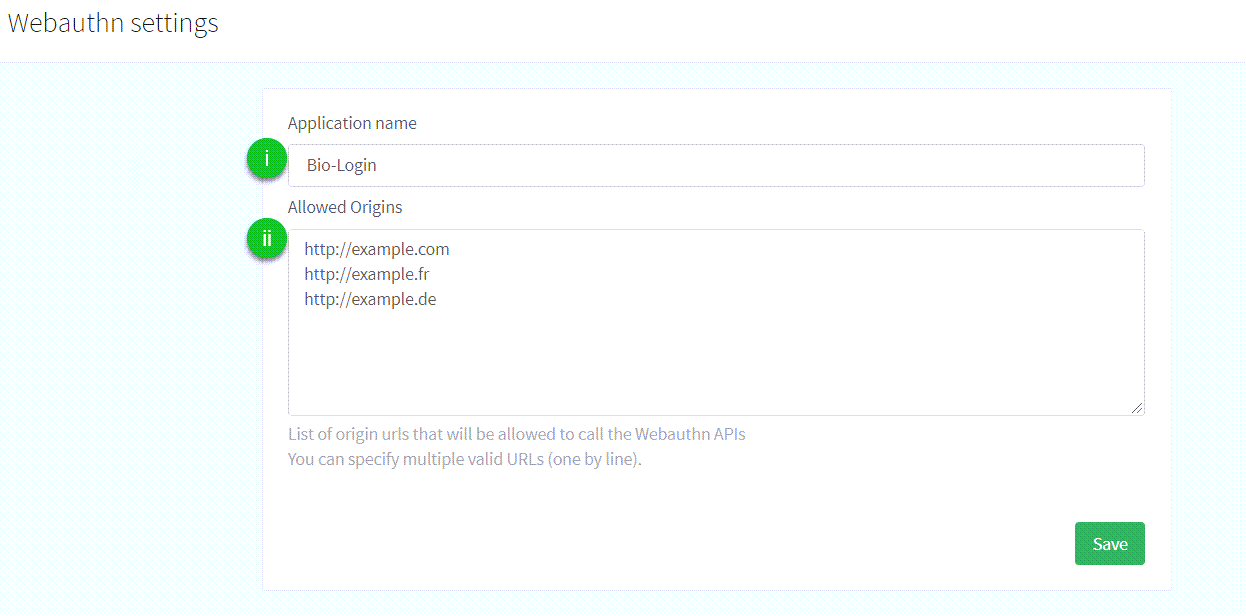
1. `Application name`: the name of the application that is displayed to the user during the FIDO2 Registration or Authentication process. _There are no particular restrictions on what you can use here._
2. `Allowed origins`: the list of **full origin URLs** of the pages allowed to complete a WebAuthn flow (for example `https://example.com` or `https://www.example.com`). The Purse Identity Console labels this field as allowed URLs only, but those URLs also act as allowed [Relying Party IDs](../../docs/biometrics/passkeys.html#relying-party-id). Enter the RP ID here as an origin URL; the hostname of the `origin` you send becomes the RP ID.
> See [WebAuthn and passkey allowed origins](../../docs/biometrics/passkeys.html#webauthn-and-passkey-allowed-origins) for how Allowed origins map to the RP ID, including single-origin and dual-origin setups.
You also need
- An Android device with a fingerprint sensor or a configured screen lock.
- Android OS 7.0 or later.
> Make sure to register a fingerprint (or screenlock).
- To install our [SDK Core](../index.html#sdk-core) which exposes all of the FIDO2 methods.
- To include the play-services-fido library as a dependency. To do this, go to your `app` folder and add the following to the `build.gradle` file under `dependencies`.
```sh
dependencies {
...
implementation "com.google.android.gms:play-services-fido:18.1.0"
...
}
```
## Initialize
### Digital Asset Links
You need to host a [Digital Asset Links](https://developers.google.com/digital-asset-links/v1/getting-started) JSON file on `[https:///.well-known/assetlinks.json](https:///.well-known/assetlinks.json)` to allow the application to use FIDO2 APIs to register and sign credentials for that domain.
In our application example, we are:
- Creating a [Firebase Hosting](https://firebase.google.com/docs/hosting/) project to host the digital asset link.
- Setting the `domain` to ``.
- Hosting the `assetlinks.json` at `[https:///.well-known/assetlinks.json](https:///.well-known/assetlinks.json)`.
```json
[
{
"relation": ["delegate_permission/common.handle_all_urls","delegate_permission/common.get_login_creds"],
"target": {
"namespace": "android_app",
"package_name": "com.reach5.identity.sdk.demo", (1)
"sha256_cert_fingerprints": [ (2)
"AF:C8:F2:4C:AF:46:AA:5B:74:7B:8D:47:4D:82:A6:D1:FF:98:BF:A6:16:D0:D0:82:E8:9A:D0:8C:13:EB:B9:CE"
]
}
}
]
```
In the `assetlinks.json` file sample above:
1. `package_name` matches the `applicationId` in the `build.gradle` file.
2. `sha256_cert_fingerprints` matches the fingerprint of the signing key.
> Refer to Android Studio’s [Generate and register an upload certificate](https://developer.android.com/studio/publish/app-signing#sign_release) page to generate a public certificate.
### Allowed origins
In the Purse Identity Console, under **Settings** **WebAuthn** you must allow:
- the domain on which the Digital Asset Links file is hosted
- the Facet ID
> The Facet ID is the platform-specific identifier (_URI_). It matches the format `android:apk-key-hash:` where `hash-of-apk-signing-cert` is the encoded version of the signing key from the application’s keystore.
>
> You can compute the Facet ID with the command below:
>
> ```sh
> keytool -list -v -keystore | grep "SHA256: " | cut -d " " -f 3 | xxd -r -p | openssl base64 | sed 's/=//g'
> ```

## Signup
The user requests to register a new account for the first time. Users don’t need to provide a password, but instead provide an identifier like an email or mobile number as well as some personal data.
> The data they provide in the signup process is reflected in the `profile` option in the [signupWithWebAuthn](../signupWithWebAuthn.html#profileWebAuthnSignupRequest) method.
Subsection
Jump to the [signup process](#signup-process)
Here is a snapshot of the signup view displayed to the user.

### Signup process
Signup is a _two-step process_.
> Each tab below shows the code needed for each step.
1. The [signupWithWebAuthn](../signupWithWebAuthn.html) method initiates the FIDO2 signup process to retrieve a randomly generated challenge, the Relying Party information, and the user information from the Purse Identity server. The options are then passed to the FIDO2 API which returns an **Android Intent** to open a fingerprint dialog and generates a new credential.
2. The [onLoginActivityResult](../onLoginActivityResult.html) method is called after the UI successfully generates a new credential. It sends the resulting data (which contains the information about this new credential) back to the Purse Identity server and finalizes the FIDO2 signup process by returning the user’s authentication token.
```kotlin
package com.reach5.identity.sdk.demo
import android.os.Bundle
import android.util.Log
import androidx.appcompat.app.AppCompatActivity
import com.reach5.identity.sdk.core.ReachFive
import com.reach5.identity.sdk.core.models.requests.ProfileWebAuthnSignupRequest
import kotlinx.android.synthetic.main.webauthn_signup.*
// The activity controlling the view
class MainActivity : AppCompatActivity() {
// The ReachFive client
private lateinit var reach5: ReachFive
// The WebAuthn identifier of the user
private lateinit var webAuthnId: String
companion object {
// The domain of the origin call (it can be stored in an env file)
const val ORIGIN = "https://dev-sandbox-268508.web.app"
// The code of the FIDO2 signup request
const val WEBAUTHN_SIGNUP_REQUEST_CODE = 3
}
override fun onCreate(savedInstanceState: Bundle?) {
super.onCreate(savedInstanceState)
setContentView(R.layout.activity_main)
// Define the action on the click of the "Signup" button
signupWithWebAuthn.setOnClickListener {
// Launch a pending FIDO2 task for signup
this.reach5.signupWithWebAuthn(
profile = ProfileWebAuthnSignupRequest(
email = signupWebAuthnEmail.text.toString(),
givenName = signupWebAuthnGivenName.text.toString(),
familyName = signupWebAuthnFamilyName.text.toString()
),
origin = ORIGIN,
friendlyName = signupWebAuthnNewFriendlyName.text.toString(),
signupRequestCode = WEBAUTHN_SIGNUP_REQUEST_CODE,
successWithWebAuthnId = { this.webAuthnId = it },
failure = {
Log.d("ReachFive","Unable to signup with FIDO2: $it")
}
)
}
}
```
```kotlin
override fun onActivityResult(requestCode: Int, resultCode: Int, data: Intent?) {
// Method A
// Tip: nothing happens if the request code does not concern ReachFive
client.onLoginActivityResult(
requestCode = requestCode,
resultCode = resultCode,
intent = data,
success = { handleLoginSuccess(it) },
failure = { reachFiveError ->
Log.e(TAG, "Login error!", reachFiveError)
},
activity = this
)
// Method B
val handler: ActivityResultHandler? = reach5.resolveResultHandler(requestCode, resultCode, data)
when (handler) {
is LoginResultHandler -> handler.handle(
success = { handleLoginSuccess(it) },
failure = { reachfiveError ->
Log.e(TAG, "Login error!", reachfiveError)
},
activity = this
)
else -> { /* Not a login callback, or not ReachFive */ }
}
}
```
## Authentication
Once the user has a credential registered on the server and the device, they can use it to login easily with their identifier.
Subsection
Jump to the [authentication process](#authentication-process)
Here is a snapshot of the login view displayed to the user.

### Authentication process
Authentication is a _two-step process_.
> Each tab below shows the code needed for each step.
1. The [loginWithWebAuthn](../loginWithWebAuthn.html) method initiates the FIDO2 authentication process to retrieve the list of previously registered credentials and a challenge string from the server. This information is passed to the FIDO2 API which searches for a credential that matches the **Relying Party ID** and creates an **Android Intent** to open the fingerprint dialog for the user to consent for authentication.
2. The [onLoginActivityResult](../onLoginActivityResult.html) method is called after the UI successfully retrieves the existing credential. It returns the operation result to the ReachFive server and finalizes the FIDO2 authentication process by returning the user’s authentication token.
```kotlin
package com.reach5.identity.sdk.demo
import android.os.Bundle
import android.util.Log
import androidx.appcompat.app.AppCompatActivity
import com.reach5.identity.sdk.core.ReachFive
import com.reach5.identity.sdk.core.models.requests.webAuthn.WebAuthnLoginRequest
import kotlinx.android.synthetic.main.webauthn_login.*
// The activity controlling the view
class MainActivity : AppCompatActivity() {
// The ReachFive client
private lateinit var reach5: ReachFive
// The scope assigned to the user
private val scope = setOf("openid", "email", "profile", "phone_number", "offline_access", "events", "full_write")
companion object {
// The domain of the origin call (it can be stored in an env file)
const val ORIGIN = "https://dev-sandbox-268508.web.app"
// The code of the FIDO2 authentication request
const val WEBAUTHN_LOGIN_REQUEST_CODE = 2
}
override fun onCreate(savedInstanceState: Bundle?) {
super.onCreate(savedInstanceState)
setContentView(R.layout.activity_main)
// Define the action on the click of the "Login" button
loginWithWebAuthn.setOnClickListener {
val email: String = webAuthnEmail.text.toString()
// Build the request according to the identifier provided by the user
val webAuthnLoginRequest: WebAuthnLoginRequest = if (email.isNotEmpty()) {
WebAuthnLoginRequest.EmailWebAuthnLoginRequest(
origin = ORIGIN,
email = email,
scope = scope
)
} else {
WebAuthnLoginRequest.PhoneNumberWebAuthnLoginRequest(
origin = ORIGIN,
phoneNumber = webAuthnPhoneNumber.text.toString(),
scope = scope
)
}
// Launch a pending FIDO2 task for authentication
this.reach5.loginWithWebAuthn(
loginRequest = webAuthnLoginRequest,
loginRequestCode = WEBAUTHN_LOGIN_REQUEST_CODE,
failure = {
Log.d("ReachFive","Unable to login with FIDO2: $it")
}
)
}
}
}
```
```kotlin
override fun onActivityResult(requestCode: Int, resultCode: Int, data: Intent?) {
// Method A
// Tip: nothing happens if the request code does not concern ReachFive
client.onLoginActivityResult(
requestCode = requestCode,
resultCode = resultCode,
intent = data,
success = { handleLoginSuccess(it) },
failure = { reachFiveError ->
Log.e(TAG, "Login error!", reachFiveError)
},
activity = this
)
// Method B
val handler: ActivityResultHandler? = reach5.resolveResultHandler(requestCode, resultCode, data)
when (handler) {
is LoginResultHandler -> handler.handle(
success = { handleLoginSuccess(it) },
failure = { reachfiveError ->
Log.e(TAG, "Login error!", reachfiveError)
},
activity = this
)
else -> { /* Not a login callback, or not ReachFive */ }
}
}
```
## Manage devices
Once the user is authenticated, they can perform several actions to manage the registered devices such as:
- [registering a new device](#register-a-new-device)
- [listing and removing devices](#other-actions)
Here is a snapshot of the view displayed to the user after a successful login.

### Register a new device
Registration is a _two-step process_.
> Each tab below shows the code needed for each step.
1. The [addNewWebAuthnDevice](../addNewWebAuthnDevice.html) method initiates the FIDO2 registration process to retrieve a randomly generated challenge, the **Relying Party** information, and the user information from the Purse Identity server. The options are then passed to the FIDO2 API which returns an **Android Intent** to open a fingerprint dialog and generates a new credential.
> A user cannot register several credentials on the same device.
2. The [onAddNewWebAuthnDeviceResult](../onAddNewWebAuthnDeviceResult.html) method is called after the UI successfully generates a new credential. It sends the resulting data (_which contains the information about this new credential_) back to the Purse Identity server and completes the FIDO2 registration process.
```kotlin
package com.reach5.identity.sdk.demo
import android.content.Intent
import android.os.Bundle
import android.util.Log
import androidx.appcompat.app.AppCompatActivity
import com.reach5.identity.sdk.core.ReachFive
import com.reach5.identity.sdk.core.models.responses.AuthToken
import kotlinx.android.synthetic.main.webauthn_devices.*
// The activity controlling the view
class AuthenticatedActivity : AppCompatActivity() {
// The ReachFive client
private lateinit var reach5: ReachFive
// The authentication token retrieved after the user has logged-in
private lateinit var authToken: AuthToken
companion object {
// The domain of the origin call (it can be stored in an env file)
const val ORIGIN = "https://dev-sandbox-268508.web.app"
// The code of the FIDO2 registration request
const val WEBAUTHN_REGISTER_REQUEST_CODE = 1
}
override fun onCreate(savedInstanceState: Bundle?) {
super.onCreate(savedInstanceState)
setContentView(R.layout.activity_authenticated)
// Fetch the authentication token from another activity
this.authToken = intent.getParcelableExtra("AUTH_TOKEN")
// Define the action on the click of the "Add new FIDO2 device" button
addNewDevice.setOnClickListener {
// Launch a pending FIDO2 task for registration
this.reach5.addNewWebAuthnDevice(
authToken = this.authToken,
origin = ORIGIN,
friendlyName = newFriendlyName.text.trim().toString(),
registerRequestCode = WEBAUTHN_REGISTER_REQUEST_CODE,
failure = {
Log.d("ReachFive", "Unable to add a new FIDO2 device: $it")
}
)
}
}
}
```
```kotlin
override fun onActivityResult(requestCode: Int, resultCode: Int, data: Intent?) {
super.onActivityResult(requestCode, resultCode, data)
// Method A, using SDK helper:
val handler = reach5.resolveResultHandler(requestCode, resultCode, data)
if (handler is WebAuthnDeviceAddResult) {
handler.handle(
success = {
showToast("New FIDO2 device registered")
refreshDevicesDisplayed()
},
failure = {
Log.d(TAG, "onAddNewWebAuthnDeviceResult error=$it")
showErrorToast(it)
}
)
}
// Method B, directly calling method. Nothing happens if requestCode does not concern SDK:
reach5.onAddNewWebAuthnDeviceResult(
requestCode,
data,
success = {
showToast("New FIDO2 device registered")
refreshDevicesDisplayed()
},
failure = {
Log.d(TAG, "onAddNewWebAuthnDeviceResult error=$it")
showErrorToast(it)
}
)
}
```
Here are some snapshots of the FIDO2 dialogs displayed to the user to save a fingerprint.

### Other actions
The tabs below instruct you on listing and removing devices.
Use the [listWebAuthnDevices](../listWebAuthnDevices.html) method to list the registered FIDO2 devices.
```kotlin
package com.reach5.identity.sdk.demo
import android.os.Bundle
import android.util.Log
import androidx.appcompat.app.AppCompatActivity
import com.reach5.identity.sdk.core.ReachFive
import com.reach5.identity.sdk.core.models.responses.AuthToken
import com.reach5.identity.sdk.core.models.responses.webAuthn.DeviceCredential
// The activity controlling the view
class AuthenticatedActivity : AppCompatActivity() {
// The ReachFive client already instantiated in another activity
private lateinit var reach5: ReachFive
// The authentication token retrieved after the user has logged-in
private lateinit var authToken: AuthToken
// The list of the FIDO2 devices of the user
private lateinit var devicesDisplayed: List
override fun onCreate(savedInstanceState: Bundle?) {
super.onCreate(savedInstanceState)
setContentView(R.layout.activity_authenticated)
/*...*/
// Fetch the authentication token from another activity
this.authToken = intent.getParcelableExtra("AUTH_TOKEN")
// Initialize the list of devices
this.devicesDisplayed = listOf()
// Fetch the registered devices of the user from Reachfive server
this.reach5.listWebAuthnDevices(
authToken = authToken,
success = {
// Refresh the list of displayed devices
this.devicesDisplayed = it
},
failure = {
Log.d("ReachFive","Unable to list the FIDO2 devices: $it")
}
)
}
}
```
+
Use the [removeWebAuthnDevice](../removeWebAuthnDevice.html) method to delete a registered FIDO2 device.
```kotlin
package com.reach5.identity.sdk.demo
import android.util.Log
import androidx.appcompat.app.AppCompatActivity
import com.reach5.identity.sdk.core.ReachFive
import com.reach5.identity.sdk.core.models.responses.AuthToken
import com.reach5.identity.sdk.core.models.responses.webAuthn.DeviceCredential
// The activity controlling the view
class AuthenticatedActivity : AppCompatActivity() {
// The ReachFive client already instantiated in another activity
private lateinit var reach5: ReachFive
// The authentication token retrieved after the user has logged-in
private lateinit var authToken: AuthToken
// The list of the FIDO2 devices of the user
private lateinit var devicesDisplayed: List
/*...*/
private fun removeDevice(position: Int) {
// The selected device
val device = this.devicesDisplayed[position]
// Delete the selected registered device from the ReachFive server
reach5.removeWebAuthnDevice(
authToken = authToken,
deviceId = device.id,
success = {
Log.d("ReachFive", "The FIDO2 device '${device.friendlyName}' is removed")
},
failure = {
Log.d("ReachFive", "Unable to remove the FIDO2 device '${device.friendlyName}': $it")
}
)
}
}
```
+
---
# Passkeys on Android
URL: /sdk-android/guides/passkeys.html
## Introduction
This guide explains how to implement passkey registration and authentication workflow on Android applications.
> The following code samples and screenshots are issued from our example application using our SDK. Feel free to check out the [Github project](https://github.com/ReachFive/identity-android-sdk).
## Passkeys prerequisites
To successfully enable passkeys for Android:
- Enable the **WebAuthn** feature on your ReachFive account.
> You may need to contact [support](mailto:support@reach5.co) to have this enabled if you do not see it on your Purse Identity Console.
You’ll also need:
- An Android device with a fingerprint sensor or a configured screen lock.
- Android OS 9.0 or later. Make sure to register a fingerprint (or screenlock).
- To install our [SDK Core](../index.html#sdk-core) which exposes all of the passkey methods.
## Get started
This section describes important terms and concepts as well the steps needed to get started with passkeys for Android with Purse Identity.
### Discoverable login
With discoverable logins, the client requests the credential requirements for the Relying Party. Then, it shows a list of possible stored user handles such as an email, phone numbers, PIN, or usernames for the device. Once the user selects and unlocks the credential, the client continues to complete the authentication flow.
### Non-discoverable login
With non-discoverable logins, the client requests the credential requirements for the Relying Party for a **specific user**. The Relying Party replies with the credentials it can accept for this specific user. If the credentials are accessible to the client, the client prompts the user to select one.
### Relying Party ID
```none
data class SdkConfig(
val domain: String,
val clientId: String,
val scheme: String,
val originWebAuthn: String? = null, (1)
) : Parcelable
```
- (1) Relying Party ID is the domain to which passkeys are bound. Once bound to a domain, it can be used on subdomains but not other full domains.
Example: Using the Relying Party ID of `boulangerie.com` allows the use of credentials on `help.boulangerie.com` for example, but not on a different full domain like `boulangerie.fr`. In this case, customers would need a common login page for passkeys for varying full domains like the stated example here.
### Digital Asset Links
You need to host a [Digital Asset Links](https://developer.android.com/training/sign-in/passkeys#add-support-dal) JSON file on `https:///.well-known/assetlinks.json` to allow the application to register and authenticate with credentials associated with the Relying Party ID ``.
assetlinks.json example
```json
[
{
"relation": ["delegate_permission/common.handle_all_urls","delegate_permission/common.get_login_creds"],
"target": {
"namespace": "android_app",
"package_name": "co.reachfive.identity.sdk.demo", (1)
"sha256_cert_fingerprints": [ (2)
"AF:C8:F2:4C:AF:46:AA:5B:74:7B:8D:47:4D:82:A6:D1:FF:98:BF:A6:16:D0:D0:82:E8:9A:D0:8C:13:EB:B9:CE"
]
}
}
]
```
- (1) `package_name` matches the `applicationId` in the `build.gradle` file.
- (2) `sha256_cert_fingerprints` matches the fingerprint of the signing key.
> Refer to Android Studio’s [Generate and register an upload certificate](https://developer.android.com/studio/publish/app-signing#sign_release) page to generate a public certificate.
#### `assetlinks` response
The `https:///.well-known/assetlinks.json` link must return a `200` HTTP response with a JSON MIME `Content-Type` header. Returning a `301` or `302` HTTP redirect or a non-JSON Content-Type causes verification to fail. See [Android’s docs](https://developer.android.com/training/sign-in/passkeys#add-support-dal) for more details.
#### Hosted pages
If you are using’s Purse Identity’s [Hosted Pages](../../docs/hosted-pages.html) and need the Asset Links file hosted on your domain at Purse Identity, you should input the content of your `assetlinks.json` file into the text area called **assetlinks.json** in the **Settings** **WebAuthn** section of the Purse Identity Console.
> We do not perform any validation on the file.
If you do not use a custom domain, the Relying Party ID associated to credentials created on Hosted Pages is `.reach5.net`. Your Digit Assets Link is served at `https://.reach5.net/.well-known/assetlinks.json`.
If you do use a custom domain, your Relying Party ID is `https://`. Your Digit Assets Link is served at `https:///.well-known/assetlinks.json`.
You could also choose to host the `assetlinks.json` file on your root domain. Hosted Pages are accessible via `auth.example.com`. You could then host the `assetlinks.json` file at `example.com`. This is a viable long-term option in the case you may not use Hosted Pages in the future.
#### Self-hosted
If you do not use Purse Identity’s Hosted Pages option, you should host the file on your own.
```none
https:///.well-known/assetlinks.json (1)
```
- (1) Ensure you use the correct Relying Party ID.
### Allowed origins
In the Purse Identity Console, under **Settings** **WebAuthn** you must allow:
- the URL of the domain that corresponds to the Relying Party ID
- the Facet ID
> The Facet ID is the platform-specific identifier (_URI_). It matches the format `android:apk-key-hash:` where `hash-of-apk-signing-cert` is the encoded version of the signing key from the application’s keystore.
>
> You can compute the Facet ID with the command below:
>
> ```sh
> keytool -list -v -keystore | grep "SHA256: " | cut -d " " -f 3 | xxd -r -p | openssl base64 | sed 's/=//g'
> ```

## Signup
The user requests to register a new account for the first time. Users don’t need to provide a password, but instead provide an identifier like an email or mobile number as well as some personal data and a [`friendlyName`](../signupWithPasskey.html). The data they provide in the signup process is reflected in the `profile` option in the `signupWithPasskey` method.
Here is a snapshot of the signup view displayed to the user.

### Signup process
The [signupWithPasskey](../signupWithPasskey.html) method initiates the passkey signup process.
```kotlin
client.signupWithPasskey(
ProfileWebAuthnSignupRequest(
givenName = "John",
familyName = "Doe",
email = "john.doe@gmail.com"
),
friendlyName = "Google Password Manager",
origin = "passkey signup from Android app",
success = { authToken -> ... }, // Get the profile's authentication token
failure = { error -> ... }, // Handle a ReachFive error
activity = activity,
)
```
## Authentication
Once the user has a credential registered on the server and the device, they can use it to login easily with their identifier.
Here is a snapshot of the login view displayed to the user.

### Log in with passkey
The [loginWithPasskey](../loginWithPasskey.html) method initiates the passkey authentication process.
```kotlin
client.loginWithPasskey(
loginRequest = WebAuthnLoginRequest.EmailWebAuthnLoginRequest(
email = "john.doe@example.com"
),
origin = "passkey login from Android app",
success = { authToken -> ... }, // Get the profile's authentication token
failure = { error -> ... }, // Handle a ReachFive error
activity = activity,
)
```
### Discoverable login
The [discoverableLogin](../discoverableLogin.html) method discovers a credential to log in a user. This can be via password, passkey, or both.
```kotlin
client.discoverableLogin(
origin = "discoverable login from Android app",
success = { authToken -> ... }, // Get the profile's authentication token
failure = { error -> ... }, // Handle a ReachFive error
activity = activity,
)
```
## Manage devices
Once a user is authenticated, they can register a passkey.
Here is an example of a user view for listing registered passkeys.

### Register a new passkey
The [registerNewPasskey](../registerNewPasskey.html) method initiates the passkey registration process.
```kotlin
client.registerNewPasskey(
authToken = authToken,
friendlyName = "Google Password Manager",
success = { ... }, // Handle success
failure = { error -> ... }, // Handle a ReachFive error
activity = activity,
)
```
### List registered passkeys
The [listWebAuthnDevices](../listWebAuthnDevices.html) lists registered devices or passkeys.
```kotlin
import com.reach5.identity.sdk.core.models.AuthToken
val authToken: AuthToken = // The authentication token obtained following signup or login.
client.listWebAuthnDevices(
authToken = authToken,
success = { devices -> ... }, // Get the list of devices
failure = { error -> ... } // Handle a ReachFive error
)
```
### Remove registered passkeys
The [removeWebAuthnDevice](../removeWebAuthnDevice.html) removes registered devices or passkeys.
```kotlin
import com.reach5.identity.sdk.core.models.AuthToken
val authToken: AuthToken = // The authentication token obtained following signup or login.
client.removeWebAuthnDevice(
authToken = authToken,
deviceId = "AcfbMjJcS7vE46R3WHOJL...",
success = { _ -> ... }, // Do something
failure = { error -> ... } // Handle a ReachFive error
)
```
---
# Web-based Flows Configuration
URL: /sdk-android/guides/web-based-flows.html
This guide will help you successfully set up web-based flows, which include:
- Web-based social login flows (SDK WebView)
- Orchestrated web login (Core)
## Identity Client Configuration
In your list of authorized callback URLs, you must whitelist `reachfive://${clientId}/callback`, where `${clientId}` is your ReachFive identity client ID.
This URL scheme is the **default callback URL** and is used to request an authorization code when using web-based flows.
## Android Manifest
Web-based flows open a [Custom Tab](https://developer.chrome.com/docs/android/custom-tabs) to authenticate users. In order to be able to redirect back to your application, you must add the following activity in the `AndroidManifest.xml` file:
```xml
```
Example `settings.xml`:
```none
reachfive
/callback
```
---
# Proguard rule exception
URL: /sdk-android/guides/proguard.html
If you have set `minifyEnabled true` in your Android build, you need to add the following Proguard rule in order to make an exception for certain Purse Identity SDK models.
Add the following rule to your `proguard-rules.pro` file to prevent Purse Identity API models from being obfuscated:
```none
-keep class co.reachfive.identity.sdk.core.models.** {*;}
```
---
# Android SDK Error Handling
URL: /sdk-android/reference/errors.html
This page contains information on how errors are formatted and the error types you may encounter while using the Android SDK.
Errors maybe be the result of either an API error response or an error produced by the SDK.
> Use `ReachFiveError.getErrorCode` or `ReachFiveError.getFidoErrorCode` to match against specific errors.
> The [Purse Identity errors](#reachfive-errors) table below is a comprehensive list and therefore, not all errors present in the table may apply to the Android SDK.
Error format for SDK
```json
{
"message": "", (1)
"code": "", (2)
"exception": "", (3)
"data": {
"error_id": "2hNBbvYecw", (4)
"error_description": "Invalid email or password", (5)
"error_message_key": "error.invalidEmailOrPassword", (6)
"error": "invalid_grant", (7)
"error_user_msg": "Invalid email or password" (8)
}
}
```
- (1) The error message.
- (2) The HTTP status code. For WebAuthn, instead of an HTTP status code, the `code` comes from the underlying WebAuthn library.
- (3) A string showing any exceptions.
- (4) The `error_id` is auto-generated for each error.
- (5) The `error_description` contains the message associated with the `error_message_key`.
- (6) The `error_message_key` contains the error key which is typically `error.`.
- (7) The `error` is the general error category.
- (8) The `error_user_msg` is the user-friendly message based on the `error_description`.
## Android SDK Errors
The following are errors specific to the Android SDK.
##### 303
`OAuthAuthorizationError`
##### 49000
`Unexpected`
##### 52000
`WebauthnActionCanceled`
##### 52001
`WebFlowCanceled`
##### 52002
`NullIntent`
##### 52003
`NoAuthCode`
##### 52004
`NoPkce`
##### 52005
`CustomTabUnavailable`
## WebAuthn Errors
The errors listed here are specific to WebAuthn methods integrated by the Purse Identity Android SDK.
> In your failure callbacks, you may also use `getFidoErrorCode` to get the original error enumeration value from the Google WebAuthn library.
##### 9
`NOT_SUPPORTED_ERR`
##### 11
`INVALID_STATE_ERR`
##### 18
`SECURITY_ERR`
##### 19
`NETWORK_ERR`
##### 20
`ABORT_ERR`
##### 23
`TIMEOUT_ERR`
##### 27
`ENCODING_ERR`
##### 28
`UNKNOWN_ERR`
##### 29
`CONSTRAINT_ERR`
##### 30
`DATA_ERR`
##### 35
`NOT_ALLOWED_ERR`
##### 36
`ATTESTATION_NOT_PRIVATE_ERR`
## Purse Identity errors
The table below contains the error key (_first column_) and the error message (_second column_) for Purse Identity errors.
##### error.invalidEmailOrPassword
`Invalid email or password`
##### error.invalidPhoneNumberOrPassword
`Invalid phone number or password`
##### error.invalidOldPassword
`Invalid old password`
##### error.updateSamePassword
`Password should be different from old password`
##### error.notHaveOldPassword
`Not have old password`
##### error.email.notFound
`Email not found {0}`
##### error.email.required
`Email is required`
##### error.email.alreadyInUse
`Email already in use`
##### error.phoneNumber
`The phone number is invalid`
##### error.phoneNotFound
`No account found with phone number {0}`
##### error.phoneNumberAlreadyInUse
`Another account with the same phone number already exists`
##### error.invalidVerificationCode
`Invalid verification code`
##### error.expiredVerificationCode
`Expired verification code`
##### error.accountBlockedAfterMultipleLoginAttempts
`Your account is locked for {lock_duration} minutes due to multiple consecutive failed login attempts. You can unlock it now by resetting your password by clicking on 'Forgot Password'.`
##### error.socialAccountAlreadyInUse
`Another user is already linked to this {0} account`
##### error.socialAccountEmailAlreadyInUse
`The email address associated with this {0} account is already used by an other account`
##### error.socialAccountPhoneNumberAlreadyInUse
`The phone number associated with this {0} account is already used by an other account`
##### error.socialAccountPhoneNumberUnverified
`` The phone number associated with this `{0}` account is unverified for the profile ID: `{1}` ``
##### error.socialAccountEmailUnverified
`The email address associated with this {0} account is unverified for the profile ID: {1}`
##### error.invalidForm
`Invalid form`
##### error.unexpected
`An unexpected error occurred. Please try again later.`
##### error.path.missing
`This field is required`
##### error.emptyPayload
`Empty payload`
##### error.requestDeserialization
`Cannot deserialize the request body`
##### error.accessDenied
`Access denied`
##### error.password.policy
`Password requirements not met`
##### error.password.weak
`Password too weak`
##### error.password.length
`Minimum length is {0}`
##### error.password.max.length
`Maximum length is {0}`
##### error.password.special.characters
`Minimum special characters required is {0}`
##### error.password.lowercase.characters
`Minimum lowercase characters required is {0}`
##### error.password.uppercase.characters
`Minimum uppercase characters required is {0}`
##### error.password.digit.characters
`Minimum digit characters required is {0}`
##### error.custom\_identifier.notFound
`Custom identifier not found valeur du custom_identifier`
##### error.hostedpages.auth
`Authentication`
##### error.hostedpages.authFailure
`Authentication failed:`
##### error.hostedpages.emailConfirmation
`Email confirmation`
##### error.hostedpages.emailConfirmationFailure
`Email confirmation failed:`
##### error.hostedpages.emailVerified
`Your email is now verified.`
##### error.hostedpages.goHome
`Go home`
##### error.hostedpages.passwordEdit
`Edit password`
##### error.hostedpages.passwordEditFailure
`Password edition failed:`
##### error.hostedpages.passwordReset
`Reset password`
##### error.hostedpages.passwordResetFailure
`Password reset failed:`
##### error.hostedpages.passwordSuccessfullyChanged
`Your password has been successfully changed! You will be redirected in a few seconds …`
##### error.hostedpages.passwordless
`Passwordless`
##### error.hostedpages.passwordlessFailure
`Passwordless failed:`
##### error.hostedpages.webauthnDevices
`Registered Devices`
##### error.hostedpages.webauthnDevicesFailure
`Backing up your devices failed`
##### error.hostedpages.thankYou
`Thank you!`
##### error.hostedpages.redirectUrl.invalid
`Invalid redirect URL`
##### error.hostedpages.redirectUrl.notWhitelisted
`URL not whitelisted`
##### error.hostedpages.returnTo.notWhitelisted
`Return to URL not whitelisted`
##### error.hostedpages.invalidConfiguration
`Invalid configuration`
##### error.hostedpages.clientNotFound
`Couldn''t find hosted pages client`
##### error.hostedpages.oidc.relyingPartyNeedsPermission
`{0} needs your permission to access your {0} account.`
##### error.hostedpages.oidc.thisWillAllowRelyingParty
`This will allow {0} to:`
##### error.hostedpages.oidc.accessYourScope
`View your {0}`
##### error.account.contextPath.notFound
`No account found with contextPath [{0}]`
##### error.account.notFound
`Account not found`
##### error.account.notExistAnymore
`This account does not exist anymore.`
##### error.account.settingsId.missing
`Missing account settings id`
##### error.account.id.notFound
`No account found with id [{0}]`
##### error.account.externalId.notFound
`No account found with external_id [{0}]`
##### error.account.email.notFound
`No account found with email [{0}]`
##### error.account.id.required
`Missing account id`
##### error.account.id.alreadyExists
`An account already exists with the same id`
##### error.account.ids.invalid
`Invalid account ids`
##### error.account.alreadyExists
`Account already exists`
##### error.account.accessDenied
`You have no access to any account`
##### error.account.noAccessSpecified
`No global role nor account access specified`
##### error.account.sourceNotFound
`Source Account [{0}] not found`
##### error.account.destinationNotFound
`Destination Account [{0}] not found`
##### error.account.esHostNotFound
`Cannot find ES host for cluster [{0}]`
##### error.account.alreadyActivated
`This account have already been activated`
##### error.account.unknown
`Unknown account`
##### error.account.anonymization.notAuthorized
`Anonymization not authorized on this account`
##### error.account.name.alreadyExists
`Account {0} ({0}) already exists`
##### error.account.inMaintenance
`Account {0} is in maintenance`
##### error.account.temporarilySuspended
`Your account has been disabled for security reasons. Please reset your password by clicking the link sent by email or SMS or contact the site administrator to reactivate it. You can receive a new password reset link by clicking on "Forgot Password".`
##### error.account.permanentlySuspended
`Your account has been disabled for security reasons. Please contact the site administrator to reactivate it.`
##### error.cluster.unknown
`Unknown cluster`
##### error.missingBody
`Missing body`
##### error.userAccessRequired
`User access required`
##### error.unknownTask
`Unknown task`
##### error.notFound
`Not found`
##### error.featureNotEnabled
`This feature is not enabled`
##### error.credentialsInvalid
`Invalid client credentials`
##### error.phoneNumberOrEmailRequired
`A valid phone number or email is mandatory`
##### error.criteriaPhoneOrEmailOnly
`Only one criteria is allowed: phone or email`
##### error.tooManyAttempts
`Too many attempts`
##### error.invalidDataType
`Invalid data type`
##### error.sortField.invalid
`Invalid sort field`
##### error.parsingFieldSelection
`Field selection parsing error: Unexpected char at {0}`
##### error.resultWindowTooLarge
`Result window is too large. See export API for a more efficient way to extract a large dataset.`
##### error.userEmail.notFound
`Unable to find the user {0} email`
##### error.invalidEventName
`Invalid event name`
##### error.decodeTokenIncorrectSecret
`Failed to decode token due to incorrect secret`
##### error.resource.notFound
`No resource found at ''{0}'' for method {0}`
##### error.identifier.mustBeValidEmail
`The identifier must be a valid email.`
##### error.identifier.mustBeValidEmailOrPhoneNumber
`The identifier must be a valid email or a valid phone number.`
##### error.interest.usedCantBeDeleted
`Interest can''t be deleted while it is used in a segment`
##### error.openGraphTags.fetchFailed
`Could not fetch open graph tags`
##### error.emailVerification.notConfigured
`Verification email settings not configured`
##### error.requestBody.parameters.required
`Parameters must be passed in the request body`
##### error.requestToken.notDelivered
`No request token delivered by {0}`
##### error.webhook.key.alreadyExists
`Webhook key already exists.`
##### error.pub-sub-hook.key.alreadyExists
`Pub/Sub hook key already exists.`
##### error.email.signup.notConfigured
`Signup email not configured`
##### error.filter.invalid
`Invalid filter: {0}`
##### error.filter.argumentOnField.invalid
`Invalid filter: invalid argument on field ''{0}''`
##### error.filter.operator.invalid
`Invalid filter: invalid operator associated with field ''{0}''`
##### error.filter.boolean.invalid
`Invalid filter: boolean value expected with field ''{0}''`
##### error.objectStorageTransfer.clientNotFound
`Could not get ObjectStorageTransfer client from protocol: {0} with settings: {0}`
##### error.objectStorageTransfer.upload
`Could not upload data: {0}`
##### error.objectStorageTransfer.couldNotDelete
`Could not delete data: {0}`
##### error.customField.invalid
`Invalid custom field type`
##### error.customField.notFound
`Custom field not found`
##### error.index.accountType.notFound
`Account index type not found`
##### error.index.type.notFound
`Index type not found`
##### error.index.template.notFound
`Index template not found`
##### error.index.notFound
`Index not found`
##### error.database.update
`Unable to update database for account {0}`
##### error.accessToken.missing
`Access token missing`
##### error.accessToken.expired
`Access token expired`
##### error.accessToken.invalid
`Invalid access token`
##### error.accessToken.freshness
`Access token is not fresh enough.`
##### error.accessToken.unexpected
`Unexpected token response: ({0}) {0}`
##### error.accessToken.scope.required
`The token does not contain the required scope: {0}`
##### error.accessToken.scope.insufficient
`Scope insufficient. Expected: [{0}]`
##### error.state.missing
`Missing state`
##### error.state.invalid
`Invalid state`
##### error.email.invalid
`Invalid email`
##### error.idToken.expired
`ID token expired`
##### error.idToken.invalid
`Invalid id token`
##### error.idToken.invalidIssuer
`Invalid id token issuer`
##### error.idToken.invalidAudience
`Invalid id token audience`
##### error.idToken.invalidNonce
`Invalid id token nonce`
##### error.authn.mfa.tkn.invalidFactor
`Invalid authentication token type`
##### error.authn.mfa.stepup.unavailable
`This action is unavailable`
##### error.authn.mfa.sms.unavailable
`This action is not available`
##### error.authn.mfa.stepup.unavailable
`This action is unavailable`
##### error.authn.mfa.stepup.invalidToken
`Invalid token`
##### error.authn.mfa.stepup.expiredToken
`Expired token`
##### error.mfa.noLiteOnly
`A lite profile cannot register a mfa credential`
##### error.oidc.authorize.access\_denied.authServer
`The request has been denied by the server.`
##### error.oidc.authorize.access\_denied.user
`The request has been denied by the user.`
##### error.oidc.authorize.consent\_required
`Consent is required by the user.`
##### error.oidc.authorize.complete.missingRequest
`Missing request form parameter.`
##### error.oidc.authCode.missing
`Missing authorization code`
##### error.pkce.unsupportedAlgo
`Unsupported PKCE algo {0}`
##### error.pkce.codeVerifier.required
`code_verifier is required`
##### error.pkce.challenges.required
`code_challenge and code_challenge_method are mandatory for this client.`
##### error.pkce.implicitFlow.forbidden
`Implicit flow is forbidden when PKCE is enforced.`
##### error.pkce.request.notFound
`Request pkce id not found`
##### error.pkce.request.emptyCodeChallenge
`Empty code_challenge.`
##### error.pkce.request.invalidCodeChallenge
`code_challenge must be between 43 and 128 characters long.`
##### error.pkce.request.invalidOrExpired
`PKCE code invalid or expired`
##### error.client.implicitFlow.forbidden
`Implicit flow forbidden for this client.`
##### error.client.notFound
`The client could not be found.`
##### error.client.notIdentity
`Not a first-party identity client`
##### error.client.notFirstParty
`Not a first-party identity client`
##### error.client.notThirdParty
`Not a third-party identity client`
##### error.client.nameEmpty
`Empty client name.`
##### error.client.clientIdEmpty
`Empty client ID.`
##### error.client.redirectUrlNotAllowed
`The redirect url is not allowed.`
##### error.client.allowed\_callback\_urls.forbidden
`allowed_callback_urls field not allowed on management client.`
##### error.client.unauthorizedAPI
`This client is not authorized to use Management API.`
##### error.client.unauthorizedScope
`This client is not allowed to use the requested scope(s): {0}`
##### error.client.refreshToken.notEnabled
`Refresh tokens cannot be enabled if no authentication method is required and PKCE is not enabled.`
##### error.client.refreshToken.identityClientOnly
`Refresh tokens are available only for identity clients.`
##### error.client.consentPageSettings.empty
`Empty consent page settings.`
##### error.client.rsaKeyPair.jwtAlgorithmNotAllowed
`RSA key pair management action unauthorized for non RS256 JWT algorithm: {0}.`
##### error.client.thirdparty.mustEnforceScope
`Third-party clients must enforce scope.`
##### error.client.thirdparty.noFullWrite
`Third-party clients cannot request the full_write scope.`
##### error.client.thirdparty.noLoginUrl
`Third-party clients cannot have login URLs.`
##### error.clientSecret.missing
`Missing client secret`
##### error.clientSecret.invalid
`Invalid client secret`
##### error.clientId.missing
`Missing client id`
##### error.provider.unknown
`Unknown provider`
##### error.provider.unknownWithName
`Unknown provider: {0}`
##### error.provider.notSupported
`Provider {0} is not supported.`
##### error.provider.notSupportedForFakeLogins
`Provider {0} not supported for fake logins`
##### error.provider.authcode.missing
`''provider_authcode'' param missing`
##### error.provider.twitterError
`Twitter error: {0}`
##### error.provider.token.missing
`''provider_token'' parameter missing`
##### error.provider.secret.missing
`''provider_secret'' parameter missing`
##### error.provider.requestToken.notFound
`No request token delivered by {0}`
##### error.provider.profileLoading
`Error during {0} profile loading: status={0} and body={0}`
##### error.provider.tokenOrCode.required
`One of ''provider_token'' or ''provider_code'' parameter is required.`
##### error.provider.callback.unexpected
`[{0}] Unexpected oauth callback: {0}`
##### error.provider.identity.notFound
`Identity provider {0} not found`
##### error.provider.mailRu.noProfile
`Mailru profile retrieving failed.`
##### error.provider.unexpectedResponse
`Unexpected {0} response`
##### error.facebook.accessToken.invalid
`Invalid OAuth access token.`
##### error.facebook.accessToken.expired
`Access token expired`
##### error.facebook.authCode.alreadyUsed
`Authorization code already used`
##### error.facebook.authCode.expired
`Authorization code expired`
##### error.facebook.authCode.invalid.expired
`Authorization code invalid or expired`
##### error.facebook.authCode.invalid
`Authorization code invalid`
##### error.facebook.mustBeAdmin
`You must be admin or developer of your Facebook application to use this feature.`
##### error.facebook.audienceExportFail
`Audience export failed`
##### error.facebook.termsOfService.notAccepted
`Terms of service of your ads account have not been accepted.`
##### error.azureAd.noAccessToken
`No access token delivered by Azure AD: [{0}] {0}`
##### error.invalidFilter.boolean
`Invalid filter: boolean value expected with field ''{0}''`
##### error.invalidFilter.invalidOperator
`Invalid filter: invalid operator associated with field ''{0}''`
##### error.role.notAllowedAsGlobal
`Role {0} is not allowed as a global role`
##### error.role.notAllowedAsAccount
`Role {0} is not allowed as an account role`
##### error.roles.notAllowedAsAccount
`Roles [{0}] are not allowed as account roles`
##### error.user.notFound
`User not found`
##### error.user.alreadyHasGlobalAccess
`User already has global access.`
##### error.user.alreadyLinked
`User is already linked to your account.`
##### error.user.resource.accessNotGranted
`You are not granted to access this resource`
##### error.audience.notFound
`Audience not found`
##### error.webhook.key.notFound
`Webhook key does not exist.`
##### error.pub-sub-hook.key.notFound
`Pub/Sub hook key does not exist.`
##### error.interest.notFound
`Interest not found`
##### error.interest.ids.notFound
`Interests {0} not found`
##### error.twilio.notConfigured
`Twilio not configured`
##### error.smtp.notConfigured
`SMTP provider not configured`
##### error.smtpProvider.notConfigured
`Email [{0}] not configured`
##### error.sms.passwordReset
`Password reset SMS not configured`
##### error.sms.accountSuspension
`Account suspension SMS not configured`
##### error.sms.verificationNotConfigured
`Verification SMS not configured`
##### error.sms.passwordlessTemplate.notConfigured
`Passwordless template not configured for SMS`
##### error.passwordless.email.notConfigured
`Passwordless email not configured`
##### error.passwordless.sms.notConfigured
`Passwordless SMS not configured`
##### error.emailService.sendNotConfigured
`Found no valid ''{0}'' configuration to send email`
##### error.emailService.templateNotConfigured
`Email [{0} - {0}] not configured`
##### error.emailService.template.invalid
`Invalid template [{0} - {0}]: {0}`
##### error.emailService.redirectUrlMissing
`Missing redirect url in ''{0}'' configuration`
##### error.emailService.templateDisabled
`Template ''{0}'' is disabled`
##### error.responseType.unsupported
`Unsupported response type`
##### error.job.notFound
`Job not found`
##### error.job.definitionTypeChange
`Job definition''s type can''t be changed, create a new job`
##### error.job.couldNotCancelNonRunning
`Could not cancel a non running job. Current status: {0}`
##### error.job.notConfigured
`Job type {0} not configured`
##### error.job.settings.invalid
`Settings are invalid for job {0}`
##### error.auth.header.missing
`Missing authorization header`
##### error.auth.header.invalid
`Invalid authentication header`
##### error.auth.header.notExpected
`Authorization header not expected`
##### error.auth.method.unexpected
`Unexpected authentication method: {0}`
##### error.session.expired
`Session expired`
##### error.token.expired
`Token expired`
##### error.token.alreadyUsed
`Token already used`
##### error.token.clientId.invalid
`Token client id is invalid`
##### error.token.notAssociatedWithClient
`The access token is not associated with this client`
##### error.freshLogin.required
`Fresh login required`
##### error.user.notExistAnymore
`This user does not exist anymore.`
##### error.refreshToken.expired
`Refresh token expired`
##### error.refreshToken.revoked
`Revoked refresh token`
##### error.authCode.expired
`Authorization code expired`
##### error.authCode.alreadyUsed
`Authorization code already used`
##### error.redirectUri.missingParam
`Missing ''redirect_uri'' param`
##### error.redirectUri.invalid
`Invalid redirect uri`
##### error.token.invalid
`Invalid token`
##### error.redirectUri.missing
`Missing ''redirect_uri'' param`
##### error.email.updateNotConfigured
`Email update verification not configured`
##### error.emailOrPhoneNumber.required
`Email or phone number is required`
##### error.acs.sendEvent
`ACS: Failed to send event using email: {0} and url: {0}, got {0}`
##### error.acs.exchangeJwt
`ACS: Failed to exchange jwt for an accessToken. ClientId: {0}`
##### error.acs.failed
`ACS failed: {0}`
##### error.dialogInsight.userId.missing
`Missing user Id in the My Dialog Insight merge response`
##### error.dialogInsight.sendEmailStatus
`Can''t read My Dialog Insight sendEmail status response`
##### error.consent.notFound
`Consent not found`
##### error.consent.date.invalid
`Consent date of ''{0}'' is not valid`
##### error.consent.key.inexistent
`Consent ''{0}'' is not valid doesn''t exist`
##### error.consent.version.id.invalid
`Consent version ID of ''{0}'' is not valid`
##### error.consent.version.language.invalid
`Consent version language of ''{0}'' is not valid`
##### error.consent.archived.cannotBeUpdated
`Archived consent ''{0}'' cannot be updated`
##### error.consent.archived.cannotBeGranted
`Archived consent ''{0}'' cannot be granted`
##### error.consent.type.required
`Consent type is mandatory for granted consents`
##### error.consent.key.alreadyUse
`Consent key ''{0}'' is already in use`
##### error.consent.default.language.required
`The translation of the version ''{0}'' in the account''s default language ({0}) is required`
##### error.consent.group.nature.immutability
`Consent’s nature (group | standalone) is set at creation time and can''t be modified afterward`
##### error.consent.group.invalid.associated.keys
`Consent group defined with invalid associated consents keys: {0}`
##### error.feature.notAvailable
`This feature is not available`
##### error.feature.notEnabled
`This feature is not enabled`
##### error.recommendation.notFound
`Recommendation not found`
##### error.scope.insufficient
`Scope insufficient. Requested values not validated by the user: [{0}]`
##### error.scope.unknown
`Unknown scope value(s): {0}`
##### error.scope.missing
`Missing scope: {0}`
##### error.phoneNumber.invalid
`The phone number is invalid`
##### error.loginAs.noSettings
`No settings for login-as feature`
##### error.validation.url
`Must be a valid URL.`
##### error.validation.uri
`Must be a valid URI.`
##### error.oidc.grants.clientNotFound
`No grant exists for this client ID`
##### error.profile.defaultAddress.onlyOne
`Only a single address can be a default address`
##### error.profile.defaultAddress.required
`A default address is required`
##### error.profile.consents.invalid
`Invalid consents`
##### error.profile.phoneNumber.invalid
`Invalid phone number`
##### error.profile.emailOrPhoneNumber.shouldBePresent
`valid email or phoneNumber should be present`
##### error.profile.multipleMatching
`Multiple matching profiles found: {0}`
##### error.profile.externalIdMismatch
`External ID mismatch.`
##### error.profile.unifiedIdMismatch
`Unified ID mismatch.`
##### error.profile.tooManyMatching
`Too many matching profile: {0}`
##### error.profile.ids.identical
`The two user ids are identical`
##### error.profile.identity.notFound
`Identity {0} not found`
##### error.profile.identity.illegalState
`Profile does not have the proper identification configured (email or phone)`
##### error.profile.identity.missingEmail
`Profile does not have an email address configured`
##### error.profile.identity.missingPhoneNumber
`Profile does not have a phone number configured`
##### error.profile.identifier.atLeastOne.required
`At least one identifier (external_id, email, phone number or provider ID) is required`
##### error.profile.identity.unlink.notAuthorized
`Local identity unlink is not authorized.`
##### error.profile.provider.unlink.notAuthorized
`Local provider unlink is not authorized.`
##### error.profile.identifier.invalid
`No valid identifier. An unique identifier (email{0}, unified ReachFive ID or external ID) should be provided.`
##### error.lite.accounts.alreadyExist
`2 Lite accounts already exist`
##### error.profile.lite.unifiedId.invalid
`Invalid unified ID provided: no matching existing profile with ID {0}`
##### error.profile.lite.tooManyMatching
`Too many matching lite profile: {0}`
##### error.profile.lite.multipleMatching
`Multiple matching lite profiles found: {0}`
##### error.profile.lite.identifier.invalid
`Invalid lite profile identifier(s). A lite profile can''t add identifiers if the profile has already one identifier.`
##### error.profile.lite.id.notFound
`Unable to find the Lite Profile with id: {0}`
##### error.profile.lite.unableUpdateWithoutUnifiedId
`Unable to update a LiteProfile without unifiedId`
##### error.profile.lite.unableFindWithUnifiedId
`Unable to find a LiteProfile with the unifiedId: {0}`
##### error.profile.lite.identifiers.invalid
`liteProfileInvalidIdentifiers`
##### error.profile.ageFilter.forbiddenOperation
`Invalid filter: ''{0}'' operator not authorized with field ''age''`
##### error.profile.ageFilter.withInt
`Invalid filter: integer value expected with field ''age''`
##### error.profile.unknownProfileFilter
`You are not allowed to filter with this fields: {0}`
##### error.profile.emailModificationImpossible
`An existing email cannot be modified with this endpoint`
##### error.profile.phoneNumberModificationImpossible
`An existing phone number cannot be modified with this endpoint`
##### error.profile.cannotDecipher
`Cannot decipher the hash`
##### error.profile.identifiersNotVerified
``Can’t synchronize because the identifier of the `target` profile isn’t verified``
##### error.profile.timestampOutdated
`Can’t synchronize because the target profile has already updated since synchronization attempt`
##### error.consoleUser.thirdPartyAlreadyUsed
`A ReachFive account linked to the same third-party account already exists`
##### error.consoleUser.deleted
`Your account have been deleted. Please ask to your team to be granted access again.`
##### error.consoleUser.alreadyActivated
`Your account have already been activated.`
##### error.consoleUser.accessRevoked
`Your access have been revoked. Please ask to your team to be granted access again.`
##### error.consoleUser.noSocialLogin
`Unknown account. To enable social login access to an existing account, configure it in your account settings.`
##### error.emailMessagingService.required
`Email is required`
##### error.emailMessagingService.sendFailed
`Email sending failed`
##### error.emailMessagingService.serviceUnavailable
`The email provider is currently unavailable`
##### error.smsMessagingService.noPhoneNumber
`Can''t send SMS. Empty phone number for the profile {0}`
##### error.smsMessagingService.noTemplate.updatePhone
`Update phone number template not configured`
##### error.smsMessagingService.noTemplate.updatePassword
`Update password template not configured`
##### error.es.resharding.incorrectNumberOfIndex
`Incorrect number of index for alias {0} ({0} instead of 1)`
##### error.webauthn.friendlyNameAlreadyAssociated
`Friendly name ''{0}'' already associated with another device.`
##### error.webauthn.credentialsNotFound
`Your account is not associated with the provided credentials.`
##### error.crypto.magento.invalidHashFormat
`Invalid Magento hash format`
##### error.crypto.magento.invalidAlgorithm
`Invalid Magento hashing algorithm version: {0}`
##### error.crypto.magento.emptyVersionsList
`Empty Magento algorithm versions list`
##### error.unverifiedLogin
`Unverified identifier account`
`User message is typically:`
`Unverified identifier account. To login, please verify your identifier with the email or the SMS that you received.`
##### error.invalidLoginType
`Invalid login type. Occurs when an unapproved identifier attempts to log in.`
`You cannot authenticate using {0}`
##### error.requestUri.invalidOrExpired
``The provided `request_uri` is expired or does not exist.``
``An `invalid_request` error typically with an `error_user_msg` such as:``
`"The authorization session has expired. Please try again."`
---