29 October 2026 (v2.169)
Production ✅
Purse Identity v2.169 brings a few new features and updates:
As always, we made some general improvements and fixed a few items for you.
Passkeys as a second factor
Offer your users a faster, safer way to confirm a sensitive action: a passkey instead of a code by email or SMS.
For your users, it takes one touch with their fingerprint, face, or device PIN. There’s no message to wait for and no code to type, and a passkey can’t be handed over the way a code can.
For your integration, it’s one more method in the step-up you already use, so there’s no new flow to build.
For your team, you can see and remove a user’s passkeys from the Purse Identity Console, on the Passkeys tab of their profile, or with the Management API. For example, you can help a user who lost their device.
How it works
-
When a user has a passkey and you’ve turned passkeys on, the
stepupresponse listswebauthnnext to the other methods, and you choose whether to offer it. -
The tokens you get back are the same as with any other second factor, with
mfainamr, so your existing checks keep working. -
Nothing changes for users without a passkey, or for accounts that haven’t turned it on. Email and SMS codes stay available as a fallback.
{
  "amr": ["sms", "webauthn"], (1)
  "token": "cf21S_kHIzh3cF_CHWH...ombTt58Dju7Ic" (2)
}
1 The methods available for this step-up. webauthnmeans the user can use a passkey.2 The step-up token. Send it to start the passkey prompt.
Enable passkeys as a second factor
To turn passkeys on as a second factor, use the Webauthn switch under in the Purse Identity Console. If you don’t see the switch, contact your Purse Identity representative.
For more details, see Passkey as a second factor.
Replacing an MFA phone number
Users can now replace the phone number they use as an MFA second factor without removing it first. When users who already have an MFA phone number start phone number registration with a different phone number, the new phone number replaces the existing one once it’s verified, or immediately if it’s already the user’s verified phone number.
The existing phone number stays active until then, so the account keeps its second factor throughout. Previously, this request returned an error, and users had to delete their existing MFA phone number first.
| Because users already have an MFA credential, replacing the phone number through the Identity API requires a step-up. |
Consent log creation date
Incremental consent log exports no longer miss consents that arrive late.
Before, an incremental export decided which logs were new by looking at date, the day the user gave consent.
If you import consents from partners once a week, a consent given on October 20 and imported on October 27 was older than your last export, so it was skipped.
Now, consent logs have a created_at field: when Purse Identity wrote the log.
Incremental exports use it, so the imported consent is exported at the next run.
The first run after this release can include logs you hadn’t seen before.
The date field is unchanged.
Logs written before this release return the same value for both fields.
{
  "consent_key": "partner-offers",
  "granted": true,
  "date": "2026-10-20T14:30:00.000Z", (1)
  "created_at": "2026-10-27T02:00:12.418Z" (2)
}| 1 | When the user gave consent, as sent by your import file or API call. |
| 2 | When Purse Identity wrote the log. Incremental exports select on this value. |
created_at is also available in the consent log object, the Management API, exports, and webhooks.
In the Purse Identity Console, it appears as Created At in the export fields and filters.
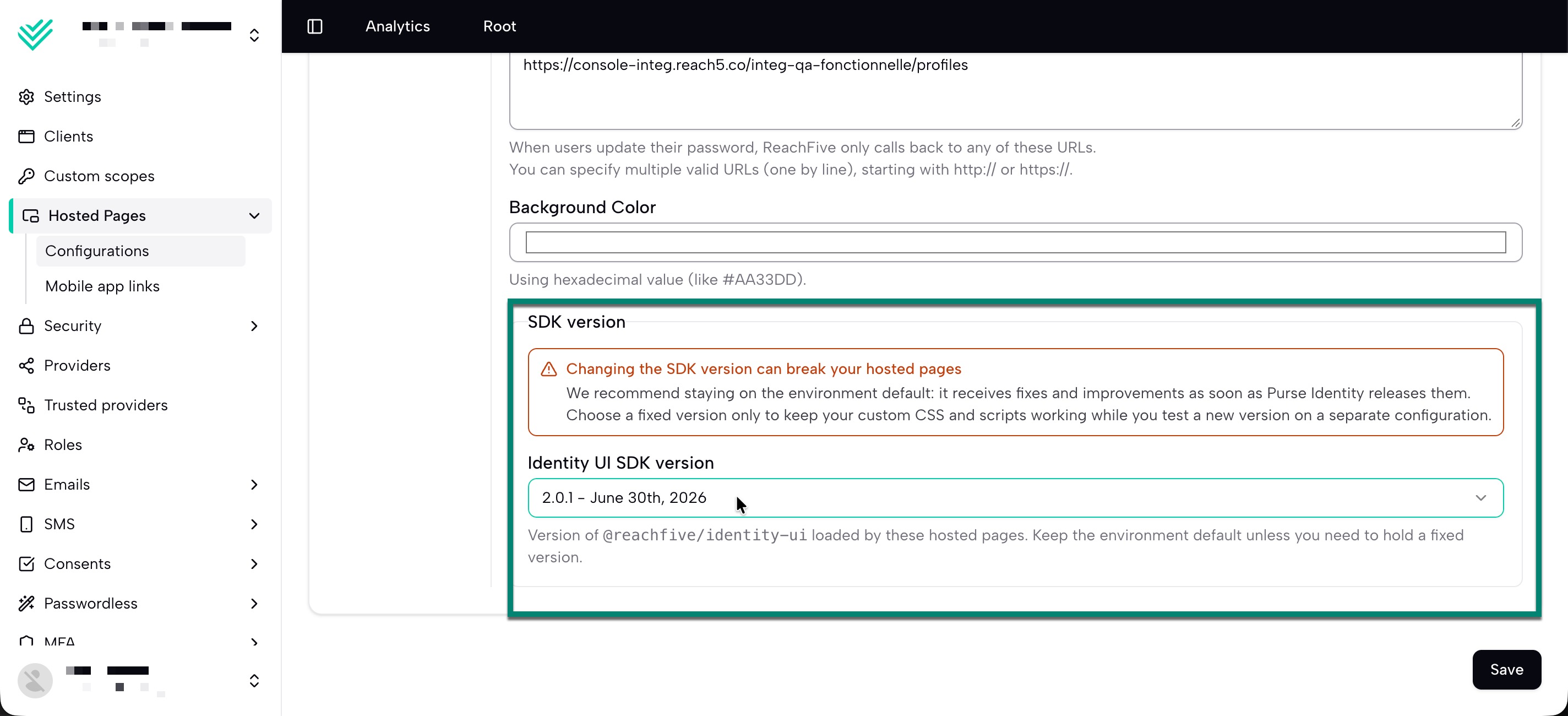
Choose when your Hosted Pages move to a new UI SDK version
You can now decide when your Hosted Pages adopt a new version of the UI SDK.
Before, Purse Identity chose the UI SDK version for your whole environment. If you customized your pages with CSS or scripts, an update could change the page structure under your customizations before you had time to test.
Now, each Hosted Pages configuration has an SDK version setting. Keep the environment default to get updates as soon as they’re released, or select a fixed version and move to a newer one when you’ve tested it, for example on a separate configuration.
General improvements
-
Tell users where a login attempt or verification request came from. The Risky login notification, MFA Activation, and MFA Step-up email and SMS templates now accept
{{city}}and{{country}}, for example:A new login was detected from {{city}}, {{country}}.The location comes from the IP address of the request. If it can’t be determined, the variables are empty and the message is still sent. If you use a custom provider, select City and Country under Fields to receive them in
personalizations. See RBA templates.
-
Password reset emails can now welcome users who don’t have a password yet. In the SMTP Password reset template,
{{user.has_password}}isfalseuntil the user sets a password, so you can adapt the wording:{% if user.has_password %}Reset your password{% else %}Create your password{% endif %}Custom email providers already have this value.
-
Now, when entering a custom field with the type
Phonewithout a country code, the Purse Identity Console automatically adds the country code based on the user’s account settings. If a user enters a country code directly, that value is still saved instead.
Fixes
| Item | Fixed |
|---|---|
The import job was not considering the Purse Identity ID as a valid identifier and was rejecting the import when a user did not have a valid email, phone, or social identity. |
✓ |
Purse Identity Console |
|
The Purse Identity Console was not correctly saving custom fields with the type |
✓ |
In some limited instances, entering a value of |
✓ |