FIDO2 web guide
This guide explains how to implement the FIDO2 registration and authentication workflow on your Web applications. You’ll find a detailed introduction about FIDO2 in our FIDO2 guide.
| For passkeys, Relying Party ID, and Allowed origins (including dual-origin setups), see Passkeys. |
Prerequisites
-
The WebAuthn feature must be enabled on your Purse Identity account.
| You may need to contact support to have this enabled if you do not see it on your Purse Identity Console. |
- You also need
-
A device with a fingerprint sensor or a configured screen lock.
| Make sure to register a fingerprint (or screen lock). |
Instructions
-
Log in to your Purse Identity Console.
-
Go to Settings > WebAuthn.
-
Configure the following:
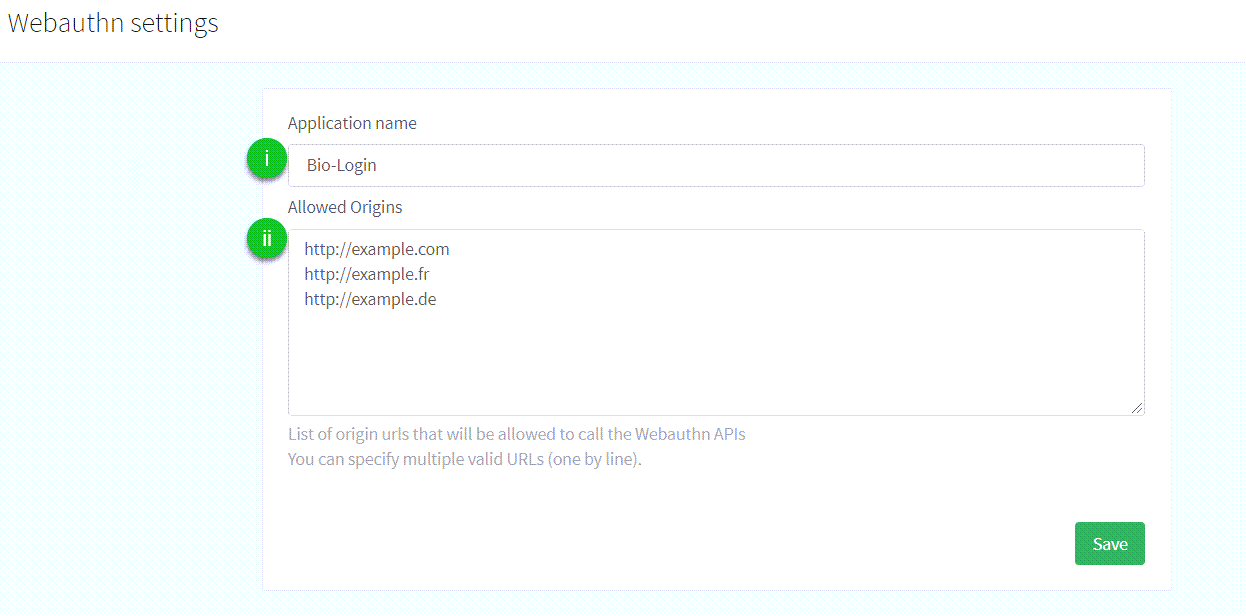
-
Application name: the name of the application that is displayed to the user during the FIDO2 Registration or Authentication process. There are no particular restrictions on what you can use here. -
Allowed origins: the list of full origin URLs of the pages allowed to complete a WebAuthn flow (for examplehttps://example.comorhttps://www.example.com). The Purse Identity Console labels this field as allowed URLs only, but those URLs also act as allowed Relying Party IDs. Enter the RP ID here as an origin URL; the hostname of theoriginyou send becomes the RP ID.
See WebAuthn and passkey allowed origins for single-origin and dual-origin configuration. -
|
The samples below pass an explicit |
|
You should first check the browser supports public-key credentials: |
Sign up
The user requests to register a new account for the first time. Users don’t need to provide a password, but instead provide an identifier like an email or mobile number as well as some personal data.
-
We initiate the FIDO2 signup process by retrieving a randomly generated challenge, the Relying Party information, and the user information from the Purse Identity server with the
POST /identity/v1/webauthn/signup-optionsendpoint.// Return a promise fulfilled with the signup options function createSignupOptions(userParams) { const params = { origin: 'https://example.com', (1) friendlyName: userParams.friendlyName || window.navigator.platform, profile: userParams.profile, clientId: yourClientId, scope: yourScope, redirectUrl: yourRedirectUrl, returnToAfterEmailConfirmation: yourReturnToAfterEmailConfirmation } return fetch('https://${YOUR_DOMAIN}/identity/v1/webauthn/signup-options', { (2) method: 'POST', headers: { 'Content-Type': 'application/json' }, body: JSON.stringify(params) }) }1 Pass the Allowed origin URL whose hostname should be the Relying Party ID (for example https://example.com).2 Replace ${YOUR_DOMAIN}with your Purse Identity domain. -
We pass the signup options to the Credential Management API (
navigator.credentials.create()) which will open a fingerprint dialog and generate a new credential.credentials.create()// Return a promise fulfilled with a new credential function createCredentials(signupOptions) { const serializedOptions = signupOptions.options.publicKey const publicKey = { ...serializedOptions, challenge: Buffer.from(serializedOptions.challenge, 'base64'), user: { ...serializedOptions.user, id: Buffer.from(serializedOptions.user.id, 'base64') }, excludeCredentials: serializedOptions.excludeCredentials && serializedOptions.excludeCredentials!.map(excludeCredential => ({ ...excludeCredential, id: Buffer.from(excludeCredential.id, 'base64') })) } return navigator.credentials.create({ publicKey }) } -
With the
POST /identity/v1/webauthn/signupendpoint, we send the new credential back to the Purse Identity server and it finalizes the FIDO2 signup process by returning a one-time authentication token.import { Buffer } from 'buffer/' // Encode an array into Base64 url safe function encodeToBase64(array) { return Buffer.from(array) .toString('base64') .replace(/\+/g, '-') .replace(/\//g, '_') .replace(/=+$/, '') } // Return a promise fulfilled with a one-time authentication token function signupWithWebauthn(signupOptions, credentials) { if (!credentials || credentials.type !== 'public-key') { return new Error('Unable to register invalid public key credentials.') } const serializedCredentials = { id: credentials.id, rawId: encodeToBase64(credentials.rawId), type: credentials.type, response: { clientDataJSON: encodeToBase64(credentials.response.clientDataJSON), attestationObject: encodeToBase64(credentials.response.attestationObject) } } return fetch('https://${YOUR_DOMAIN}/identity/v1/webauthn/signup', { (3) method: 'POST', headers: { 'Content-Type': 'application/json' }, body: JSON.stringify({ publicKeyCredential: serializedCredentials, webauthnId: signupOptions.options.publicKey.user.id }) }) } -
Finally, we call the
GET /oauth/authorizeendpoint to parse the result of the signup request and retrieve the user’s authentication token.// Login the user and redirects to the URL specified as `redirect_uri` function authorizeUser(tkn) { const location = `https://${YOUR_DOMAIN}/oauth/authorize?` + (4) `client_id=${YOUR_CLIENT_ID}` + `&scope=${YOUR_SCOPE}` + `&response_type=code` + `&redirect_uri=${YOUR_REDIRECT_URI}` + `&code_challenge=${YOUR_CODE_CHALLENGE}` + `&code_challenge_method=S256` + `&tkn=${oneTimeAuthenticationToken}` window.location.assign(location) }
Authenticate
Once the user has registered their credentials on the server and the device, they can use it to easily login with their identifier.
-
We initiate the FIDO2 authentication process to retrieve the list of previously registered credentials and a challenge string from the server with the
POST /identity/v1/webauthn/authentication-optionsendpoint.// Return a promise fulfilled with the authentication options function createAuthenticationOptions(userParams) { const params = { email: userParams.email, phoneNumber: userParams.phoneNumber, origin: 'https://example.com', clientId: yourClientId, scope: yourScope } return fetch('https://${YOUR_DOMAIN}/identity/v1/webauthn/authentication-options', { (1) method: 'POST', headers: { 'Content-Type': 'application/json' }, body: JSON.stringify(params) }) } -
This information is passed to the Credential Management API (
navigator.credentials.get()) which searches for a credential that matches the Relying Party ID. A fingerprint dialog is opened for the user to consent for authentication and it retrieves the existing credential.credentials.get()// Return a promise fulfilled with an existing credential function getCredentials(authenticationOptions) { const serializedOptions = authenticationOptions.publicKey const publicKey = { ...serializedOptions, challenge: Buffer.from(serializedOptions.challenge, 'base64'), allowCredentials: serializedOptions.allowCredentials.map(allowCrendential => ({ ...allowCrendential, id: Buffer.from(allowCrendential.id, 'base64') })) } return navigator.credentials.get({ publicKey }) } -
With the
POST /identity/v1/webauthn/authenticationendpoint, we send the operation result to the Purse Identity server and finalizes the FIDO2 authentication process by returning a one-time authentication token.import { Buffer } from 'buffer/' // Encode an array into Base64 url safe function encodeToBase64(array) { return Buffer.from(array) .toString('base64') .replace(/\+/g, '-') .replace(/\//g, '_') .replace(/=+$/, '') } // Return a promise fulfilled with a one-time authentication token function loginWithWebauthn(credentials) { if (!credentials || credentials.type !== 'public-key') { return new Error('Unable to authenticate with invalid public key credentials.') } const serializedCredentials = { id: credentials.id, rawId: encodeToBase64(credentials.rawId), type: credentials.type, response: { authenticatorData: encodeToBase64(credentials.response.authenticatorData), clientDataJSON: encodeToBase64(credentials.response.clientDataJSON), signature: encodeToBase64(credentials.response.signature), userHandle: credentials.response.userHandle && encodeToBase64(credentials.response.userHandle) } } return fetch('https://${YOUR_DOMAIN}/identity/v1/webauthn/authentication', { (3) method: 'POST', headers: { 'Content-Type': 'application/json' }, body: JSON.stringify({ ...serializedCredentials }) }) } -
Finally, we call the
GET /oauth/authorizeendpoint to parse the result of the authentication request and retrieve the user’s authentication token.// Login the user and redirects to the URL specified as `redirect_uri` function authorizeUser(tkn) { const location = `https://${YOUR_DOMAIN}/oauth/authorize?` + (4) `client_id=${YOUR_CLIENT_ID}` + `&scope=${YOUR_SCOPE}` + `&response_type=code` + `&redirect_uri=${YOUR_REDIRECT_URI}` + `&code_challenge=${YOUR_CODE_CHALLENGE}` + `&code_challenge_method=S256` + `&tkn=${oneTimeAuthenticationToken}` window.location.assign(location) }
Register
Once the user is authenticated, they can register their new device. Hooray!
| A user cannot register several credentials on the same device. |
-
We initiate the FIDO2 registration process by retrieving a randomly generated challenge, the Relying Party information, and the user information from the Purse Identity server with the
POST /identity/v1/webauthn/registration-optionsendpoint.// Return a promise fulfilled with the registration options function createRegistrationOptions(accessToken, friendlyName) { const params = { friendlyName: friendlyName || window.navigator.platform, origin: 'https://example.com', } return fetch('https://${YOUR_DOMAIN}/identity/v1/webauthn/registration-options', { (1) method: 'POST', headers: { 'Content-Type': 'application/json', 'Authorization': `Bearer ${accessToken}` }, body: JSON.stringify(params) }) } -
We pass the registration options to the Credential Management API (
navigator.credentials.create()) which will open a fingerprint dialog and generate a new credential.credentials.create()// Return a promise fulfilled with a new credential function createCredentials(regisationOptions) { const serializedOptions = registrationOptions.options.publicKey const publicKey = { ...serializedOptions, challenge: Buffer.from(serializedOptions.challenge, 'base64'), user: { ...serializedOptions.user, id: Buffer.from(serializedOptions.user.id, 'base64') }, excludeCredentials: serializedOptions.excludeCredentials && serializedOptions.excludeCredentials!.map(excludeCredential => ({ ...excludeCredential, id: Buffer.from(excludeCredential.id, 'base64') })) } return navigator.credentials.create({ publicKey }) } -
With the
POST /identity/v1/webauthn/registrationendpoint, we send the operation result to the Purse Identity server and completes the FIDO2 registration process.import { Buffer } from 'buffer/' // Encode an array into Base64 url safe function encodeToBase64(array) { return Buffer.from(array) .toString('base64') .replace(/\+/g, '-') .replace(/\//g, '_') .replace(/=+$/, '') } // Return an empty promise function addNewWebAuthnDevice(credentials) { if (!credentials || credentials.type !== 'public-key') { return new Error('Unable to register invalid public key credentials.') } const serializedCredentials = { id: credentials.id, rawId: encodeToBase64(credentials.rawId), type: credentials.type, response: { clientDataJSON: encodeToBase64(credentials.response.clientDataJSON), attestationObject: encodeToBase64(credentials.response.attestationObject) } } return fetch('https://${YOUR_DOMAIN}/identity/v1/webauthn/registration', { (3) method: 'POST', headers: { 'Content-Type': 'application/json', 'Authorization': `Bearer ${accessToken}` }, body: JSON.stringify({ ...serializedCredentials }) }) }