Authorization code grant
If you use a traditional webapp (server-side) and your source code isn’t available publicly, you can use the Authorization Code Flow. This flows exchanges an Authorization Code for a token.
| For more in-depth implementation details, check out Authentication (Web Application). |
Flow
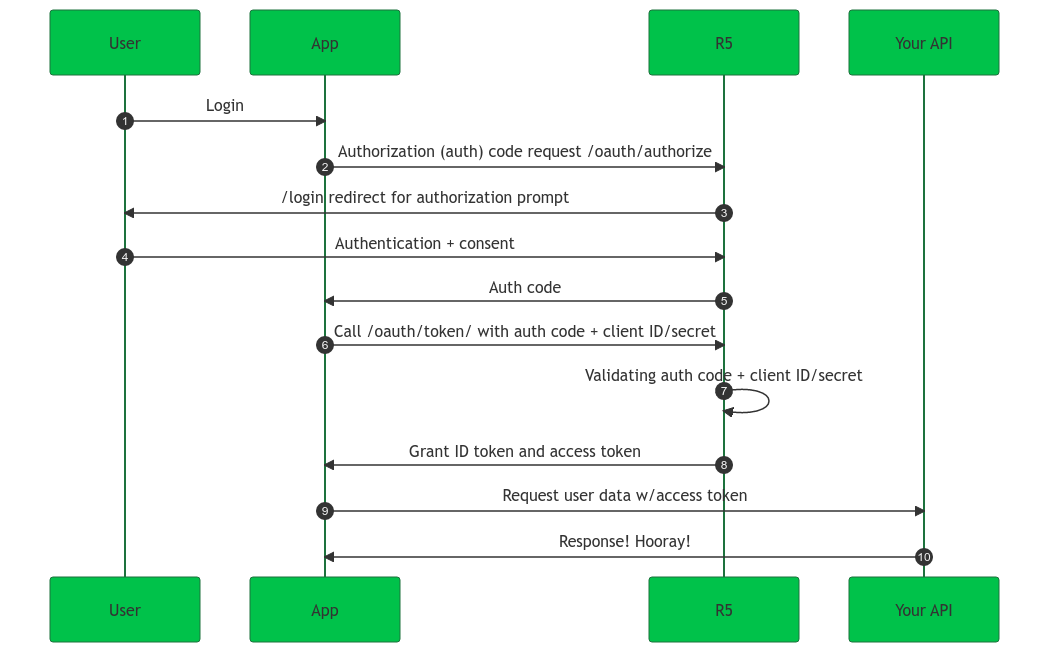
-
A user logs in from your app.
-
Purse Identity’s SDK redirects the user to the Purse Identity Authorization Server
/oauth/authorizeendpoint. -
Purse Identity’s Authorization Server redirects the user to the login and auth prompt.
-
The user authenticates through one of the login options.
Users may see a consent page listing the permissions Purse Identity will give to the regular web application. -
Purse Identity’s Authorization Server redirects the user back to the application with an authorization code.
This is for one-time use only. -
Purse Identity’s SDK sends the code to the Purse Identity Authorization Server
/oauth/tokenendpoint along with the app’sClient IDandClient Secret. -
Purse Identity’s Authorization Server verifies the code, Client ID, and Client Secret.
-
Purse Identity’s Authorization Server responds with an ID Token and Access Token.
This could also be a refresh token. -
Your app can then use the Access Token to call an API to access information about the user.
-
Your API responds with the requested data.